

Sign up now and get 50% off on your first month on any plan

If you're familiar with apps and automation, you've likely encountered the term "webhooks."
But have you ever stopped to wonder what a webhook is?
Imagine receiving an instant notification from PayPal every time a client makes a payment or getting an alert from Shopify when a new order is placed. Webhooks, a powerful tool that enables apps to communicate with each other in real-time, make these seamless interactions possible.
In this article, we'll explore webhooks, explaining what they are, how they work, and why they’re essential to modern app integration.
Whether you're a developer looking to streamline your processes or simply curious about the tech behind your favorite apps, this guide will explain the magic of webhooks.
What is a webhook? Here is the short version:
What is a webhook? It is a message that one application sends to another when something happens.
That is the simplest webhook meaning there is. Your cold email tool detects a reply, fires a webhook, and your CRM instantly creates a new deal. Your payment processor receives a charge, fires a webhook, and your app unlocks the customer's account.
No human intervention. No delay. No manual data entry.
If you have ever set up a Zapier automation, you have used webhooks, even if you did not realize it. Zapier's "triggers" are webhooks under the hood. When Stripe fires a "payment received" webhook, Zapier catches it and runs your automation.
The webhook is the notification mechanism that makes the whole thing work.
According to a 2025 Postman API report, 83% of developers working with third-party integrations use webhooks as their primary real-time data transfer method. For sales and marketing teams, webhooks are what make your tools talk to each other without you manually exporting CSVs or checking dashboards.
This guide explains what a webhook is in plain language, how the technical mechanism works, how webhooks compare to APIs and polling, and how Smartlead uses webhook events to connect your outbound operating system with your CRM, Slack, and the rest of your sales stack.
Understanding how webhooks work comes down to a simple three-step process: an event happens in App A, App A sends data to a URL you specified in App B, and App B receives that data and does something with it. The entire round trip takes milliseconds.
Here is the technical flow broken down for non-developers:
That is it. No scheduled checks. No manual transfers. The data moves the instant the event occurs.
A 2026 MuleSoft connectivity report found that the average B2B company uses 976 different applications. Webhooks are the connective tissue between those applications. Without them, data stays siloed in individual tools and teams spend hours on manual data entry.

Let's walk through an example to make this process more concrete:
Scenario: An online store (Shopify) must notify a shipping service (ShipStation) whenever a new order is placed.
Webhooks are sometimes compared to various other systems like polling or APIs. Let’s understand how they differ.

The webhook vs API question comes up constantly, and polling usually gets tangled into it.
All three involve moving data between applications, but they work differently, and choosing the wrong one costs you either speed, efficiency, or both.
Webhooks (push model): App A sends data to App B when an event happens. App B does not ask for it. It just receives. This is like getting a text message notification. You do not check your phone every 5 seconds. The phone tells you when something arrives.
API calls (pull model): App B asks App A for data whenever it wants. "Do you have any new leads?" "No." "How about now?" "No." "Now?" "Yes, here is one." This works, but it requires App B to know when to ask. It is like calling a restaurant to check if your table is ready instead of getting a text when it is.
Polling (scheduled pull): App B asks App A for data on a fixed schedule (every 5 minutes, every hour, every day). This is the least efficient method because most polls return no new data. A 2025 CloudFlare analysis found that 95% of polling requests return "no new data," which means 95% of those requests are wasted compute and bandwidth.
For sales teams, the practical difference is speed.
If your CRM uses polling to check Smartlead every 15 minutes, an interested prospect who replied at 2:01 PM does not appear in your CRM until 2:15 PM at the earliest. With a real-time data webhook, that lead is in your CRM at 2:01 PM.
In sales, those 14 minutes are the difference between booking a meeting and losing to a competitor who responded faster.
Webhooks are everywhere in modern sales stacks. Here is a webhook example for each of the workflows sales and marketing teams run daily, many without realizing webhooks power them.
Cold email reply to CRM:Smartlead detects a reply categorized as "interested." A webhook fires, sending the lead data and reply content to HubSpot, Salesforce, or Pipedrive. A new deal is created automatically with the prospect's name, company, email, and the reply text as the first activity note.
Form submission to email sequence:A prospect fills out a demo request form on your website. The form tool (Typeform, Webflow, HubSpot Forms) fires a webhook to Smartlead. Smartlead adds the prospect to a nurture sequence that sends a confirmation email and follow-up series.
Payment received to account activation:Stripe processes a payment. A webhook fires to your app's backend, which activates the customer's account and sends a welcome email. This is how every SaaS company handles signups. No human clicks "activate account."
Email bounce to list hygiene:Smartlead detects a hard bounce. A webhook fires to your CRM, marking the contact as invalid. This prevents your sales team from manually reaching out to a dead email address and protects the deliverability of your future campaigns.
Meeting booked to Slack notification:A prospect books a meeting through Calendly. Calendly fires a webhook to Slack. Your #sales-wins channel gets a notification: "New meeting booked: John Smith, VP Sales at Acme Corp, tomorrow at 2 PM." The rep sees it immediately.
According to a 2026 Segment State of Personalization report, companies using webhook-based integrations (real-time) between their sales tools see 31% faster lead response times than companies using batch sync (polling or manual export). That speed advantage compounds across every stage of the sales funnel.
Webhooks push data to you when something happens, providing real-time updates without asking for them.
APIs pull data whenever you request, giving you control over when and what data you retrieve.
APIs, or Application Programming Interfaces, are like menus at a restaurant. They provide options (endpoints) from which you can request information or send data. When you want something from an API, you request a specific endpoint, and the API responds with the data you asked for. You initiate this interaction, which can happen whenever you need information or want to send data.
The difference between webhooks and APIs is how and when the communication happens. With webhooks, the communication is event-driven; the server sends you data automatically when something specific occurs, like getting a notification when a new order is placed. APIs, on the other hand, require you to initiate the communication. You have to ask the API for the information, like looking up a recipe in a cookbook whenever you decide to cook.
Both have their strengths: webhooks for instant updates and APIs for flexible, on-demand data access.
By now, you know that webhooks are a powerful tool for enabling real-time communication between applications, but knowing when to use them can make a big difference in your applications' efficiency and responsiveness.
Here are some scenarios where webhooks are particularly useful:
Webhooks are ideal if your application needs to react instantly to specific events. For example, you can get notified whenever a new lead responds to your email or clicks a CTA in your email.
Webhooks are great for automating workflows across different systems. For instance, if you're using a customer relationship management (CRM) tool, you can set up webhooks to automatically create a new entry in your project management app whenever a new lead is added, streamlining your process without manual intervention.
By using webhooks, you can reduce the need for constant polling, which can save bandwidth and processing power. Instead of your server continuously asking another system for updates, webhooks send updates only when an event occurs, making your system more efficient.
Webhooks can facilitate seamless data sharing when integrating with third-party services. For example, payment processors like PayPal use webhooks to inform your application about transaction statuses in real-time, allowing you to update your records and trigger further actions automatically.
Webhooks can improve user experience by providing timely updates. For example, if you have a collaborative platform, webhooks can notify users instantly when changes are made to shared documents, ensuring everyone stays on the same page without delay.
Smartlead is a cold email outreach tool that allows you to create webhooks and set up automation for your email campaigns and overall infrastructure.
Here's a detailed guide on how to create and utilize webhooks in Smartlead.
Webhooks in Smartlead allow you to automate responses to specific events in your cold email campaigns. Some of the key event types for which you can create webhooks include:
These event types, or webhooks, send different messages known as payloads, which contain all the information related to the specific event.
Smartlead fires webhook events for every meaningful moment in the outbound workflow. This means you can trigger automations in your CRM, Slack, Zapier, or custom tools based on what happens inside your campaigns.
Here are the webhook events available in Smartlead:
Each webhook sends a JSON payload with structured data that your receiving tool can parse and act on. For teams using Smartlead's API, webhooks complement the API by pushing real-time events while the API handles on-demand data retrieval. Together, they give you full bidirectional communication between Smartlead and your stack.

In Smartlead, you can define the scope of a webhook’s event type, which determines the level at which the webhook operates:
Each scope has a different priority level, with user-level webhooks having the highest priority. It's important to note that having webhooks with the same scope (e.g., the same client) but different event types can lead to data losses. However, you can create one client-level webhook with multiple event types to avoid this issue.
Step 1: Get your receiving URL.This is the webhook endpoint from the tool you want to send data to. Examples:
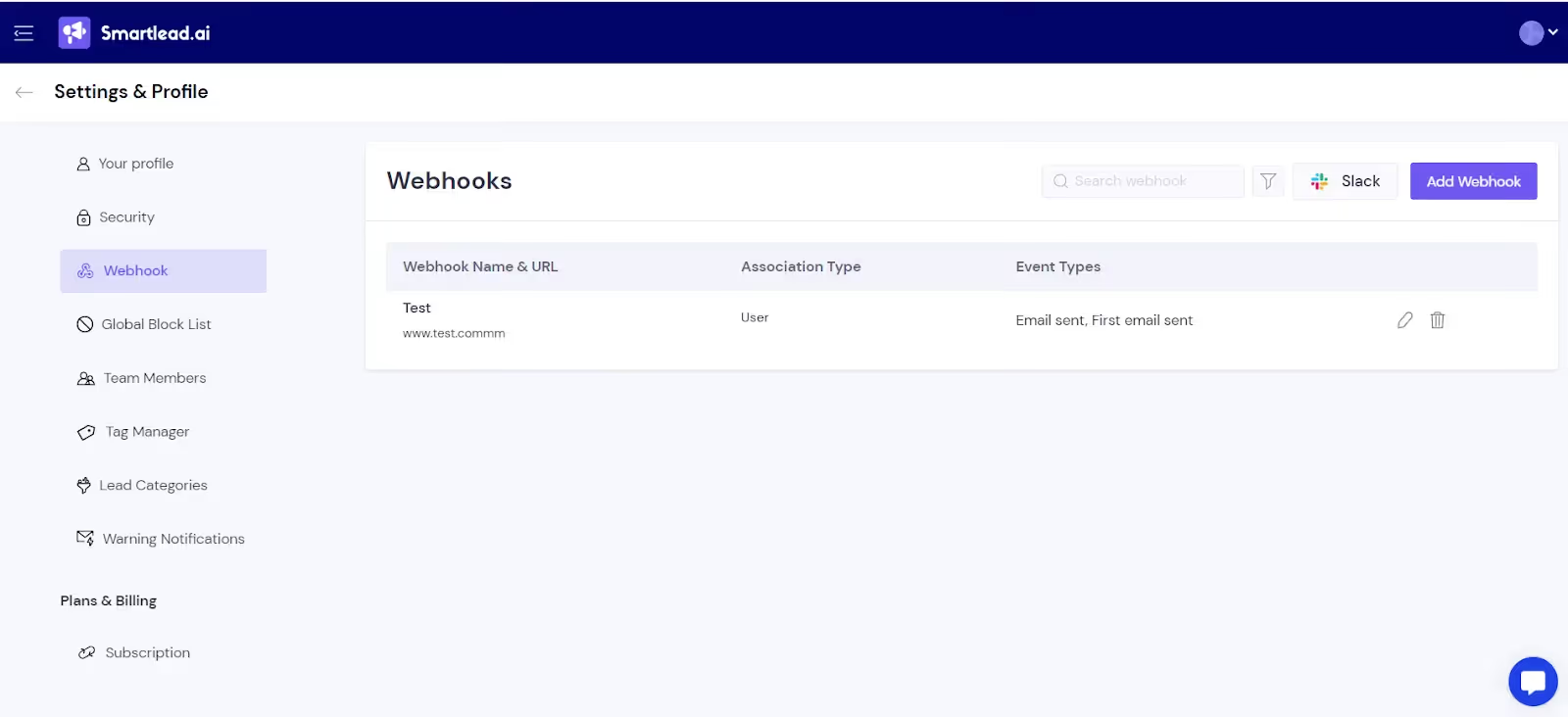

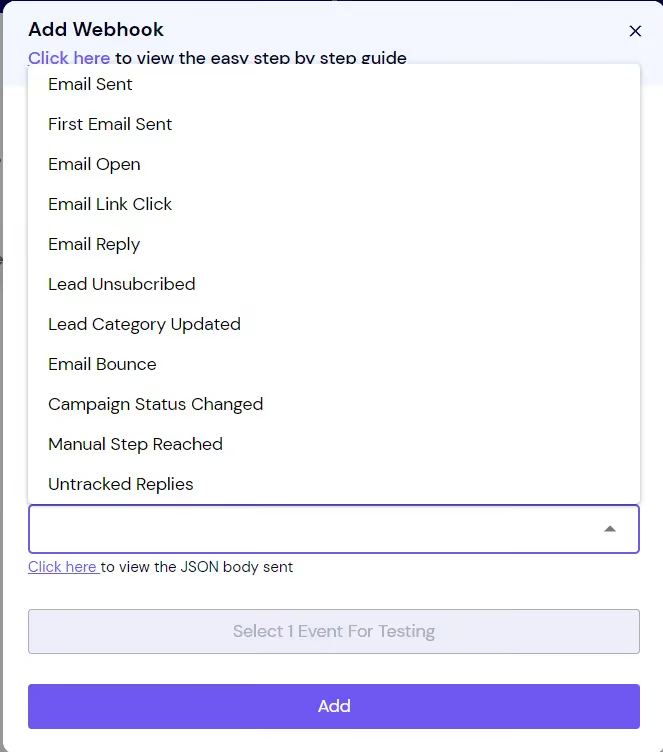
Step 2: Open Smartlead webhook settings. Navigate to Settings > Integrations > Webhooks in your Smartlead dashboard.
Step 3: Select your events. Choose which webhook events you want to fire (reply received, lead status changed, bounce, etc.). You can set up multiple webhooks pointing to different URLs for different events. For example: reply events go to HubSpot, bounce events go to your suppression list tool, and interested-reply events go to Slack.
Step 4: Paste the receiving URL and save. Smartlead sends a test payload to verify the connection. If the receiving tool responds with a 200 status code, the webhook is active.
Step 5: Test with a real event.Send yourself a test email from a campaign and reply to it. Watch the webhook fire and verify the data appears in your receiving tool.
For teams using automation platforms like Zapier, Make, or n8n as intermediaries, the webhook URL comes from the automation platform. This gives you flexibility to add logic between the webhook and the final destination: filter for specific reply categories, enrich data before pushing to CRM, or fan out to multiple tools from a single webhook. The same pattern powers automated follow-up workflows that adjust based on prospect behavior.
For a detailed walkthrough on setting up a webhook in Smartlead using Make, refer to Riccardo Vandra’s video tutorial. If you want to directly jump to the section on Make, start at 10:20 in the video. Like Make, you can use other automation platforms like Zapier and n8n to set up webhooks within Smartlead.
Webhooks are reliable but not infallible.
When they break, the failure is usually silent. Data stops flowing and nobody notices until a rep asks "why didn't this lead show up in HubSpot?" Understanding the common failure modes helps you build a resilient integration.
If your CRM or receiving tool is temporarily unavailable (server maintenance, rate limiting, outage), the webhook fires but the data has nowhere to go.
The fix: Smartlead implements retry logic. If the first delivery fails (non-200 response), the system retries 3 times with exponential backoff (after 1 minute, 5 minutes, then 30 minutes). If all retries fail, the event is logged in your webhook delivery history for manual review.
Your receiving tool expects data in a specific structure, but the webhook payload uses different field names. This is common when connecting to custom-built applications. The fix: review the webhook documentation and use a middleware tool (Zapier, Make) to transform the payload before delivery.
Network issues can cause a webhook to fire twice for the same event.
If your CRM does not handle duplicates, you end up with two deals for the same lead. The fix: use the unique event ID included in every Smartlead webhook payload to deduplicate on the receiving side.
At high volume (10,000+ emails per day), webhook events can fire hundreds of times per hour.
Some receiving tools have rate limits. The fix: use event filtering in Smartlead to only fire webhooks for the events you actually need. If you only care about interested replies, do not subscribe to every open and click event.
A 2025 PagerDuty incident analysis found that 23% of integration failures in sales stacks were caused by webhook delivery issues. The most common root cause was not the webhook itself but the receiving endpoint's inability to handle the payload. Regular monitoring of your webhook delivery logs prevents data gaps.
Webhooks are not a feature. They are the infrastructure layer that makes your entire sales stack work as a single system instead of a collection of disconnected tools. So when someone on your team asks what is a webhook actually doing for the business, this is the answer: it is what connects every layer of the outbound workflow.
Prospecting layer: SmartProspect finds and verifies contacts. When new prospects are added to a campaign, Smartlead can receive webhook notifications from your enrichment tools (Clearbit, Clay) to append additional data.
Sending layer: Smartlead manages sequences, warmup, mailbox rotation, and deliverability via SmartDelivery. Campaign events (sends, opens, clicks) fire webhooks to your analytics tools.
Reply layer: The Master Inbox captures and categorizes replies. Reply webhooks push data to your CRM, Slack, and SmartAgents for AI-driven follow-up.
CRM layer: HubSpot, Salesforce, or Pipedrive receives webhook data and creates or updates deals. CRM webhooks can fire back to Smartlead when a deal status changes (e.g., "closed won" triggers a referral campaign for that customer).
Reporting layer: Analytics tools (Looker, Mixpanel, PostHog) receive webhook data for attribution and funnel analysis. You can track the complete journey from first email sent to deal closed without manual data stitching.
According to a 2026 RevOps Collaborative report, sales teams with webhook-connected stacks close deals 19% faster than teams relying on manual data transfer or scheduled syncs. The speed advantage comes from eliminating the delays between "something happened" and "someone acts on it."
Webhook security matters because you are sending structured data (prospect names, emails, reply content) over the internet. Without proper security, that data could be intercepted or your webhook endpoint could receive spoofed events from a malicious actor pretending to be Smartlead.
Here are the security measures to implement:
A 2025 OWASP report on webhook security found that 34% of webhook implementations lacked signature verification, leaving them vulnerable to spoofed events. For sales data, spoofed webhooks could inject fake leads into your CRM or trigger false automations. Signature verification takes 10 minutes to implement and prevents this entirely.
By effectively leveraging webhooks, particularly in tools like Smartlead, you can instantly monitor crucial email interactions such as opens, clicks, and bounces.
This capability can enhance your ability to engage with recipients promptly and streamline your outreach efforts through automated workflows.
Whether managing campaigns, monitoring client interactions, or refining user engagement strategies, integrating webhooks into your email tracking arsenal ensures you stay informed and responsive.
Experience webhooks in Smartlead today by signing up for a free trial.

A webhook is an automatic notification from one app to another. When something happens in App A (like a prospect replying to your email), App A sends a message to App B (like your CRM) with the details. It happens instantly, without anyone clicking anything. Think of it as a push notification between software tools. That is what a webhook is at its core: software telling other software the news, the moment it happens.
An API is a way to ask for data ("give me all leads from this campaign"). A webhook is a way to receive data automatically ("here is a new lead that just replied"). APIs are pull. Webhooks are push. Most modern integrations use both: webhooks for real-time events, APIs for historical data retrieval and bulk operations.
Not anymore. Tools like Zapier, Make (Integromat), and n8n provide visual webhook builders that require no code. You copy a webhook URL from the automation tool, paste it into Smartlead's settings, and build your workflow visually. For custom integrations, developers can work with the raw JSON payload.
Smartlead retries failed webhook deliveries 3 times with increasing delays (1 minute, 5 minutes, 30 minutes). If all retries fail, the event is logged in your webhook delivery history. You can view failed deliveries, see the error reason, and manually retry them. Monitoring your webhook logs weekly prevents data gaps.
Webhooks are lightweight HTTP requests with small data payloads (typically under 1KB). They do not slow down Smartlead. On the receiving side, performance depends on your tool's capacity. At very high volume (hundreds of events per minute), some receiving tools may rate-limit. Use event filtering to subscribe only to the events you need.
You can set up multiple webhook endpoints for different events. For example, reply events go to HubSpot, bounce events go to your data hygiene tool, and interested-reply events go to Slack. There is no hard limit on the number of endpoints.
Yes. Both Zapier and Make support incoming webhooks as triggers. You create a "Catch Webhook" trigger in Zapier or a "Webhooks" module in Make, copy the generated URL, and paste it into Smartlead's webhook settings. From there, you can build any automation workflow using the webhook data as the starting point. If you are still asking yourself what is a webhook going to do for your workflow, this is the fastest way to find out: catch one event in Zapier and watch the automation run.
Join us to elevate your outreach!
Founder, StackOptimise
Smartlead's combination of automation, unlimited inboxes, and easy campaign management has completely transformed how we run cold email campaigns.
.jpg)
Founder, Cold Email Hackers

We have about 15 companies and we use Smartlead for all of them.

Founder, DutchSave Media

One of the things I love about using Smartlead is the deliverability feature. If they landed in the bounce or spam folders, we could resolve this quickly.

Co-Founder, Growth Today

I want to continue to use Smartlead to make operations more seamless - the plan is to bring more clients here and build more SOPs.

Founder, FueltoFly

Smartlead listens to the agencies and customers and builds according to what people want, that has really made things easier for us.

Founder, OutboundSync

We build an infrastructure product, and OutboundSync communicates with Smartlead itself. I love the webhook and API. They're really well done and keep getting better.

Founder, Axoleads

With SmartDelivery, you can put all of that in the hands of the tool. It ensures your emails land in inboxes, and by running a simple test, you can see if you're hitting the mark.

Founder, Claygen
Deliverability is the cornerstone of cold email outreach. You could have the best email copy in the world, but if no one is seeing it, it's useless. I really love the feature where you can actually give client accesses to your clients.

Co-Founder, Cymate

I do not want to switch to another software. Pick a solution you trust, stick with it, and keep refining your copy.

CMO, Avalanche Capital

Managing large volumes of emails through multiple inboxes used to be a logistical nightmare. With Smartlead, the process is seamless. We book thousands of discovery calls through cold emails. These campaigns are generating leads at a scale we never thought possible.

Founder, Growth Engine X

We came for the unlimited inboxes, and we stayed for the API. 1.5M cold emails/month, 7,767+ inboxes managed.

Head of Community & Ecosystem, TxtCart

You cannot replace having 10,000 touches with potential clients. When you have that much distribution and reach, you really start to see incredible results. The simplicity of Smartlead made all the difference. It doesn't require you to be a technical wizard.

Founder, Hyperke

Smartlead has been a game-changer for us. It increased our appointment volume, improved ease of use, and offered valuable features. 80% increase in appointments/month, peak of 276 appointments in a single month.

Founder, Kinetyca

Smartlead has been our cold email backbone from day one. The platform evolves constantly, keeping pace with how deliverability and personalization need to work today. 21% overall reply rate, $175K in 4 months for multiple B2B clients.

Founder, Reachflow

Smartlead is centered around deliverability and constantly evolving. Their API is not like any other platform. Smartlead covers all our needs. The focus on core features like deliverability and API integration is unmatched.

CEO, Halfwarm

Our approach to crafting conversational emails led to reply rates that many of my peers thought were unattainable.

Co-Founder, letstrike

We've grown on zero capital, zero marketing, purely cold emailing - and that's the story we love to tell. The best approach is no approach if you can't handle domain meltdown. The second best is something like Smartlead that's built from the ground up for deliverability at scale.

Founder, Fenixtal

Smartlead's white-labeling and automation let us punch above our weight. The 12M euros sales potential? That's what happens when you combine human creativity with Smartlead's precision.

Co-Founder, Digital Creativs

Nine out of 10. Ninety percent of our clients are on Smartlead unless they come in with an existing setup. That's the default.

Co-Founder, BuildingReach

At the end of the day, you have to take a bet on one tool or another. It was a no-brainer taking that bet on Smartlead. We had to even turn down the volume of our marketing campaigns - Smartlead was capable of driving more volume than our sales team was able to fulfill.

Founder & MD, Prospectiv

Since starting the business in January of this year, we've already generated $200K in sales exclusively from cold email. Smartlead has been central to our operations and has exceeded our expectations.

Founder, Growthlynk

There's so much stuff built on top of it. I would be dead if I had to rebuild it with another tool. I can manage hundreds of senders easily. I can send hundreds of thousands of emails.

Founder, Corebits

The platform's HubSpot integration, real-time Slack updates, and advanced campaign customization have been game changers for our business and our clients'.

Founder, Apex Ascension

From day one, we've never used anything else.