Ever wondered why some people succeed with cold email outreach while other struggle to get their messages across? Are there any secrets aka cold email best practices that successful marketers are following and you need to follow too?
Let's agree that acquiring high-quality prospects for a business can be challenging because cold emailing campaigns can be hit or miss. However, it's important to note that cold email marketing techniques can indeed deliver excellent ROIs when done correctly.
Cold emailing is the practice of sending unsolicited emails to potential customers, clients, or leads who have not previously interacted with you or your business. The goal is to introduce your product, service, or offer to a new audience, build relationships, or generate sales leads.
Cold emailing is one of the most effective ways to generate many business leads and drives almost 20-30% more conversion rate if done right.
But how do you do that? By following the best cold email practices.
In this article, let's talk about some cold email best practices that can help you close more leads and grow revenue.
Effective marketing is an essential part of every organization.
Considering a well-designed email marketing structure helps boost the business's sales, and to follow this, you need to go through the below cold email best practices that make it easier to achieve success.
Let's dive in:
The subject line is the first thing a recipient sees in their inbox. It plays a significant role in whether or not the email will be opened.
It is said that almost 47% of the recipients open emails with interesting subject lines.
A strong subject line needs to capture the recipient's attention while giving them a reason to open your email.
To optimize your subject line and make it awesome, you need to follow the below two steps:

Knowing your target audience is essential for crafting effective cold emails. You need to do some research on the individual or company you’re reaching out to. Understand their pain points, industry, and challenges to create an email that speaks directly to their needs. The more relevant your message is to them, the more likely they will engage and respond.
Sending lengthy cold emails to clients is worthless, so keeping an eye on the word count is essential. Long messages make the customer click on the "delete" icon. Research proves that drafting short emails between 50 and 125 words is enough to engage clients.
Shorter emails immediately get to the context of the message and allow the recipient to make their relevant decision regarding your product or service. It is rightly said that the golden rule of cold emailing is "deliver value to your prospects"; that's why to add your information in bullet points in the message.
A cold email should feel like a conversation, not a formal letter. While maintaining professionalism is important, overly stiff or robotic language can make your message feel impersonal. Instead, aim for a tone that’s friendly, approachable, and easy to understand. A conversational tone helps build rapport and creates a sense of familiarity.
To get a response from a cold email, you must demonstrate how your product or service can solve a problem the recipient is facing. Focus on their pain points and present your solution as a way to address those challenges. Doing this shows that you understand their needs and are not just trying to sell to them, which increases the chances of a response.

Before hitting the "send" button, always proofread your email to avoid mistakes. Small errors, such as typos or grammatical mistakes, can damage your credibility and make your email appear unprofessional. A well-written email will reflect positively on you and your company, making the recipient more likely to engage with your message.
While text-based cold emails are effective, incorporating visuals like images, emojis, or videos can make your email stand out. However, it's important to use them sparingly. Too many visuals can overwhelm the reader and appear unprofessional. Instead, use high-quality images or videos that enhance the message and create a visual impact.
Using templates can save time and ensure consistency across your team. However, don’t rely on them too heavily. A cold email template should serve as a base, not a one-size-fits-all solution. Personalize each email to fit the recipient’s needs, so it doesn’t sound like a mass message. This will help improve the chances of getting a response.
Timing plays a critical role in the success of cold email campaigns. Sending an email at the right time can significantly improve your open and response rates. Studies show that emails sent early in the morning on Mondays see the highest engagement rates. Make sure you test different times to find when your audience is most likely to open and respond to your emails.
A generic email is much less likely to get a response. Personalization makes your email feel tailored specifically for the recipient, and it increases the chances of them engaging with your message. Use the recipient's name, reference their company or industry, and speak directly to their challenges. Personalized emails are far more effective than those that seem like mass mailings.
It’s rare for a cold email to get a response after the first try. Following up on your initial email is crucial for maintaining momentum. However, follow-ups should offer value rather than just ask if they’ve seen the first email. Being persistent is important, but don’t bombard your prospect with endless emails—space them out over a few days to maintain interest.

Measuring the performance of your cold email campaigns allows you to improve your approach over time. By analyzing key metrics like open rates, response rates, and click-through rates, you can see what’s working and where you need to adjust. Regular testing and optimization are key to refining your email strategy and increasing success.
Each cold email should have one clear objective. If you try to address too many points or topics in one email, you may lose the recipient’s focus. Stick to one main message or call-to-action (CTA) and structure your email in a way that guides the recipient’s attention directly to that goal. A clear, concise message increases the chances of engagement.
Remember, the recipient cares about how your product or service will benefit them, not about how great your company is. Shift the focus of your email to address their specific needs and challenges. By positioning yourself as a solution to their problems, you make your offer more relevant and appealing.
An email signature adds credibility and provides recipients with the information they need to reach out to you. It reassures the recipient that your email is legitimate and not spam. Your signature should be professional, concise, and provide clear contact details.
A strong call-to-action (CTA) is crucial for guiding the recipient on what to do next. A CTA should be clear, actionable, and easy to follow. Whether it's scheduling a call, downloading a resource, or trying out a product, make sure it’s obvious and easy for the recipient to take action.
Including attachments in your cold emails is not recommended. They can trigger spam filters and often lead to lower email deliverability. Instead, provide links to relevant resources or content that recipients can access without downloading files. This keeps your emails lighter and more likely to be opened.
A simple cold email should cover the following sections:
Below is an example of the template.

Cold emailing can indeed be an effective outreach strategy when done correctly. It allows you to connect with potential customers who might not be aware of your brand or offerings.
However, the effectiveness of cold emailing hinges on several factors, like the quality and personalization of your emails, and the relevance of your message to the recipient.
Before understanding the average cold email response rate, let us first understand the basics of cold email response rate.
Cold email response rate is a metric that is considered to decide the success of the email outreach of any business. This response rate means the number of potential clients who responded to your emails.
It typically indicates whether the respective client is interested in your products or services. An excellent cold email response rate varies between 1% to 10%, but this can vary depending on the kind of business you are in. Below is a simple formula for calculating the average cold email response rate to understand it clearly:

In terms of cold email best practices, brevity is key. A concise and straight-to-the-point email around 100-200 words long is likely to have the most impact. Start with an engaging subject line, a personalized introduction, and then get right to the point. The aim is to pique the recipient's interest and encourage them to respond, rather than overwhelming them with information.
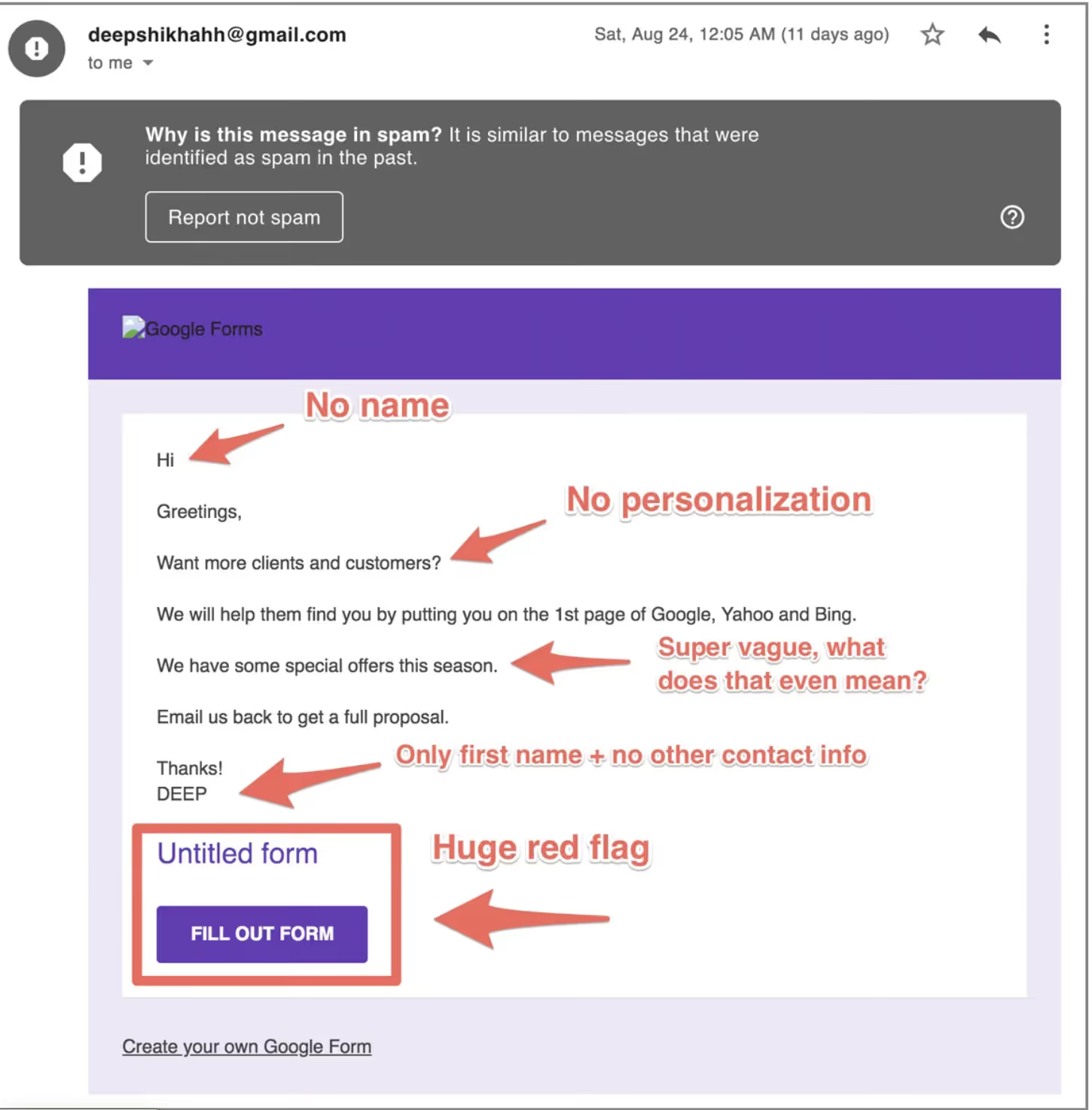
No, cold emails are not Spam, only if done right. Cold emails are targeted emails with relevant and personal content related to the target audience. The businesses sending cold emails have a legitimate purpose behind sending these. So to ensure that your cold emails do not land in the spam folder and avoid spam folder issues altogether, they should include the following:
For example, the below email is a cold email that has landed in the spam folder because of the highlighted reasons in the image. So make sure you avoid such mistakes. Also, if required, you can take tips to avoid landing in spam folders from Smartlead AI, the best cold email marketing software in the market.
Everybody knows the basic cold email guidelines but are these enough for a successful campaign? I asked Vaibhav—Smartlead founder—and the answer was NO.
Here are some of the cold email best practices that nobody tells you, but you must know. At Smartlead, our customers have seen as high as 40% positive reply rate following the below practices.
Sending bulk emails is always risky. For instance, sending 100 emails from one email address looks spammy.
Many marketers use multiple email addresses to avoid that, but only a handful of them know about the email time gap.
“Keep a minimum of 5 mins email time gap between sending emails”~ Vaibhav
If you are sending a large number (volume) of emails from one email address (within the sending limit), you can continue doing so.
However, you must maintain a minimum of 5 mins time gap between sending emails.

DNC or the Do Not Contact (DNC) list is something that nobody tells a beginner.
A DNC list is a list of leads or domains that you shouldn’t send your messages to. They have either unsubscribed or blocked you, or asked you to stop sending emails.
“Maintain a DNC list for better email sender reputation”~ Vaibhav
In case you aren’t aware, sending messages to leads that unsubscribed or blocked you is violating the CAN-SPAM Act.
Cold email automation tools like Smartlead allow users to create a DNC list on the software itself. So that you can exclude specific leads from receiving any further emails from a campaign, even if they are part of an ongoing campaign.
While response rate, delivery rate, and clickthrough rate are crucial, marketers mustn’t ignore the bounce rate of email campaigns.
If you have launched an email campaign and you are seeing more than 2% bounce rate, then the best initiative is to stop.
Stop the campaign, check what went wrong, and fix it before resuming it.
“Review the lead quality, copy, and email reputation before resuming a low-performing campaign”~ Vaibhav
Cold email automation tools come with an analytics dashboard where you can see the overall performance of email campaigns.
The dashboard mainly shows
The industry standard for the above email marketing metrics is below:
Campaigns that don’t meet the above metrics should be paused immediately. Review the copy, and assess the quality of the lead list and the email reputation before resuming the campaign.
A cold email campaign includes several email accounts. While some of those might perform well, some might not.
At Smartlead, we try to filter out the low-performing email accounts after launching a campaign via the analytics dashboard.
This is a great way to boost deliverability. It has proven to be highly impactful for us.

“Look for your domain on Common Spam Blacklist”~ Vaibhav
Are your campaigns underperforming recently? Have the open rates dropped down to 5%, and the spam rate gone up?
If yes, there’s a chance that your domain is blacklisted (blocklisted).
ESPs (Email Service Providers) blacklist a domain or an IP address under suspicion of sending out spam emails. Sometimes, it is also because you are failing the SPF or DMARC authentication or there’s a mistake in the copy that alerted the spam filters.
Regardless of the reason, it’s important to learn why your campaigns are not performing like before and landing in the spam folder. Is your domain blacklisted?
To know that, you can check out free blacklist checker tools like mxtoolbox.
Popular ESPs—Google, Yahoo, HotMail, and Outlook—provide a daily sending limit of 500 emails per day.
But, for a successful outreach campaign, the best practice is to set a sending limit of 50 emails per address per day.
This has been a highly beneficial practice for us at Smartlead. The above sending limit includes the warm-up emails too.
If you are using certain mailboxes to send 10 emails per day, don’t increase the volume suddenly.
Take a week or two to gradually increase the email volume to 50 or 60 emails per day.
A sudden increase in the number of messages sent will alert the spam filters, eventually affecting the sender reputation score.
“Spintax improves deliverability by increasing randomization of messages”~ Vaibhav
Spintax or Spin Syntax is a bulk emailing hack that creates variations of sentences or words by using multiple words or phrases in the template.
You can add similar words such as {Hey} and {Hi}, separated by a vertical line |
For example:
{Hi|Hello|Hey}
This tactic will help you generate a more personalized set of cold emails. Sending email messages with a little variation from one another increases the chances of landing in leads’ inboxes.
“Select multiple mailboxes per campaign to send the load horizontally”~ Vaibhav
Inbox rotation means sending emails from various mailboxes instead of sending from one mailbox only.
Here, inbox means one mailbox/email address.
So, the inbox rotation practice means rotating the sender’s account or using various sender addresses to send bulk emails.
This is a great tactic to divide the email volume into small chunks for several mailboxes. This will help to stick to the “50 emails per day per address” limit.

In line with cold email best practices, there are several key metrics you should track to gauge the success of your cold email campaigns:
People say that cold emailing can either do your business or ruin it.
So getting a few techniques wrong can reduce the trustworthiness of your brand in your prospect's eyes.
So you can easily use the above-mentioned cold email best practices to create a powerful marketing campaign with cold emailing and get more leads with it.
The internet is full of cold email tips & tricks. These tips & tricks mainly include
While I totally agree with the effectiveness of the above emailing hacks, as a marketer, you need MORE.
You need the secret emailing practice from an experienced email marketer who has already brought the results (multiple times).
If you are reading this, get set, GO.
Use the above game-changing tips from Vaibhav and the cold email best practices we discussed in this article and let us know the results. If you are looking for cold email automation, check out Smartlead.
Join us to elevate your outreach!

Founder, StackOptimise
Smartlead's combination of automation, unlimited inboxes, and easy campaign management has completely transformed how we run cold email campaigns.
.jpg)
Founder, Cold Email Hackers

We have about 15 companies and we use Smartlead for all of them.

Founder, DutchSave Media

One of the things I love about using Smartlead is the deliverability feature. If they landed in the bounce or spam folders, we could resolve this quickly.

Co-Founder, Growth Today

I want to continue to use Smartlead to make operations more seamless - the plan is to bring more clients here and build more SOPs.

Founder, FueltoFly

Smartlead listens to the agencies and customers and builds according to what people want, that has really made things easier for us.

Founder, OutboundSync

We build an infrastructure product, and OutboundSync communicates with Smartlead itself. I love the webhook and API. They're really well done and keep getting better.

Founder, Axoleads

With SmartDelivery, you can put all of that in the hands of the tool. It ensures your emails land in inboxes, and by running a simple test, you can see if you're hitting the mark.

Founder, Claygen
Deliverability is the cornerstone of cold email outreach. You could have the best email copy in the world, but if no one is seeing it, it's useless. I really love the feature where you can actually give client accesses to your clients.

Co-Founder, Cymate

I do not want to switch to another software. Pick a solution you trust, stick with it, and keep refining your copy.

CMO, Avalanche Capital

Managing large volumes of emails through multiple inboxes used to be a logistical nightmare. With Smartlead, the process is seamless. We book thousands of discovery calls through cold emails. These campaigns are generating leads at a scale we never thought possible.

Founder, Growth Engine X

We came for the unlimited inboxes, and we stayed for the API. 1.5M cold emails/month, 7,767+ inboxes managed.

Head of Community & Ecosystem, TxtCart

You cannot replace having 10,000 touches with potential clients. When you have that much distribution and reach, you really start to see incredible results. The simplicity of Smartlead made all the difference. It doesn't require you to be a technical wizard.

Founder, Hyperke

Smartlead has been a game-changer for us. It increased our appointment volume, improved ease of use, and offered valuable features. 80% increase in appointments/month, peak of 276 appointments in a single month.

Founder, Kinetyca

Smartlead has been our cold email backbone from day one. The platform evolves constantly, keeping pace with how deliverability and personalization need to work today. 21% overall reply rate, $175K in 4 months for multiple B2B clients.

Founder, Reachflow

Smartlead is centered around deliverability and constantly evolving. Their API is not like any other platform. Smartlead covers all our needs. The focus on core features like deliverability and API integration is unmatched.

CEO, Halfwarm

Our approach to crafting conversational emails led to reply rates that many of my peers thought were unattainable.

Co-Founder, letstrike

We've grown on zero capital, zero marketing, purely cold emailing - and that's the story we love to tell. The best approach is no approach if you can't handle domain meltdown. The second best is something like Smartlead that's built from the ground up for deliverability at scale.

Founder, Fenixtal

Smartlead's white-labeling and automation let us punch above our weight. The 12M euros sales potential? That's what happens when you combine human creativity with Smartlead's precision.

Co-Founder, Digital Creativs

Nine out of 10. Ninety percent of our clients are on Smartlead unless they come in with an existing setup. That's the default.

Co-Founder, BuildingReach

At the end of the day, you have to take a bet on one tool or another. It was a no-brainer taking that bet on Smartlead. We had to even turn down the volume of our marketing campaigns - Smartlead was capable of driving more volume than our sales team was able to fulfill.

Founder & MD, Prospectiv

Since starting the business in January of this year, we've already generated $200K in sales exclusively from cold email. Smartlead has been central to our operations and has exceeded our expectations.

Founder, Growthlynk

There's so much stuff built on top of it. I would be dead if I had to rebuild it with another tool. I can manage hundreds of senders easily. I can send hundreds of thousands of emails.

Founder, Corebits

The platform's HubSpot integration, real-time Slack updates, and advanced campaign customization have been game changers for our business and our clients'.

Founder, Apex Ascension

From day one, we've never used anything else.