


.avif)
Want to convert more leads from your email marketing campaign? Then this piece of content is going to be of great help. No matter what type of business we have, email marketing ROI is a key part of our strategy. But creating a successful drip campaign can be tricky. This blog post will share how to create a winning drip campaign using our simple flowchart. Let's get started!
A drip campaign flowchart is a visual map. It shows automated email sequences triggered by specific user actions, behaviors, or timelines.
The flowchart outlines the journey from initial contact to conversion, showing email triggers, delays between messages, conditional branches based on user engagement, and the desired outcomes at each stage.
The most common way of performing a drip campaign is to send emails in sequence. It is a great way to follow a buyer's journey and maintain contact with our target audience.
Drip campaigns are a lead-nurturing process where you send pre-written emails over time. The goal is to build trust and guide prospects toward conversion without causing them overwhelm.
A flowchart helps you with execution. It prevents over-sending, improves timing accuracy, and enables proper audience segmentation.
With a visual roadmap, you eliminate manual errors and save hours on campaign setup. Also, it becomes much easier to maintain a consistent brand voice across all touchpoints.
Each drip campaign serves a different purpose. Here are six proven flowchart templates you can adapt to your business:
Triggered when a new subscriber joins your email list. A welcome series warms up the relationship and provides immediate value.
Day 0: Welcome email with immediate access to promised resource → Day 2: Share your brand story and mission → Day 4: Highlight your value proposition and key benefits → Day 7: First call-to-action (download guide, start free trial, schedule demo)
Pro tip: Include your brand story on Day 2 to build trust. By Day 7, subscribers are more likely to convert because they've already engaged with you multiple times.
Designed to move prospects through the sales funnel by delivering educational content that addresses their pain points and objections.
Prospect captured → Email 1: Problem-focused educational content → Email 2: Case study showing your solution → Email 3: Demo offer or product overview → Email 4: Social proof (testimonials, reviews) → Email 5: Limited-time offer or meeting request
Pro tip: Space these 3-4 days apart. Check email opens and clicks to determine if a prospect is ready for a sales outreach or needs more nurturing.
Helps new customers succeed with your product by guiding them through key features and best practices, reducing churn and increasing lifetime value.
Customer signs up → Email 1: Getting started guide and quick-start video → Email 2: Feature spotlight #1 (most important) → Email 3: Feature spotlight #2 (advanced use case) → Email 4: Success tips from top customers → Email 5: Check-in and support resources
Pro tip: Send Day 1 immediately. Onboarding sequences reduce churn by up to 30% when delivered within the first two weeks of signup.
Recovers lost revenue by reminding customers about unpurchased items, addressing objections, and offering incentives. This is critical for e-commerce success.
Customer leaves checkout → Email 1 (1 hour later): Gentle reminder with product image and price → Email 2 (24 hours later): Social proof (other buyers, reviews) → Email 3 (48 hours later): Discount code or free shipping offer → Email 4 (72 hours later): Final urgency reminder and support contact
Pro tip: The first email within 1 hour recovers 25% of abandoned carts. The discount offer in Email 3 recovers an additional 15-20%.
Reaches out to inactive subscribers who haven't opened emails in 30+ days. Win them back or remove them to maintain list health.
Inactivity detected (30 days) → Email 1: “We miss you” message with valuable content → Email 2 (7 days later): Special offer or exclusive deal → Email 3 (7 days later): Final reminder with benefit summary → Email 4: Unsubscribe prompt or move to inactive segment
Pro tip: Re-engagement campaigns recover 10-25% of inactive subscribers. Those who don't re-engage should be removed to protect sender's reputation.
Specifically designed for B2B sales teams reaching prospects who haven't opted in. Personalization and a value-first approach are critical here.
Prospect identified → Email 1 (Day 1): Personalized intro with specific reason for reaching out → Email 2 (Day 3): Value-add: relevant article, insight, or research → Email 3 (Day 5): Case study relevant to their industry → Email 4 (Day 7): Demo offer or meeting proposal → Email 5 (Day 10): Final attempt with urgency → Email 6 (Day 14): Break-up email and removal from sequence
Pro tip: Cold email typically has 2-5% reply rates. Focus on personalization and value in Emails 1-2 to get past gatekeepers.
Building a winning drip campaign requires strategic planning, clear audience understanding, and systematic testing. Follow these seven steps to create a flowchart that converts.
Ask yourself: What do I want subscribers to do? Possible goals include making a purchase, scheduling a demo, downloading a guide, increasing product adoption, or re-engaging inactive users. Your goal shapes everything: email copy, frequency, CTA, and success metrics.
Write it down: 'Convert X% of leads to customers in Y days.'
Not all subscribers are the same. Segment by behavior, demographics, interests, or purchase history. Your flowchart will branch differently for each segment.
What initiates the campaign? Triggers can be time-based (birthday, anniversary) or event-based (signup, purchase, link click). Be specific.
Create a timeline: How many emails? What's the spacing? Example: 5 emails over 14 days, sent every 2-3 days. Use the timing table below as a reference, then customize it to your audience and goal.
Each email serves a purpose. Email 1 introduces your offer. Email 2 builds credibility. Email 3 addresses objections. And so on. Match your copy to the buyer journey stage.
Effective email copywriting relies on proven formulas.
For example, the PAS formula (Problem-Agitation-Solution) works well for awareness and education emails: introduce a pain point, amplify its impact, then position your solution.
The AIDA formula (Attention-Interest-Desire-Action) is perfect for conversion emails: grab attention with a compelling subject, build interest with benefits, create desire through social proof or scarcity, and drive action with a clear CTA.
For CTAs, use action-oriented language like “Schedule Your Demo,” “Get Started Free,” or “Claim Your Offer” rather than the generic “Click Here.” Test multiple CTA variations to find what resonates best with your audience segment.
Add conditional branches: If the subscriber opens the email, send Path A. If they don't open, send Path B. If they click the link, mark them sales-ready. Branching personalizes the experience without overwhelming your team.
Branching logic follows simple if/then patterns that automate personalization.
~If a subscriber opens email 1 within 24 hours, send email 2 immediately to capitalize on engagement momentum.
~If they don’t open within 72 hours, resend with a new subject line or alternative angle rather than simply waiting. If they click the link, mark them as “Sales-Ready” and trigger an immediate follow-up from your sales team.
~If they bounce or unsubscribe, automatically remove them from future sends. These rules eliminate manual work and ensure each subscriber receives the right message at the right time based on their actual behavior, not just calendar dates.
Never launch a campaign without testing. Run A/B tests on subject lines, send times, copy, and CTAs. Measure open rates, click rates, conversions, and unsubscribes. Use this data to iterate and improve over time.
Structure your A/B tests systematically by testing one variable at a time.
Start with subject lines since they have the biggest impact on open rates, then move to send times, followed by email content and CTAs.
Split your audience: send variation A to 50% and variation B to the other 50%, run the test for at least 100-200 sends to get statistical significance, and measure for at least 3-5 days to capture different time zone opens.
Compare metrics like open rate (for subject line tests), click rate (for CTA tests), and conversion rate (for overall performance).
Keep the winning variation and test a new challenger against it in the next cycle. This iterative approach compounds over time, turning incremental gains into significant revenue increases.
Email marketing is constantly evolving. Stay ahead of trends with these 2026 best practices to maximize deliverability, engagement, and conversions.
Subject lines are your first impression. The data is clear: 28-39 characters perform best, keeping your entire message visible on mobile (47.7% of emails are opened on mobile). Avoid spam trigger words like FREE, URGENT, and LIMITED. Instead, use curiosity, personalization, and clear value propositions.
Nearly half your subscribers read on phones. Use single-column layouts, large fonts (at least 14px for body text), and clickable buttons (48x48px minimum touch area). Test every email on iPhone and Android before sending.
Segmented emails drive 50% more clickthroughs than one-size-fits-all broadcasts. Use dynamic content blocks to personalize based on behavior, industry, company size, or purchase history. In 2026, AI-powered segmentation is your competitive advantage.
Artificial intelligence is transforming email marketing in 2026. AI engines analyze subscriber behavior to predict the best send time for each individual, not just one send time for all. Result: 30-50% increases in opens and clicks. AI also generates subject lines and email variants on the fly, testing thousands of combinations instantly.
In 2026, A/B testing is table stakes. Test every variable: subject line, sender, copy, CTA, images, send time, and frequency. Start with subject lines (highest ROI), then move to CTA copy and send times. Statistical significance requires 100+ recipients per variant.
• Run tests for a minimum of 7 days to capture different time zones and schedules
• Use split testing, not multivariate, to isolate one variable
• Set a minimum lift threshold (e.g., 5% improvement) to implement changes
Non-compliance tanks your sender reputation. CAN-SPAM (US law) requires an unsubscribe link in every email, a clear subject line, and a physical address. GDPR (EU law) requires explicit opt-in consent and easy opt-out. Always respect user preferences and remove unsubscribes within 10 days.
• Include physical mailing address in email footer
• Honor unsubscribe requests immediately
• Maintain authentication (SPF, DKIM, DMARC) for all sending domains
Even the best drip campaigns fail if emails land in spam. Deliverability depends on technical authentication, sender reputation, and list quality. Set up SPF (Sender Policy Framework) and DKIM (DomainKeys Identified Mail) records on your sending domain to authenticate emails and prevent spoofing. DMARC (Domain-based Message Authentication, Reporting, and Conformance) adds an extra layer of protection by telling receivers how to handle unauthenticated emails. Monitor your sender reputation using tools like Sender Score or Return Path; aim for a score above 80. Maintain list hygiene by regularly removing hard bounces (invalid email addresses), soft bounces (temporary delivery failures), and inactive contacts (users who haven’t engaged in 6+ months). For new domains and IP addresses, warm them up gradually: start with small send volumes to trusted addresses and increase over 2-4 weeks. Avoid common spam trigger words like “Free,” “Act Now,” “Limited Time,” and excessive punctuation or ALL CAPS text. These fundamentals form the foundation of high deliverability and ensure your drip campaigns actually reach inboxes.
Drip marketing is a powerful technique for growing our email list by delivering messages based on the individual signing up to our list. A drip campaign flowchart shows the specific order in which our potential customers should receive their message content over time.
Generally, the first message is the most efficient way to introduce our products, sell them, and offer further information. If our content is presented clearly with plenty of explanation, recipients will have no problems following the campaign. Considering the user interest, we will set a campaign with a series of messages from the first moment till the customers take action on our website, app, channel, or social media platform.
One of the most important things when setting up our campaign is how often we'll be sending messages. Also, automation allows completing the processes in a few minutes, saving time and productivity.
The flowcharts are the best way to keep track of messages and follow best practices with the information in mind. In addition, it will help us track open rates when we should send follow-up messages and a proper structure to our campaign.
To help you further understand, we are sharing our drip campaign templates, giving us a maximum conversion rate. The campaign flowchart plays an important role in email sequence automation, so creating a perfect flowchart for a seamless Drip email campaign workflow is highly recommended.
As a first step, we have to create a potential prospects list, which may be for any Initial onboarding email, cart abandonment email, or confirmation email. Then, creating a personalized and informative message copy is the next step in the campaign creation process. After that comes the flowchart or mapping of the messages we will send to our leads. For a better understanding, let us discuss the steps or stages in drip marketing campaigns.
The drip campaign emails aim to generate leads, increase brand awareness, and create rapport with loyal customers. And to achieve the campaign's goal, we have to get people on board with our product recommendations. So start by asking ourselves what it is that we want to achieve. For example, do we want to create brand awareness or get more people to purchase your product or service? Then work out what specific action a reader needs to take to achieve this goal. It can range from making a purchase or placing an order, taking advantage of a special offer, and using your contact details when referring friends, colleagues, and family members.
Once we have the structure for our drip campaign, we must fill it in. Drip campaigns are built as a series of messages that can include information about webinars, additional products, videos, sales pages, or a combination. The important factor here is that we make it compelling for our recipients with hyper-personalized email copies. And the automated follow-up emails after the initial email, a series of content convinces our prospect to land on our purchase page. It acts as a reminder message and helps the sales team in email opens and conversions.

Remember that when creating content for a marketing campaign, it's essential to be unique and offer something different from others in our marketplace. We also need to give an idea for subscribing so that our readers know what they will receive once they opt-in to your contact list or buy from us. Incentives are most commonly free offers such as webinars, ebooks, coupons, etc. So setting up incentives for the customer is an easy way to hook the audience.
Daily, people will send out an email to the prospect’s email address for the sales process initiation. It may be an announcement of a new product or service, or it could just provide interesting information. And the method is commonly used by marketers and sales team people across the board.
It's not recommended to send too many mails in a short period of time. Otherwise, our audience or blog subscribers will get bored of receiving them and will not notice when we've sent out valuable information to them. And with AI cold email software, we can run any type of drip campaign with auto-rotate email options to avoid getting spammed.
Email automation is helpful in bulk email sending, but there should be a certain condition to control the campaign. Our messages shouldn't annoy the recipes, so setting follow-ups with time delays is highly recommended. The preferred time delay for the series of emails after the initial message is 3, the next follow-up message in a couple of days, the third in 3 days, and the final message in the next three days. A total of 15 days can be the recommended duration for a campaign. Also, what if we get replies to our messages immediately? We should stop the movement and follow them personally for a confirmed purchase once we get a response.
Testing is key if we want the best results from our marketing team's effort. It helps us find if something isn't working and pushes us to create a perfect campaign. In addition, by planning every aspect of our campaign before launch, we'll better understand our sales goals and how to measure them efficiently. And planning the test must be treated as seriously as the actual implementation.
Pick a perfect time and day to launch the campaign, set the drive with enough time to run, and give customers enough options for their purchase decisions so everything can run smoothly. With cold emailing software, we can track the performance of the sent email in the master dashboard with complete data like opens, replies, etc.
Email drip campaign flowchart is a great way to max out our marketing budget without spending tons of time on it. We can analyze the results and optimize as needed, which will help us get a more customer base. AB Testing helps us in making the campaign perform better.

We must follow these steps and marketing strategies to achieve massive success with our drip email marketing campaign. First, smartly plan the email marketing flow chart to get the maximum out of our Lead nurturing campaign. To help further, sharing some simple templates helped us achieve our goals.
The drip flow charts are the mind map we create for the seamless workflow of the campaign. Here are some email marketing flow chart samples for scenarios like upcoming events, trials or sign-ups, onboarding emails, etc.
The drip campaign is a great way to generate leads and build relationships with our current customers. We use these flow charts as an example of how it's done.

The Drip Campaign Flowcharts will guide us through the process of creating a successful campaign for upcoming events. All it takes are simple steps: Collecting contact lists, creating eye-catchy message templates, and sequencing bulk reminders in advance to have the attendees in the loop.

These are the general flow of any lead nurturing campaign. In addition, it includes gathering prospective clients' information, sending the invite to download or trial sign-up product, Offering incentives like discounts on future purchases for the customer testimonial, and Monitoring user behavior via web analytics while running this test. Finally, modify strategy based upon results.
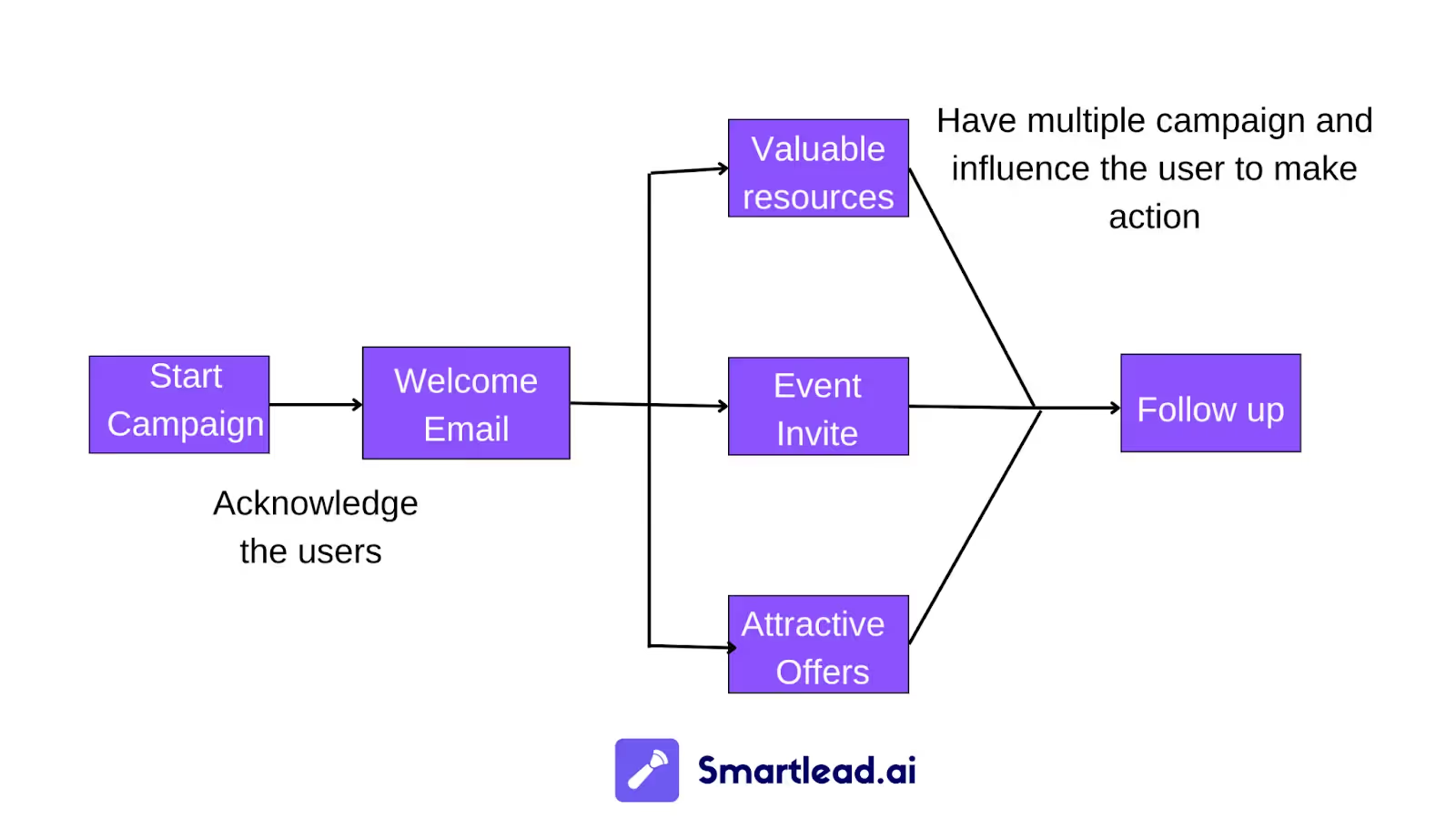
While drip campaigns can be a great way to nurture leads and increase conversions, they require thought and planning to be effective. By creating a drip campaign flowchart, you can ensure that your messages are sent out at the right time and in the correct order. In addition, it will help keep our customers engaged and interested in what we say or offer them. Not sure where to start? Check out our email drip flowchart template samples for some inspiration. Once you've created your flowchart, please test it before launching it live.
Join us to elevate your outreach!



Founder, StackOptimise
Smartlead's combination of automation, unlimited inboxes, and easy campaign management has completely transformed how we run cold email campaigns.
.jpg)
Founder, Cold Email Hackers

We have about 15 companies and we use Smartlead for all of them.

Founder, DutchSave Media

One of the things I love about using Smartlead is the deliverability feature. If they landed in the bounce or spam folders, we could resolve this quickly.

Co-Founder, Growth Today

I want to continue to use Smartlead to make operations more seamless - the plan is to bring more clients here and build more SOPs.

Founder, FueltoFly

Smartlead listens to the agencies and customers and builds according to what people want, that has really made things easier for us.

Founder, OutboundSync

We build an infrastructure product, and OutboundSync communicates with Smartlead itself. I love the webhook and API. They're really well done and keep getting better.

Founder, Axoleads

With SmartDelivery, you can put all of that in the hands of the tool. It ensures your emails land in inboxes, and by running a simple test, you can see if you're hitting the mark.

Founder, Claygen
Deliverability is the cornerstone of cold email outreach. You could have the best email copy in the world, but if no one is seeing it, it's useless. I really love the feature where you can actually give client accesses to your clients.

Co-Founder, Cymate

I do not want to switch to another software. Pick a solution you trust, stick with it, and keep refining your copy.

CMO, Avalanche Capital

Managing large volumes of emails through multiple inboxes used to be a logistical nightmare. With Smartlead, the process is seamless. We book thousands of discovery calls through cold emails. These campaigns are generating leads at a scale we never thought possible.

Founder, Growth Engine X

We came for the unlimited inboxes, and we stayed for the API. 1.5M cold emails/month, 7,767+ inboxes managed.

Head of Community & Ecosystem, TxtCart

You cannot replace having 10,000 touches with potential clients. When you have that much distribution and reach, you really start to see incredible results. The simplicity of Smartlead made all the difference. It doesn't require you to be a technical wizard.

Founder, Hyperke

Smartlead has been a game-changer for us. It increased our appointment volume, improved ease of use, and offered valuable features. 80% increase in appointments/month, peak of 276 appointments in a single month.

Founder, Kinetyca

Smartlead has been our cold email backbone from day one. The platform evolves constantly, keeping pace with how deliverability and personalization need to work today. 21% overall reply rate, $175K in 4 months for multiple B2B clients.

Founder, Reachflow

Smartlead is centered around deliverability and constantly evolving. Their API is not like any other platform. Smartlead covers all our needs. The focus on core features like deliverability and API integration is unmatched.

CEO, Halfwarm

Our approach to crafting conversational emails led to reply rates that many of my peers thought were unattainable.

Co-Founder, letstrike

We've grown on zero capital, zero marketing, purely cold emailing - and that's the story we love to tell. The best approach is no approach if you can't handle domain meltdown. The second best is something like Smartlead that's built from the ground up for deliverability at scale.

Founder, Fenixtal

Smartlead's white-labeling and automation let us punch above our weight. The 12M euros sales potential? That's what happens when you combine human creativity with Smartlead's precision.

Co-Founder, Digital Creativs

Nine out of 10. Ninety percent of our clients are on Smartlead unless they come in with an existing setup. That's the default.

Co-Founder, BuildingReach

At the end of the day, you have to take a bet on one tool or another. It was a no-brainer taking that bet on Smartlead. We had to even turn down the volume of our marketing campaigns - Smartlead was capable of driving more volume than our sales team was able to fulfill.

Founder & MD, Prospectiv

Since starting the business in January of this year, we've already generated $200K in sales exclusively from cold email. Smartlead has been central to our operations and has exceeded our expectations.

Founder, Growthlynk

There's so much stuff built on top of it. I would be dead if I had to rebuild it with another tool. I can manage hundreds of senders easily. I can send hundreds of thousands of emails.

Founder, Corebits

The platform's HubSpot integration, real-time Slack updates, and advanced campaign customization have been game changers for our business and our clients'.

Founder, Apex Ascension

From day one, we've never used anything else.


