Sign up now and get 50% off on your first month on any plan

You can build a functioning outbound AI sales agent that is connected to your live campaign data, capable of diagnosing issues and surfacing answers, in 5 minutes using Claude Desktop and Smartlead MCP.
No code, no API wrappers, no developer on call. Smartlead's MCP server ships with 116+ tools, giving Claude direct access to your campaigns, sending accounts, lead lists, and deliverability data the moment you connect it.
This is a setup guide for a real, operational AI agent that connects to your outbound stack and does work.
Before going into setup, it is worth being precise. "AI outbound agent" gets used to describe three very different things, and most teams are thinking about the wrong one.
The common but incorrect version is an AI tool that writes your cold email copy. You feed it a prospect name and a value proposition, it writes five subject line variants. That is AI-assisted copywriting. It is useful, but it is not an agent with memory, a connection to your stack, and the ability to act on data it can actually see.
The correct version is an AI system connected to your outbound stack that can query live data, identify problems, and take action without you having to do the work manually.
An AI outbound agent operating on Smartlead can do the following.
Monitor account health proactively by checking sending volume, bounce rates, and warmup status across every mailbox at once.
Detect deliverability issues before they compound by catching accounts approaching spam thresholds before they start hurting deliverability scores. Find leads who replied but are still active in sequences, one of the most common operational gaps in outbound, fixed with a single query.
Generate performance summaries on demand by pulling open rates, reply rates, and conversion data across campaigns with a single prompt. Run pre-launch checks before a campaign goes live by verifying sequences, checking sending limits, and confirming lead list hygiene.
Provide diagnostics when performance drops by identifying whether the issue is the copy, the mailboxes, the timing, or the targeting.
All of it is operations: the invisible daily work that most sales teams do manually, slowly, and inconsistently. That is what an AI outbound agent actually handles.
Smartlead gives you two paths to outbound AI automation that serve different use cases and different levels of readiness.
This is the path this article covers in depth.
Connect Claude Desktop to your Smartlead account using MCP (Model Context Protocol). Claude picks up all 116+ Smartlead tools automatically and can immediately answer any question about your outbound stack using live data.
The result is an interactive agent: you ask it something, it queries your Smartlead data in real time, and it answers with specifics. Not generic advice or assumptions, but your actual account health, your actual campaign numbers, your actual lead activity.
This tier is most useful for daily monitoring and account health checks, campaign diagnostics and troubleshooting, pre-launch audits before new campaigns go out, on-demand reporting for yourself or your team, and building intuition for what an agent should be doing in your stack.
Setup time is 5 minutes and the only prerequisites are a Smartlead account and Claude Desktop.
SmartAgents is Smartlead's built-in autonomous outbound agent layer. Where the Claude and MCP setup is interactive (you trigger it), SmartAgents is autonomous: it runs end-to-end workflows on its own schedule without being asked.
This tier is most useful for fully automated outbound at scale, workflows that need to run on a fixed schedule without human initiation, and teams that have already mapped out their operational workflows and want to automate execution entirely.
The recommended path is to start with Option 1. It takes five minutes, gives you an immediate productivity gain, and teaches you what you actually want an agent to do. Most teams discover their real use cases after two weeks of using the interactive tier. SmartAgents is the graduation path once those patterns are clear.
This takes five minutes. No code required at any step.
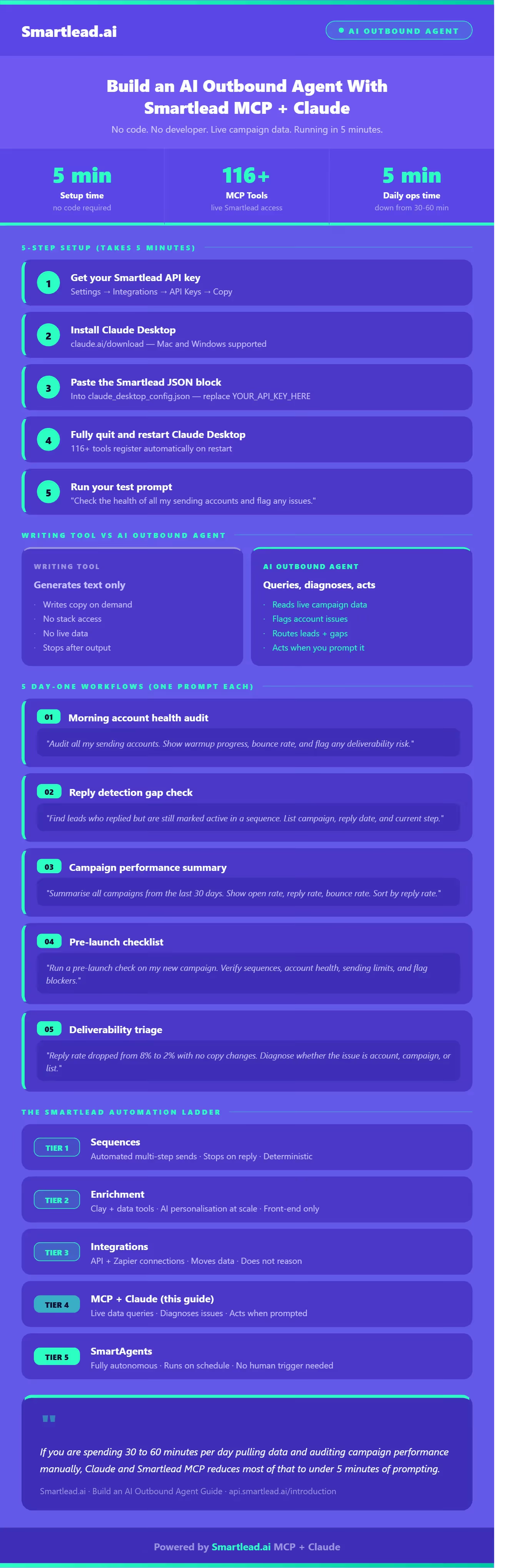
In your Smartlead dashboard, navigate to Settings, then Integrations, then API Keys. Copy the key shown there. If you have not generated one before, create a new key and copy it.
Keep it accessible for the next two minutes as you will paste it into a config file. Treat it like a password and do not share it over Slack or paste it into a shared doc. It gives full API access to your Smartlead account.
Full API documentation is at api.smartlead.ai/introduction and the Smartlead help centre.
Download Claude Desktop from claude.ai/download. It runs on Mac and Windows. Install it like any other application with no configuration needed at this stage.
Open the Claude Desktop configuration file. On Mac this lives at:
~/Library/Application Support/Claude/claude_desktop_config.json
On Windows:
%APPDATA%\Claude\claude_desktop_config.json
If the file does not exist yet, create it. Add the following JSON, replacing YOUR_API_KEY_HERE with the key you copied in Step 1:
If you already have other MCP servers configured in this file, add the smartlead block inside the existing mcpServers object. Do not replace the whole file.
Close Claude Desktop completely and reopen it. When it loads, Smartlead's 116+ tools register automatically. No authentication flow, no API testing, no further configuration required.
Type this into Claude Desktop:
"Check the health of all my sending accounts and flag any issues."
Claude will query your Smartlead account in real time and return a structured health summary including bounce rates, sending volumes, warmup status, and anything that needs attention. If it returns live data about your campaigns, your agent is working.
For a more detailed walkthrough with screenshots and troubleshooting steps, see the full MCP setup guide.
Once the connection is live, here are the five workflows that deliver the most immediate value. Each one takes a single prompt.
Run this every morning before you start sending. It catches account-level problems before they become campaign-level problems.
What you get back: a structured table of every account with clear flags on anything drifting out of range. Takes 30 seconds to review. Previously took 10 to 15 minutes of manual dashboard scanning.
This one finds money left on the table. Leads who replied but are still active in sequences represent warm interest that is being re-cold-emailed, one of the most damaging operational gaps in outbound.
What you get back: a list of leads to immediately remove from sequences and hand to your SDRs for follow-up. Connect this to the Master Inbox for complete visibility.
This replaces the manual dashboard pull that usually happens before a team meeting or a weekly review.
What you get back: a ready-to-share performance table. Ask Claude to reformat as a table or bullet list if needed.
Run this before any new campaign goes live. It catches configuration errors before they cost you deliverability.
What you get back: a checklist of what is configured correctly and what needs to be fixed. Catches issues that would only have shown up as poor performance data three days later.
When a campaign that was performing well suddenly is not, this is the fastest way to isolate the cause.
What you get back: a structured diagnosis separating account health problems from campaign configuration problems from lead list quality problems, the three root causes that cover 90% of performance drops.
The interactive tier delivers most of the value for most teams. But there is a clear signal that tells you when it is time to go further.
The trigger is when you are running the same prompts every day at the same time. When your morning account health audit becomes a habit and you have a list of five prompts you run every morning before you start work, that is the moment to look at SmartAgents. Those workflows can be automated. They can run on a schedule, without you initiating them, and surface results to wherever you want them such as Slack, email, or a dashboard.
The Claude and MCP tier builds your intuition for what an agent should do in your stack. SmartAgents executes it autonomously without the trigger.
Most teams spend two to four weeks in the interactive tier before their workflows are stable enough to automate. That is not a criticism of the interactive tier, it is the point of it. You learn what the agent should be doing. Then you automate it.
This is worth being direct about because the term "AI agent" has been stretched to cover everything from a chatbot to a fully autonomous system.
What the Claude and Smartlead MCP setup is: an interactive outbound AI sales agent. You ask it questions, it queries your live Smartlead data, and it responds with structured answers and analysis. It acts when you prompt it. It does not act on its own.
What it is not: a fully autonomous pipeline that runs without any manual initiation. That is SmartAgents territory.
For most sales ops managers and growth leads, the interactive tier covers the majority of practical needs. You get instant access to your outbound data in natural language, you can run any diagnostic in seconds, and you eliminate most of the manual dashboard work that currently sits between you and answers about your campaigns.
The honest benchmark: if you are currently spending 30 to 60 minutes per day pulling data, checking account health, and auditing campaign performance manually, the Claude and Smartlead MCP setup reduces most of that to under 5 minutes of prompting. That is the actual value, stated plainly.
Full autonomous operation where the agent monitors, decides, and acts without being asked is the next tier. Start here first.
No. The Claude and Smartlead MCP setup requires no coding at any step. You copy an API key, paste a JSON block into a config file, and restart an application. Everything after that is natural language: you type what you want to know, and Claude uses your Smartlead data to answer. The only technical step is editing a configuration file, which is closer to filling out a form than writing code.
Smartlead MCP is the integration layer that connects Claude (or any MCP-compatible AI client) to your Smartlead account. It exposes 116+ tools that give Claude access to your campaigns, accounts, and lead data. The agent it creates is interactive: it acts when you ask it to. SmartAgents is Smartlead's native autonomous agent product. It uses the same underlying tools but operates autonomously, running workflows on a schedule without manual intervention. MCP and Claude is the interactive tier. SmartAgents is the autonomous tier.
Three things specifically. First, it operates across your entire account simultaneously by checking all sending accounts, all campaigns, and all lead activity at once in seconds rather than one dashboard view at a time. Second, it never misses a workflow since manual processes get skipped on busy days but an agent does not.
Third, it makes connections across data that are difficult to see manually, such as identifying that a bounce rate spike on one account started the same day you increased send volume, which points to a sending cadence problem rather than a list quality problem.
Five minutes for the Claude and Smartlead MCP setup, assuming you already have a Smartlead account. The steps are: get your API key, install Claude Desktop, add a JSON block to a config file, restart the application. The first live query runs immediately after restart.
Not directly. Smartlead's MCP server is built on Anthropic's Model Context Protocol, which is currently natively supported by Claude Desktop and a small number of other MCP-compatible clients.
ChatGPT does not natively support MCP as of March 2026. Claude Desktop is the recommended client since it is free to download and the MCP connection is built in without any additional configuration.
Run a test query immediately after setup: ask Claude to check the health of your sending accounts. If it returns specific data about your actual accounts including real names, real numbers, and real statuses, the connection is live. If it returns generic advice or asks you to provide data manually, the connection is not established yet.
The most common cause is a typo in the config file or a stale Claude Desktop session. Restart the app and check the JSON formatting first.
Most sales teams are sitting on more outbound data than they can manually process. Account health degrades quietly. Leads fall through gaps. Deliverability problems compound before anyone notices. The information to catch all of it exists in your Smartlead account. The problem is getting to it fast enough to matter.
The Claude and Smartlead MCP setup solves that problem in five minutes. You ask a question. Claude queries your live data. You get an answer with the specificity and structure you need to act on it. The five workflows above are the starting point. Most teams add two or three more within the first week once they see what is possible.
Start with the morning account health audit on day one. Run it every day for a week. By the end of that week you will have a clear picture of your stack's real operational state and a list of workflows worth automating. That is when SmartAgents becomes the obvious next step.
.avif)
Join us to elevate your outreach!
Founder, StackOptimise
Smartlead's combination of automation, unlimited inboxes, and easy campaign management has completely transformed how we run cold email campaigns.
.jpg)
Founder, Cold Email Hackers

We have about 15 companies and we use Smartlead for all of them.

Founder, DutchSave Media

One of the things I love about using Smartlead is the deliverability feature. If they landed in the bounce or spam folders, we could resolve this quickly.

Co-Founder, Growth Today

I want to continue to use Smartlead to make operations more seamless - the plan is to bring more clients here and build more SOPs.

Founder, FueltoFly

Smartlead listens to the agencies and customers and builds according to what people want, that has really made things easier for us.

Founder, OutboundSync

We build an infrastructure product, and OutboundSync communicates with Smartlead itself. I love the webhook and API. They're really well done and keep getting better.

Founder, Axoleads

With SmartDelivery, you can put all of that in the hands of the tool. It ensures your emails land in inboxes, and by running a simple test, you can see if you're hitting the mark.

Founder, Claygen
Deliverability is the cornerstone of cold email outreach. You could have the best email copy in the world, but if no one is seeing it, it's useless. I really love the feature where you can actually give client accesses to your clients.

Co-Founder, Cymate

I do not want to switch to another software. Pick a solution you trust, stick with it, and keep refining your copy.

CMO, Avalanche Capital

Managing large volumes of emails through multiple inboxes used to be a logistical nightmare. With Smartlead, the process is seamless. We book thousands of discovery calls through cold emails. These campaigns are generating leads at a scale we never thought possible.

Founder, Growth Engine X

We came for the unlimited inboxes, and we stayed for the API. 1.5M cold emails/month, 7,767+ inboxes managed.

Head of Community & Ecosystem, TxtCart

You cannot replace having 10,000 touches with potential clients. When you have that much distribution and reach, you really start to see incredible results. The simplicity of Smartlead made all the difference. It doesn't require you to be a technical wizard.

Founder, Hyperke

Smartlead has been a game-changer for us. It increased our appointment volume, improved ease of use, and offered valuable features. 80% increase in appointments/month, peak of 276 appointments in a single month.

Founder, Kinetyca

Smartlead has been our cold email backbone from day one. The platform evolves constantly, keeping pace with how deliverability and personalization need to work today. 21% overall reply rate, $175K in 4 months for multiple B2B clients.

Founder, Reachflow

Smartlead is centered around deliverability and constantly evolving. Their API is not like any other platform. Smartlead covers all our needs. The focus on core features like deliverability and API integration is unmatched.

CEO, Halfwarm

Our approach to crafting conversational emails led to reply rates that many of my peers thought were unattainable.

Co-Founder, letstrike

We've grown on zero capital, zero marketing, purely cold emailing - and that's the story we love to tell. The best approach is no approach if you can't handle domain meltdown. The second best is something like Smartlead that's built from the ground up for deliverability at scale.

Founder, Fenixtal

Smartlead's white-labeling and automation let us punch above our weight. The 12M euros sales potential? That's what happens when you combine human creativity with Smartlead's precision.

Co-Founder, Digital Creativs

Nine out of 10. Ninety percent of our clients are on Smartlead unless they come in with an existing setup. That's the default.

Co-Founder, BuildingReach

At the end of the day, you have to take a bet on one tool or another. It was a no-brainer taking that bet on Smartlead. We had to even turn down the volume of our marketing campaigns - Smartlead was capable of driving more volume than our sales team was able to fulfill.

Founder & MD, Prospectiv

Since starting the business in January of this year, we've already generated $200K in sales exclusively from cold email. Smartlead has been central to our operations and has exceeded our expectations.

Founder, Growthlynk

There's so much stuff built on top of it. I would be dead if I had to rebuild it with another tool. I can manage hundreds of senders easily. I can send hundreds of thousands of emails.

Founder, Corebits

The platform's HubSpot integration, real-time Slack updates, and advanced campaign customization have been game changers for our business and our clients'.

Founder, Apex Ascension

From day one, we've never used anything else.