
With Smartlead MCP connected to Claude, you can query your campaign data in real time by simply asking a question.
Claude calls the relevant Smartlead tools, retrieves live data from your account, and returns a structured answer without opening a dashboard, exporting a spreadsheet, or writing a query.
In this guide we exactly how that works, what kinds of analysis are possible, which prompts to use, and how to chain those prompts into workflows that take you from a question all the way to a decision.
When you ask Claude a question about your Smartlead campaigns, Claude actively calls Smartlead's MCP tools at that moment.
It retrieves your current data, structures the answer, and presents it back to you all in a single conversational turn.
The data reflects your account's state as of the last Smartlead sync, which is typically within minutes of real time.
You are not working from yesterday's export and not waiting for a cron job. You ask, Claude calls the API, and you get an answer.
This matters practically because if you paused a campaign two hours ago, Claude's response reflects that. If three accounts bounced this morning, that shows up when you ask.
The feedback loop is tight, which is exactly what you need when you are in the middle of a campaign push and need to make fast decisions.
The Model Context Protocol (MCP) gives Claude a structured way to call external tools, interpret the responses, and reason across multiple data points in a single answer.
Smartlead's MCP server exposes over 116 tools across campaign management, account configuration, lead activity, and analytics.
The analytics category alone covers campaign performance metrics, reply rates, open rates, account-level stats, multi-period comparisons, and lead activity data.
What makes this different from using a dashboard is the conversational layer. A dashboard shows you what it was built to show.
Claude responds to what you actually want to know. You can ask a follow-up, drill into a specific campaign, request a comparison that was never pre-built, and get an answer that combines multiple data sources in a single response.
That flexibility is what makes MCP useful for day-to-day investigation rather than just periodic reporting.
Getting this running takes less than five minutes if you have the prerequisites in place.
The MCP integration pulls live data from your Smartlead account. You need API access, which is available on paid plans. If you are on a trial or a free plan, check whether API access is included before proceeding.
This is the only technical step. You add the Smartlead MCP server to your Claude Desktop configuration file, paste in your API key, and restart Claude.
If you have not done this yet, set it up first as this guide assumes MCP is already connected. Full setup instructions are at smartlead mcp setup guide.
MCP tool calling requires the Claude Desktop application. The browser version of Claude does not support MCP connections.
If you are currently using Claude in your browser, download Claude Desktop and complete the MCP configuration there before continuing.
Once MCP is configured, there is no additional setup.
You open Claude, type a question, and the integration handles the rest. Claude will automatically call the right Smartlead tools based on what you ask without you needing to specify which tool to use or how to structure the request.
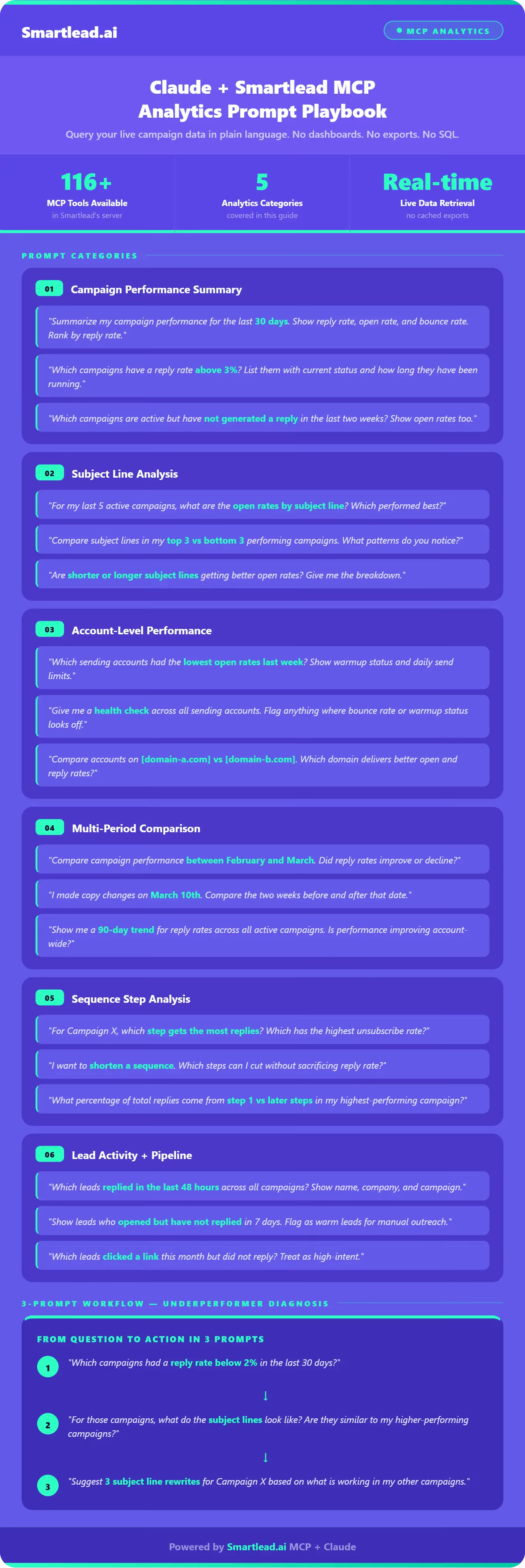
The prompts below are not theoretical. Each one maps to real Smartlead MCP tools that Claude will call when you use them. The responses include structured data pulled live from your account. For each category, we have included a range of prompts covering different levels of depth so you can start simple and go deeper as you get comfortable with the workflow.
This prompt triggers Claude to call the campaign performance tools across your account.
The response comes back as a ranked table of your best-performing campaigns at the top, your weakest at the bottom. If you have 12 active campaigns, you get 12 rows with reply rate, open rate, and bounce rate for each.
This is the starting point for most analytics sessions. Run it first to get a full picture, then follow up on whatever catches your attention.
Subject line performance is one of the highest-leverage things you can measure in cold email, and it is one of the most tedious to pull manually across multiple campaigns.
Claude calls the relevant MCP tools, retrieves the subject line data for each campaign, and surfaces a comparison.
Use this when you are testing subject line variants across campaigns and want to know which patterns are actually moving open rates.
This prompt asks Claude to cross-reference two categories of data, performance metrics and account configuration, in a single response.
It uses multiple MCP tools to pull both pieces and combine them into a view you would otherwise have to build manually by jumping between different sections of your Smartlead dashboard.
The reason this matters is that low open rates on a specific sending account can indicate deliverability problems, a warmup issue, or domain reputation degradation.
Seeing performance and warmup status together immediately tells you whether you have a problem and what category it falls into, so you can take the right action rather than guessing.
Catching a bad account early can save an entire campaign.
Multi-period comparison is one of the most useful things Claude can do with Smartlead MCP, and one of the most painful to do manually.
Pulling two months of data, aligning it by campaign, calculating the delta, and ranking by change is several minutes of spreadsheet work at a minimum. With MCP, it is one prompt.
Claude calls the multi-period comparison tools, retrieves both periods, calculates the changes, and returns a ranked view of which campaigns improved and which declined.
This is the prompt type to reach for at the end of a month, after a major copy change, or any time you want to know if what you changed actually worked.
It is also useful for catching gradual decline before it becomes a serious problem.
Sequence step analysis tells you where your email series is working and where it is losing people. If step 3 generates 60% of your replies, that is a signal about message framing that should inform how you write future sequences. If step 4 has a high unsubscribe rate, something in that email is creating friction.
Replace X with the actual campaign name or ID and Claude will pull the step-level activity data and break it down.
Beyond campaign-level metrics, MCP gives you visibility into individual lead activity: who is opening, who is clicking, who replied and when, and who went through a full sequence without engaging at any point.
This is useful when you need to prioritize follow-up, flag warm leads for your sales team, identify segments worth re-engaging, or simply make sure that no interested lead is falling through the cracks between Smartlead and your CRM.
The lead activity layer is where analytics connects directly to revenue. A campaign metric tells you how a sequence is performing on average. Lead-level data tells you which specific people to act on today.
A few practical principles that improve the quality of Claude's responses consistently across every type of query.
"Last 30 days" returns a better-scoped response than "recently." MCP tools accept date range parameters, and Claude passes them more accurately when you are specific.
Vague time references produce vague results, and it is easy to end up looking at a different window than you intended.
If you are asking about a specific campaign, use its name or ID.
This prevents Claude from having to infer which campaign you mean across a larger dataset and reduces the chance of getting aggregated data when you want granular data.
Numbers without benchmarks are hard to interpret. "Reply rate was 4.2%" is less useful than "Reply rate was 4.2%, up from 3.1% last month."
When you want context, ask for it directly: "vs. last month," "compared to my other campaigns," "above or below my account average." The comparison is often where the insight actually lives.
Claude handles multi-part questions, but if you want a clearly structured response with distinct sections, asking one thing at a time tends to produce cleaner output. Run the summary first, then drill into the anomaly you spotted.
Claude maintains context across turns in a session.
If the first response flags that Campaign X had a low open rate, you can ask "why might that be?" in the next message and Claude will reason about the data it already retrieved.
You do not need to re-run queries or re-paste context. This is one of the biggest advantages of the conversational format over traditional reporting tools.
If you want a table, say so. If you want a ranked list, ask for it to be ranked.
If you want the output formatted as something you can paste into a doc or share with a teammate, mention that. Claude will adjust the structure of its response based on how you frame the request.
The real value of MCP analytics is chained investigation, not one-off lookups. A single prompt gives you a data point. A sequence of prompts gives you a decision. Here are three complete workflows that take you from an initial question all the way to an action.
Prompt 1: Which campaigns had a reply rate below 2% in the last 30 days?
Prompt 2: For those campaigns, what do the subject lines look like? Are they similar to my higher-performing campaigns?
Prompt 3: Suggest three subject line rewrites for Campaign X based on what is working in my other campaigns.
Prompt 1: Which of my sending accounts had the lowest open rates last week?
Prompt 2: For those accounts, show me their warmup status, daily send limits, and bounce rate.
Prompt 3: Which of those accounts should I pause today based on the data?
Prompt 1: Compare campaign performance between last month and this month. Which campaigns improved the most?
Prompt 2: For the campaigns that declined, what changed? Show me step-level data for the worst-performing one.
Prompt 3: Based on this analysis, which two campaigns should I prioritize for copy changes this week?
Being specific about limits is as useful as being specific about capabilities.
Claude works within what Smartlead's MCP tools expose. If a metric is not surfaced through Smartlead's MCP server, Claude cannot retrieve it.
The analytics category is comprehensive, covering campaign performance, reply rates, open rates, deliverability signals, account stats, and lead activity, but it is bounded by what Smartlead tracks and exposes through its API.
No cross-platform data by default. Claude cannot pull data from your CRM, enrichment tools, or BI stack unless those platforms also have MCP integrations configured in Claude Desktop.
If you want to correlate Smartlead reply rates with HubSpot deal outcomes, you need both MCP connections active, or you need to bring the external data into the conversation manually.
No revenue attribution unless that data is in Smartlead. If your revenue attribution lives in Salesforce or another system, Claude's Smartlead analytics responses will not include it. For cross-platform attribution, your BI stack is still the right tool.
Claude is not a replacement for your dashboards for team-wide reporting.
The value of MCP analytics is speed and interactivity for individuals doing real-time investigation. For sharing weekly performance reports with your leadership team or visualizing trends over quarters, your existing reporting infrastructure handles that better.
The real value of MCP is not the numbers but what you do with them. Claude does not have to stop at reporting as it can move directly into action.
After an analytics prompt identifies a problem, you can follow up with an action prompt in the same session:
The three underperforming accounts you identified, can you check their warmup status and flag any that need intervention?
This is where MCP becomes a workflow tool, not just a reporting tool. Claude calls the account management tools, retrieves warmup status for those specific accounts, and tells you which ones need attention. You went from "which accounts are underperforming" to "which accounts need action today" in two prompts.
Another example workflow:
Prompt 1: Which campaigns had a reply rate below 2% in the last 30 days?
Prompt 2: For those campaigns, what do the subject lines look like? Are they similar to my higher-performing campaigns?
Prompt 3: Suggest three subject line rewrites for Campaign X based on what is working in my other campaigns.
By the end of that three-prompt sequence, you have identified the underperformers, diagnosed a likely cause, and generated candidate fixes all without leaving Claude.
This is the pattern that experienced Smartlead users find most valuable: use analytics to diagnose, then pivot immediately to action within the same conversation.
Yes, when Smartlead MCP is configured in Claude Desktop, Claude can call Smartlead's API tools directly during a conversation. When you ask about your campaign data, Claude retrieves it at that moment—not from a cached export or a scheduled sync. The data reflects your account's current state, typically within minutes of real time.
Smartlead's MCP analytics tools cover campaign performance summaries (open rate, reply rate, bounce rate), subject line performance, account-level metrics, warmup status, lead activity logs, sequence step analysis, and multi-period comparisons. You can ask about a single campaign, compare across campaigns, or look at account-wide patterns without writing queries or exporting data.
No, the Smartlead dashboard is a visual interface that shows pre-built metrics and charts. Claude with MCP is a conversational interface that calls the same underlying data on demand. The dashboard is optimized for monitoring. Claude with MCP is optimized for investigation when you want to ask a specific question, compare two things, or chain analysis into action. They complement each other rather than replace each other.
Claude retrieves data directly from Smartlead's API through the MCP connection. The accuracy of the data depends on tracking and sync cycles, not on Claude's processing. Claude surfaces what the Smartlead API returns. If there is a discrepancy between what Claude reports and what your dashboard shows, check whether the dashboard is filtered differently (by date range, by campaign, by account) and whether both are looking at the same time window.
If you want structured exports regularly, you can also ask Claude to format its response as a CSV-friendly table and copy that output, or save the report in a markdown format, or ask it to prepare a .html format dashboard.
Start with the campaign performance summary prompt: "Summarize my campaign performance for the last 30 days. Show reply rate, open rate, and bounce rate for each campaign. Rank them by reply rate." This gives you a full account overview in one prompt. From there, pick one anomaly such as a campaign that over- or underperformed and ask a follow-up question about it. After two or three sessions, you will have a sense of which prompt patterns are most useful for your specific workflow.
Cold outreach only improves when you can see clearly what is working and move quickly on what is not.
The gap between knowing your reply rate and understanding why it is what it is has always been the hard part, and it is usually where time gets lost: pulling reports, formatting data, comparing periods, and trying to connect the dots across metrics that live in different parts of your dashboard.
Smartlead MCP with Claude closes that gap. You ask a question, you get an answer structured around your actual account data, and you can follow up on it immediately without switching tools or losing context.
The analysis that used to take fifteen minutes of manual work becomes a two-minute conversation, and the action that follows can happen in the same session.
The prompts in this guide are a starting point. The ones you end up using regularly will be shaped by your specific campaigns, your audience, and the patterns you keep needing to investigate. Start with the campaign performance summary, follow the threads that surface, and build from there.
Join us to elevate your outreach!



Founder, StackOptimise
Smartlead's combination of automation, unlimited inboxes, and easy campaign management has completely transformed how we run cold email campaigns.
.jpg)
Founder, Cold Email Hackers

We have about 15 companies and we use Smartlead for all of them.

Founder, DutchSave Media

One of the things I love about using Smartlead is the deliverability feature. If they landed in the bounce or spam folders, we could resolve this quickly.

Co-Founder, Growth Today

I want to continue to use Smartlead to make operations more seamless - the plan is to bring more clients here and build more SOPs.

Founder, FueltoFly

Smartlead listens to the agencies and customers and builds according to what people want, that has really made things easier for us.

Founder, OutboundSync

We build an infrastructure product, and OutboundSync communicates with Smartlead itself. I love the webhook and API. They're really well done and keep getting better.

Founder, Axoleads

With SmartDelivery, you can put all of that in the hands of the tool. It ensures your emails land in inboxes, and by running a simple test, you can see if you're hitting the mark.

Founder, Claygen
Deliverability is the cornerstone of cold email outreach. You could have the best email copy in the world, but if no one is seeing it, it's useless. I really love the feature where you can actually give client accesses to your clients.

Co-Founder, Cymate

I do not want to switch to another software. Pick a solution you trust, stick with it, and keep refining your copy.

CMO, Avalanche Capital

Managing large volumes of emails through multiple inboxes used to be a logistical nightmare. With Smartlead, the process is seamless. We book thousands of discovery calls through cold emails. These campaigns are generating leads at a scale we never thought possible.

Founder, Growth Engine X

We came for the unlimited inboxes, and we stayed for the API. 1.5M cold emails/month, 7,767+ inboxes managed.

Head of Community & Ecosystem, TxtCart

You cannot replace having 10,000 touches with potential clients. When you have that much distribution and reach, you really start to see incredible results. The simplicity of Smartlead made all the difference. It doesn't require you to be a technical wizard.

Founder, Hyperke

Smartlead has been a game-changer for us. It increased our appointment volume, improved ease of use, and offered valuable features. 80% increase in appointments/month, peak of 276 appointments in a single month.

Founder, Kinetyca

Smartlead has been our cold email backbone from day one. The platform evolves constantly, keeping pace with how deliverability and personalization need to work today. 21% overall reply rate, $175K in 4 months for multiple B2B clients.

Founder, Reachflow

Smartlead is centered around deliverability and constantly evolving. Their API is not like any other platform. Smartlead covers all our needs. The focus on core features like deliverability and API integration is unmatched.

CEO, Halfwarm

Our approach to crafting conversational emails led to reply rates that many of my peers thought were unattainable.

Co-Founder, letstrike

We've grown on zero capital, zero marketing, purely cold emailing - and that's the story we love to tell. The best approach is no approach if you can't handle domain meltdown. The second best is something like Smartlead that's built from the ground up for deliverability at scale.

Founder, Fenixtal

Smartlead's white-labeling and automation let us punch above our weight. The 12M euros sales potential? That's what happens when you combine human creativity with Smartlead's precision.

Co-Founder, Digital Creativs

Nine out of 10. Ninety percent of our clients are on Smartlead unless they come in with an existing setup. That's the default.

Co-Founder, BuildingReach

At the end of the day, you have to take a bet on one tool or another. It was a no-brainer taking that bet on Smartlead. We had to even turn down the volume of our marketing campaigns - Smartlead was capable of driving more volume than our sales team was able to fulfill.

Founder & MD, Prospectiv

Since starting the business in January of this year, we've already generated $200K in sales exclusively from cold email. Smartlead has been central to our operations and has exceeded our expectations.

Founder, Growthlynk

There's so much stuff built on top of it. I would be dead if I had to rebuild it with another tool. I can manage hundreds of senders easily. I can send hundreds of thousands of emails.

Founder, Corebits

The platform's HubSpot integration, real-time Slack updates, and advanced campaign customization have been game changers for our business and our clients'.

Founder, Apex Ascension

From day one, we've never used anything else.