


Sign up now and get 50% off on your first month on any plan


At 2:14 on a Tuesday afternoon, someone from your ideal customer profile opens your pricing page. They read it for four minutes. Then they leave.
Your rep finds out on Friday, if at all, from a spreadsheet someone exported on Thursday.
The email goes out the following Monday, five days late, to a person who has since booked demos with two of your competitors.
That gap between a buying signal and a first message is where most outbound pipeline leaks.
Outbound automation closes it. It doesn't do that by sending more email. It does it by wiring three tools together so a signal triggers the research, the contact data and the first message, with nobody copying anything between tabs.
This guide shows how to connect Common Room (signals), FullEnrich (contact data) and Smartlead (sending) into one automated outbound pipeline. We checked the mechanics against each vendor's own documentation, so the setup steps here are the real ones.
Let’s get into it.
Outbound automation is the use of connected software to find prospects, get their contact data and run outreach sequences, without manual steps between each stage.
Signal-based outbound automation starts the process when a prospect does something that suggests intent, such as changing jobs or visiting your pricing page, instead of launching a sequence at a static list.
The old way looks like this: someone builds a list of 5,000 contacts, a sequence goes out to all of them, and you hope enough people happen to be in the market that week. Most of that list isn't.
You spend sender reputation on people who have no reason to answer.
Signal-based selling flips the order.
A job change, a pricing page visit, a question in a community or a change in a company's tech stack puts a person in a segment. The segment gets enriched, and the enrolled contacts receive a message that mentions what actually happened. You email fewer people, but they're the ones with a reason to reply.
How much better is it?
Here's the honest answer: we don't have a published reply-rate lift for signal-triggered campaigns that we'd stand behind, so we won't invent one.
What we do have is a benchmark for cold email in general. In Smartlead's State of Cold Email 2026 report, which analyzed more than 850 million emails, the typical sender needed about 135 contacts for each reply, and the top 10% needed about 38.
The report ties that gap to behaviors, such as list quality, bounce rate and relevance, rather than to any single tool. Targeting people who just did something is the most direct way to move in the right direction.
What you can automate, and what you shouldn't
Automation scales whatever you give it. A weak offer sent to a perfectly targeted list is still a weak offer, only faster. Get the offer and the ICP right first, and our guide to outbound sales strategy covers that groundwork.
An automated outbound pipeline runs in four stages: a signal puts a person into a segment, enrichment adds verified contact data, a campaign sends the first message, and replies come back to a human.
In this stack Common Room sits in the middle as the hub. It captures the signals, runs the enrichment through FullEnrich and pushes contacts into Smartlead.
That last point matters, because it isn't how most guides describe it.
You don't chain three tools together with webhooks. Common Room has a native Smartlead integration, and FullEnrich is built into Common Room as a premium enrichment option. You connect Smartlead to Common Room once, and the rest happens inside Common Room.
Smartlead handles the last two layers. Replies from every campaign land in the unified inbox, and deals can be tracked in Smart Funnel, Smartlead's built-in CRM. If you run Salesforce, HubSpot or Pipedrive, Smartlead connects to those too.
For years, teams have chased the same three questions:
Who should I reach out to?
When is the right time to do it?
How do I make sure they actually see it?
And for years, answering those questions meant piecing together a patchwork of disconnected tools, CRMs, enrichment platforms, sequencing engines, intent signals, data lakes, and spreadsheets.
Each one powerful on its own, but never built to work together.
That fragmentation creates friction. Reps lose time hopping between tools. Leads slip through the cracks. Deliverability suffers.
Outbound stops being strategic and starts becoming operational overhead.
The result? Even the best messages go unseen.
The best data goes unused. And your team’s most valuable resource, time, gets burned managing systems instead of creating conversations.
Common Room is the signal layer. It pulls activity from your website, community, social channels, product and CRM into one profile per person (it calls this Person360), scores the contact and lets you build segments that refill themselves as new people qualify. Those segments are what you push into Smartlead.
The signal types Common Room's documentation lists include:
A few Common Room features do most of the work in an outbound setup:
On price, the plan page is blunt: Essential is $2,500 a month billed annually, with five seats and up to 100,000 contacts. Advanced and Enterprise are custom. The Smartlead integration is included on all Common Room plans. We cover the full cost picture below.
FullEnrich is the contact data layer. A signal tells you who to reach, but you still need a verified way to reach them. FullEnrich looks up work emails, personal emails and mobile numbers across more than 20 data providers, one after another, until it finds a verified match. That's what "waterfall enrichment" means.
Here's what FullEnrich says about its own results (these are vendor claims, so treat them as a starting point to test, not a guarantee):
In the Common Room integration, FullEnrich adds premium phone enrichment. Common Room says this expands verified phone coverage two to three times across North America and EMEA. You choose which contacts get enriched automatically based on your ICP, or you run FullEnrich on specific contacts when you need it. Common Room's pricing page lists premium phone number enrichment credits by plan (100 on Essential and Advanced, 200 on Enterprise), so ask Common Room what's included and what's an add-on before you budget.
For FullEnrich outbound workflows outside Common Room, the same enrichment is available through the FullEnrich web app and API, and through Clay, n8n, Make and Zapier.
Two practical notes:
If you strip outbound to its core, every motion depends on three things:
How do I connect at scale, without breaking deliverability?When these three C’s finally work together, outbound transforms from guesswork to growth engine.
Miss any one of these, and your pipeline suffers.
That’s why Smartlead, Common Room, and FullEnrich coming together is more than just a feature update, it’s a rethinking of the outbound automation stack itself.
Common Room is where your go-to-market team finally gets full visibility.
It surfaces person-level intelligence, intent signals, product usage, buying triggers, and engagement data, all unified under one identity. It answers the question: Who should I talk to, and why now?
.avif)
Even the best signal is useless if you can’t reach the person behind it.
FullEnrich solves that with verified, mobile-first enrichment across North America and EMEA with 80%+ find rates and triple verification to maximize connection rates.
It answers the question: Where can I reach them, and can I trust that data?
.avif)
And then comes Smartlead, the powerhouse that makes outreach actually happen.
It’s the engine that converts data and context into meaningful, scalable communication. Smartlead is now the first truly AI-native outbound operating system for GTM teams.
Smartlead provides:
Smartlead’s AI-powered warmup tool ensures your emails consistently hit the primary inbox. With one click, you can enable AI warmup for any mailbox, and the system auto-adjusts volume, replies, and pacing for superior deliverability.

Smartlead combines high-volume email campaigns with intelligent deliverability management:
From startups to enterprise teams, Smartlead helps outbound sales teams send millions of emails with strong deliverability. Customers love features like:
In today’s crowded inboxes, personalization is more than a nice-to-have, it’s a must. But manually tailoring hundreds of emails? Impossible.
That’s where Smartlead’s custom variables come in. They allow you to inject dynamic, human-like touches into your cold emails, automatically.
By leveraging these variables, you can make your emails timely, relevant, and highly engaging, increasing opens, clicks, and responses without extra manual work. Let’s break
down the key variable types and how to use them.
Time-based variables help your emails feel context-aware, greeting your prospects in a way that matches their local time or day.
Variable: {{sl_time_of_day}}. Automatically adjusts based on the campaign timezone and the email send time:
Example: Good {{sl_time_of_day}}, John → “Good afternoon, John”
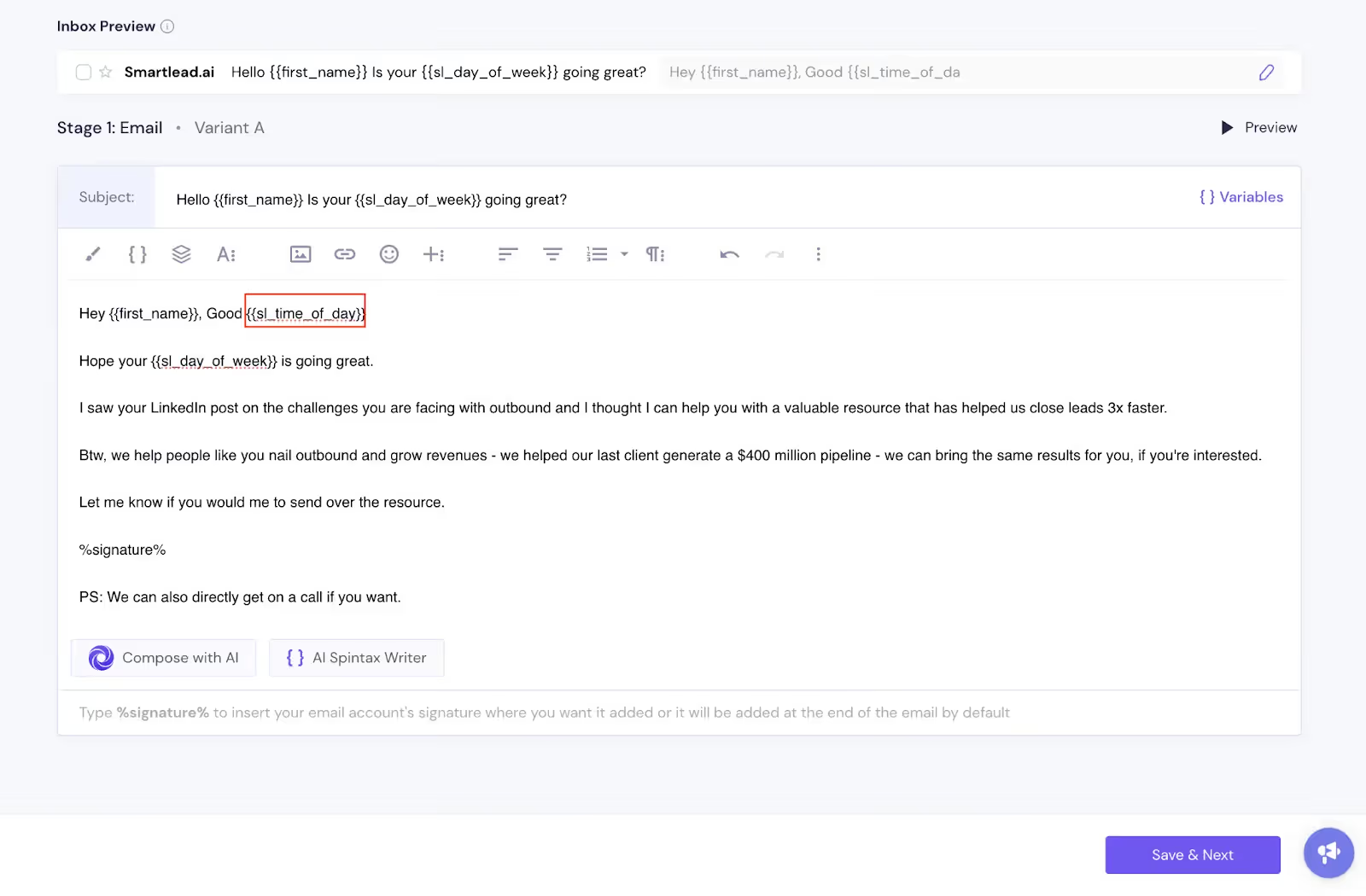
Result:
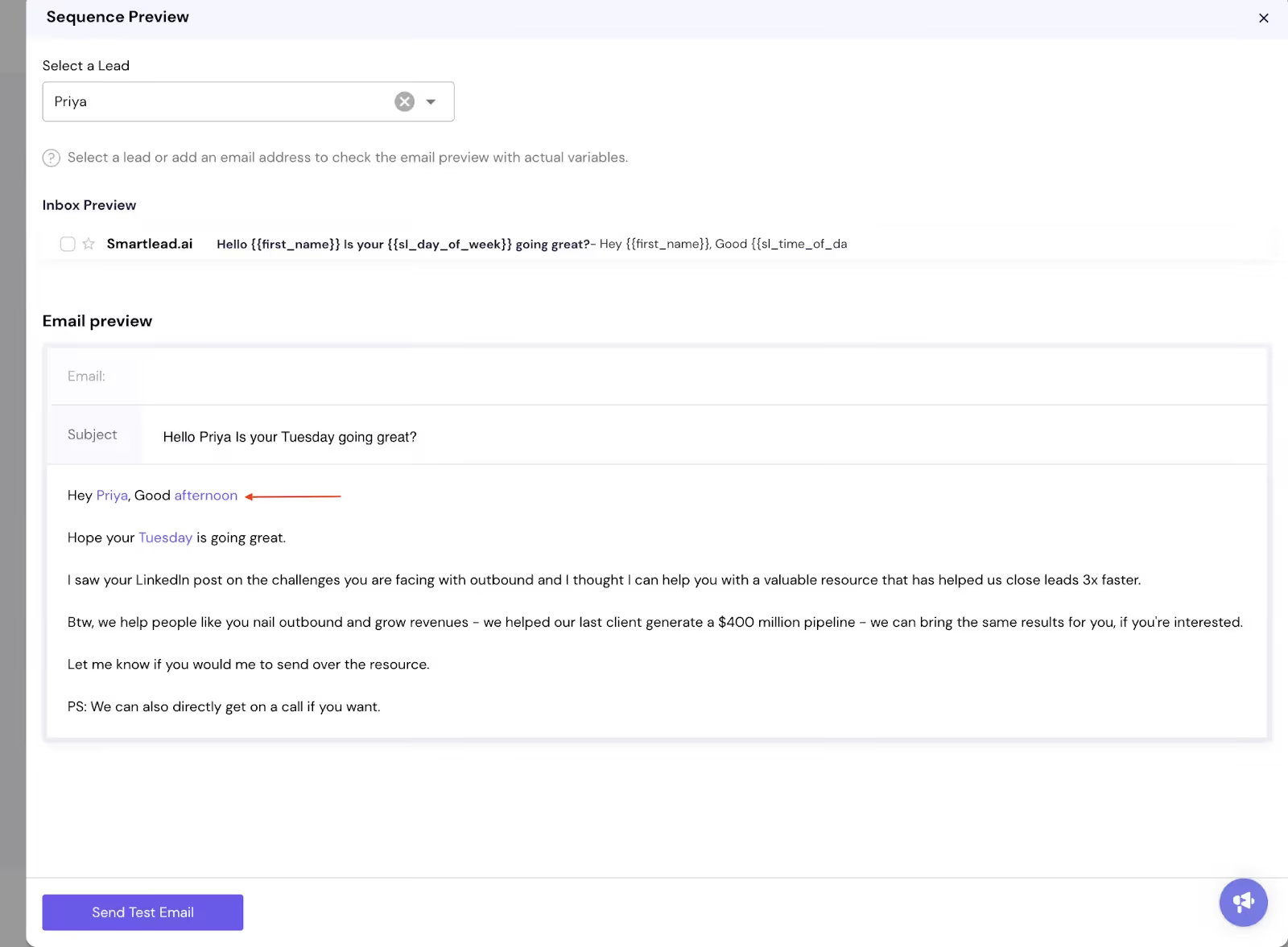
Variable: {{sl_day_of_week}}: Turns into the actual day name when the email is sent.
Example:
Happy {{sl_day_of_week}} → “Happy Friday”
Tip: Ensure there are no spaces inside the brackets to avoid errors.
Smartlead allows you to dynamically insert dates into your emails, perfect for meeting invites, reminders, or follow-ups.
Variable: {{sl_date "timeframe" "format"}}
Examples:
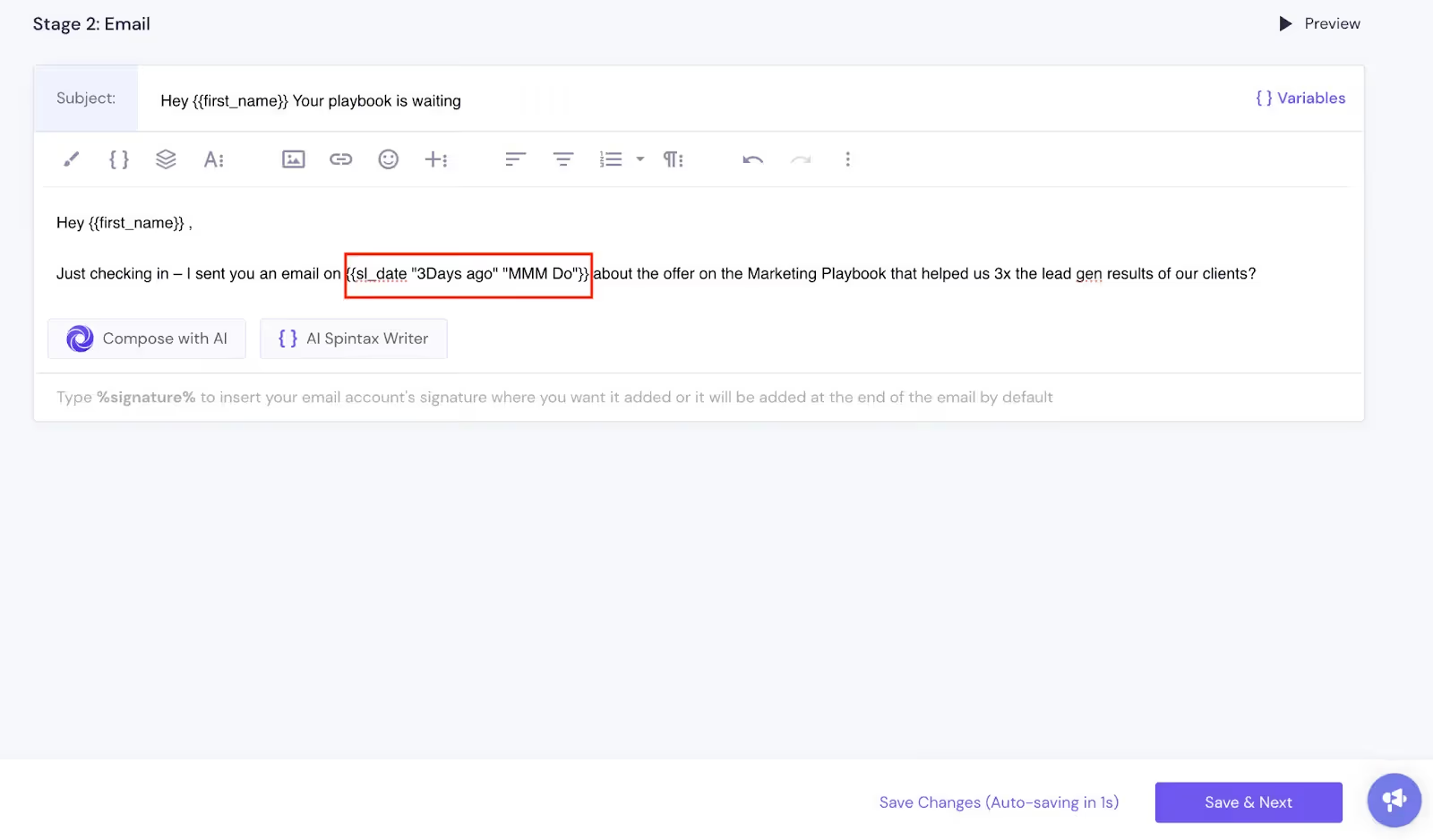
Skip weekends with: {{sl_date "now_wd 2Days" "Do MMM"}}
This ensures your dates align with business days, perfect for meeting requests or follow-ups.
Smartlead lets you dynamically insert sender information to make emails feel authentic:
Tip: Use these when you want control over sender placement and consistency across campaigns.
By combining time-based, date-based, and sender variables, your cold emails can feel personal, timely, and intentiona, all without extra manual work.
Moreover, setting up email campaigns doesn’t have to be a technical headache.
With Smartlead, you can quickly select your domains, choose from handpicked Google, Outlook, or SMTP mailboxes, and start sending in just a few clicks.
The platform saves you time with auto-suggested domains and mailboxes tailored to your campaign needs, while ensuring high deliverability with premium US IPs.
Every mailbox is correctly configured so your emails land directly in your lead’s primary inbox, giving you a seamless and reliable infrastructure that lets you focus on crafting the
right messages and scaling your outreach effortlessly.
What Our Customers Say:
“Smartlead helped us scale to millions of emails with strong deliverability. Unlimited sending, AI inbox warm-up, and flexible tracking domains make it perfect for high-volume outbound.” — Gabriel M., Founder & CEO, Reachflow
“I can upload hundreds of email accounts, send thousands of cold emails per day, and still maintain an organized master inbox. Unmatched scalability and deliverability.”
— Mykyta, CEO, Yell Cut
It answers the question: How do I scale outreach without losing authenticity or deliverability?
Now, for the first time, all three live in one place, inside Smartlead.
Common Room as your intelligence layer, FullEnrich as your data layer, and Smartlead as your action layer.
Together, they turn outbound from a fragmented process into a single, seamless motion, where every signal leads directly to a conversation.
High-volume outbound doesn’t have to mean generic messaging or lost context.
With Smartlead integrated into Common Room, your team can hit more inboxes while keeping every outreach personal, timely, and relevant.
Here’s what that looks like in practice.
That’s how you move at the speed of intent.
Outbound has always been a multi-step dance between insight, action, and scale.
Now, it’s a single motion.
Reps can now move from signal → enrichment → sequence in a few clicks.
Common Room detects engagement, FullEnrich provides verified numbers, and Smartlead launches personalized campaigns, all in one workflow.
That means faster response times, higher connection rates, and fewer dropped leads.
When a hot lead shows intent, say, they visit your pricing page or request a demo, your reps can instantly dial verified mobile numbers from FullEnrich, backed by Common
Room’s buying context. No tab-switching. No guessing which number is correct. Just action.
With Smartlead’s unlimited mailboxes and deliverability-focused setup, you can safely scale outreach across thousands of contacts, without hitting caps or hurting domain reputation.
Even better, every email can pull in AI-generated snippets from Common Room’s RoomieAI, automatically personalizing messaging to match live buying signals like funding
events, product adoption, or role changes.
The result? More messages, faster, but every one of them lands with meaning.
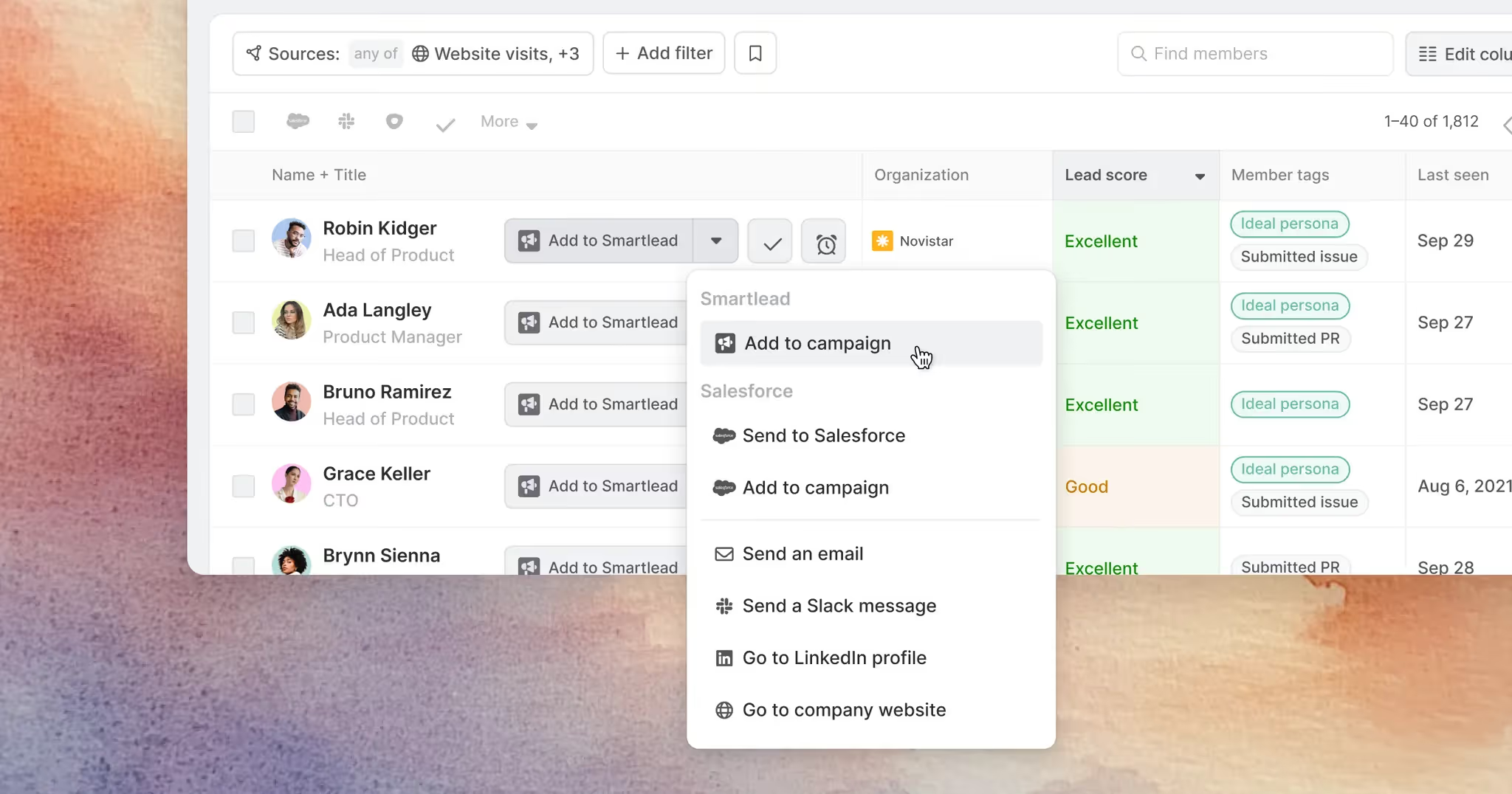
This integration turns your outbound process into a closed-loop system that moves from insight → enrichment → outreach without friction.
A prospect just visited your pricing page. Common Room surfaces the signal → FullEnrich confirms a verified number → Smartlead launches a follow-up sequence. Your rep calls within minutes, while intent is still fresh.
A team expanding into EMEA enriches new accounts through FullEnrich inside Common Room.Reps can confidently reach verified mobile numbers, then trigger Smartlead campaigns optimized for timezone and language. More connections. Fewer wasted dials.
Using Common Room’s segmentation, you identify 200 ICP accounts showing strong buying intent. Each contact is enriched, then dropped into a Smartlead campaign that references specific signals like “recent funding” or “new leadership hires.” Unlimited mailboxes mean the sequence scales instantly, without throttling.
When multiple contacts at the same company show intent, Common Room lets you push them all into a unified Smartlead campaign. Each message is personalized by role, decision-maker, influencer, or user, ensuring you connect meaningfully across the buying committee.
Setting up the integration takes just a few clicks.
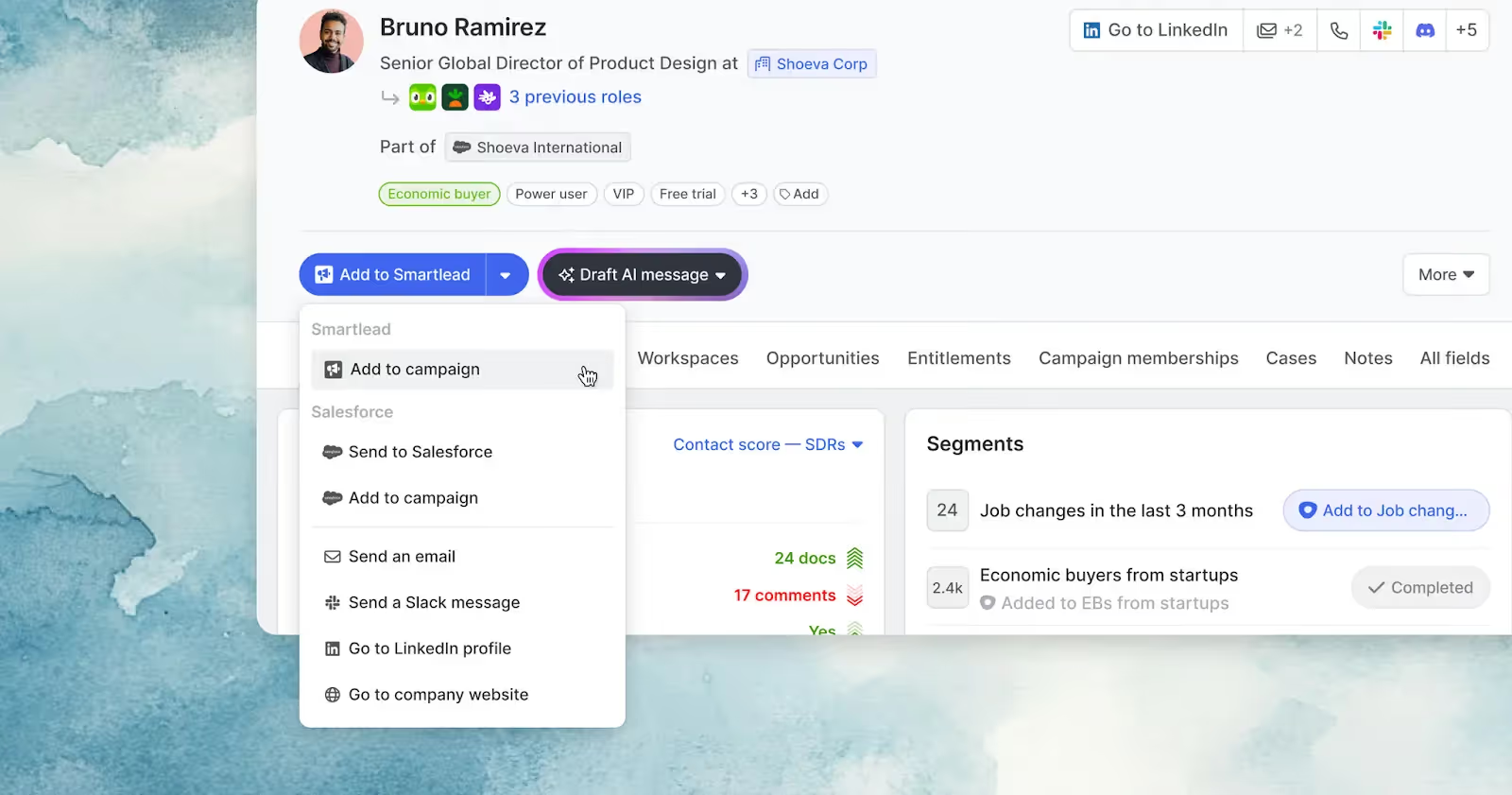
Outbound becomes a self-optimizing system.
Yes. Common Room earns its price when you have a lot of signal sources, a team of reps and the budget for a platform. If you don't, you can run a leaner version of signal-based selling and still send with Smartlead.
The pattern is the same, with different parts:
A lean version of the enrichment and sending layers is about $94 a month (FullEnrich Pro plus Smartlead Base), before the cost of whatever produces your signals. You'll do more wiring yourself, and you won't get Common Room's single profile per person. For many small teams, that's a fair trade.
SmartAgents can also take on pieces of the workflow, such as monitoring reply rates and alerting your team in Slack when numbers drop, and our guides to AI prospecting and the best AI prospecting tools cover where AI fits into the sourcing step.
This isn’t just an integration story. It’s a reflection of where outbound is headed.For years, the best GTM teams have known that data, context and delivery are the three pillars of pipeline generation.
But until now, no platform brought all three together seamlessly.
The Common Room + FullEnrich + Smartlead partnership closes that gap:
Together, they form a pipegen engine that moves as fast as your market does, without sacrificing quality or compliance.
Outbound isn’t about volume anymore. It’s about velocity, visibility, and verified data that drives real conversations.
By bringing Smartlead’s automation and deliverability infrastructure into Common Room’s intelligence layer, powered by FullEnrich’s verified contact engine, outbound teams can finally do what they’ve always wanted to:
The tools are connected. The workflows are unified. And the path from signal to send has never been shorter.
Ready to Build Your Connected Outbound Motion?
Smartlead + Common Room + FullEnrich is now live. If your GTM motion depends on speed, context, and conversion, this is your new stack.
Connect Smartlead inside the Common Room today. Scale relevance. Protect deliverability. Build a pipeline that moves.
.avif)
Outbound automation is the use of connected tools to find prospects, get their contact data and run outreach without manual steps between each stage. In a signal-based setup, a buying signal such as a job change or pricing page visit triggers enrichment and enrolls the person in a campaign. Reps shift from building lists to answering replies and running conversations.
A tool captures a signal and resolves it to a named person. Enrichment adds a verified email and phone number. The contact is added to a campaign that matches the signal, and the sending platform delivers each step on schedule. Replies land in an inbox where a rep answers. In this stack, Common Room handles the signals and enrichment, and Smartlead handles sending and replies.
You copy your API key from Smartlead's Settings page and paste it into the Smartlead integration in Common Room. Once connected, you can add Common Room contacts to Smartlead campaigns, and you can map RoomieAI message snippets to a campaign variable so each email references the signal. The integration is included on all Common Room plans.
You need a signal source, a contact data source and a sending platform. Common Room and FullEnrich are one combination, and you can substitute others. FullEnrich works with Clay, n8n, Make and Zapier, and Smartlead connects through its API and integrations. The sending layer matters most, because without warmup, mailbox rotation and deliverability tools, automated volume damages your sender reputation.
Common Room Essential is $2,500 a month billed annually, FullEnrich Pro starts at $55 a month for 1,000 credits, and Smartlead starts at $39 a month. A realistic starting stack is about $2,600 to $2,700 a month, mostly Common Room. A leaner setup that skips Common Room, with FullEnrich and Smartlead only, starts around $94 a month before the cost of your signal source. Always check current prices with each vendor.
Connecting Smartlead to Common Room takes a few minutes, because it's an API key and a paste. The real work is deciding which signals matter, building segments and writing a campaign for each one. As a planning estimate, allow a day or two for setup and testing, then a few weeks of monitoring before you trust it to run at volume.
Only if the message ignores the signal. When the first email references what actually happened, such as a role change or a question the person asked, it reads as relevant. Keep it short, and have a human reply to every response. Smartlead's benchmark found first emails under 50 words earned a 1.47% reply rate.
It depends on your offer, list and domains, so measure your own baseline. In Smartlead's data on 850M+ emails, the typical sender earns a 0.74% reply rate, the top 10% earn 2.63% and the top 5% earn 3.85%. Run signal-triggered and static-list campaigns side by side to see your own difference.
Signal-based selling means reaching out when a prospect shows a sign of intent, instead of working through a static list. Common signals include job changes, visits to key pages, community activity, hiring and changes in a company's tech stack. The aim is to email fewer people who are more likely to be in the market and to reference what they just did.
Yes. FullEnrich has a web app and an API, and it integrates with Clay, n8n, Make and Zapier. It starts free with 50 credits and no credit card, and paid plans start at $55 a month for 1,000 credits. You can send enriched contacts into Smartlead through its API or an automation tool.
The integration unifies context (Common Room), contact data (FullEnrich), and communication (Smartlead). This allows GTM teams to detect buying signals, enrich verified contact info, and trigger AI-personalized outreach, all in one motion, cutting time from signal to send to just seconds.



Founder, StackOptimise
Smartlead's combination of automation, unlimited inboxes, and easy campaign management has completely transformed how we run cold email campaigns.
.jpg)
Founder, Cold Email Hackers

We have about 15 companies and we use Smartlead for all of them.

Founder, DutchSave Media

One of the things I love about using Smartlead is the deliverability feature. If they landed in the bounce or spam folders, we could resolve this quickly.

Co-Founder, Growth Today

I want to continue to use Smartlead to make operations more seamless - the plan is to bring more clients here and build more SOPs.

Founder, FueltoFly

Smartlead listens to the agencies and customers and builds according to what people want, that has really made things easier for us.

Founder, OutboundSync

We build an infrastructure product, and OutboundSync communicates with Smartlead itself. I love the webhook and API. They're really well done and keep getting better.

Founder, Axoleads

With SmartDelivery, you can put all of that in the hands of the tool. It ensures your emails land in inboxes, and by running a simple test, you can see if you're hitting the mark.

Founder, Claygen
Deliverability is the cornerstone of cold email outreach. You could have the best email copy in the world, but if no one is seeing it, it's useless. I really love the feature where you can actually give client accesses to your clients.

Co-Founder, Cymate

I do not want to switch to another software. Pick a solution you trust, stick with it, and keep refining your copy.

CMO, Avalanche Capital

Managing large volumes of emails through multiple inboxes used to be a logistical nightmare. With Smartlead, the process is seamless. We book thousands of discovery calls through cold emails. These campaigns are generating leads at a scale we never thought possible.

Founder, Growth Engine X

We came for the unlimited inboxes, and we stayed for the API. 1.5M cold emails/month, 7,767+ inboxes managed.

Head of Community & Ecosystem, TxtCart

You cannot replace having 10,000 touches with potential clients. When you have that much distribution and reach, you really start to see incredible results. The simplicity of Smartlead made all the difference. It doesn't require you to be a technical wizard.

Founder, Hyperke

Smartlead has been a game-changer for us. It increased our appointment volume, improved ease of use, and offered valuable features. 80% increase in appointments/month, peak of 276 appointments in a single month.

Founder, Kinetyca

Smartlead has been our cold email backbone from day one. The platform evolves constantly, keeping pace with how deliverability and personalization need to work today. 21% overall reply rate, $175K in 4 months for multiple B2B clients.

Founder, Reachflow

Smartlead is centered around deliverability and constantly evolving. Their API is not like any other platform. Smartlead covers all our needs. The focus on core features like deliverability and API integration is unmatched.

CEO, Halfwarm

Our approach to crafting conversational emails led to reply rates that many of my peers thought were unattainable.

Co-Founder, letstrike

We've grown on zero capital, zero marketing, purely cold emailing - and that's the story we love to tell. The best approach is no approach if you can't handle domain meltdown. The second best is something like Smartlead that's built from the ground up for deliverability at scale.

Founder, Fenixtal

Smartlead's white-labeling and automation let us punch above our weight. The 12M euros sales potential? That's what happens when you combine human creativity with Smartlead's precision.

Co-Founder, Digital Creativs

Nine out of 10. Ninety percent of our clients are on Smartlead unless they come in with an existing setup. That's the default.

Co-Founder, BuildingReach

At the end of the day, you have to take a bet on one tool or another. It was a no-brainer taking that bet on Smartlead. We had to even turn down the volume of our marketing campaigns - Smartlead was capable of driving more volume than our sales team was able to fulfill.

Founder & MD, Prospectiv

Since starting the business in January of this year, we've already generated $200K in sales exclusively from cold email. Smartlead has been central to our operations and has exceeded our expectations.

Founder, Growthlynk

There's so much stuff built on top of it. I would be dead if I had to rebuild it with another tool. I can manage hundreds of senders easily. I can send hundreds of thousands of emails.

Founder, Corebits

The platform's HubSpot integration, real-time Slack updates, and advanced campaign customization have been game changers for our business and our clients'.

Founder, Apex Ascension

From day one, we've never used anything else.