Sign up now and get 50% off on your first month on any plan


Your email landed. They opened it. They read it.
And then nothing happened.
No reply, no click, no meeting booked. Just silence.
Nine times out of ten, that silence is not a copy problem or a subject line problem. It is a CTA problem. A weak, generic, or misaligned call to action is the last thing standing between a good email and a real conversation. This post breaks down how to write CTAs that feel natural, prompt action, and give you something measurable to improve over time.
A CTA, or call to action, is the specific phrase or instruction at the end of your email that tells the reader what to do next. In cold outreach, it usually appears just before your signature and asks the recipient to reply, click a link, book a call, or take whatever next step you are trying to create.
Before writing one, get clear on what you actually want to happen. A CTA designed to warm up a cold prospect looks very different from one designed to book a demo with someone already familiar with your product. The email copy should build toward the CTA naturally, so by the time the reader reaches it, the action feels like the obvious next step rather than a sudden ask.
Your CTA should follow logically from the email it closes. If there is any mismatch between the problem you raised and the action you are asking for, the whole thing falls apart.
Identify the core pain point your email addresses and write a CTA that connects directly to it. If your pitch is about saving time through automation, "Open to a quick chat about saving hours each week?" lands because it refers back to the thing you just made relevant. A generic "let's connect" does not.
Multiple CTAs create decision fatigue. When a reader has to choose between booking a call, watching a video, and visiting a website, the most likely outcome is that they do none of them.
Pick one action, write the email to build toward it, and stop there. The goal of a cold email is to start a conversation, not complete a sale. One clear next step is all you need.
The CTA should be visually distinct from the rest of the email. Put it on its own line. If you are using a link, make sure it is clearly labelled rather than buried in a sentence.
Consider that a significant portion of your recipients will read your email on a phone while doing something else. The CTA needs to be immediately visible on a small screen, not something they have to hunt for.
Aim for four to eight words. The shorter the CTA, the lower the perceived effort required to act on it. "Worth a quick chat?" requires less mental commitment than "Would you be open to scheduling a 15-minute introductory call this week?" They ask for the same thing. One feels like nothing. The other feels like homework.
Generic CTAs tell the reader that the email was not written for them. Personalized CTAs tell them the opposite.
Reference their specific challenge, team, goal, or industry rather than using a placeholder that could apply to anyone. "Open to discussing how your RevOps team is handling this?" works harder than "Want to learn more?" because it shows you thought about the person receiving it.
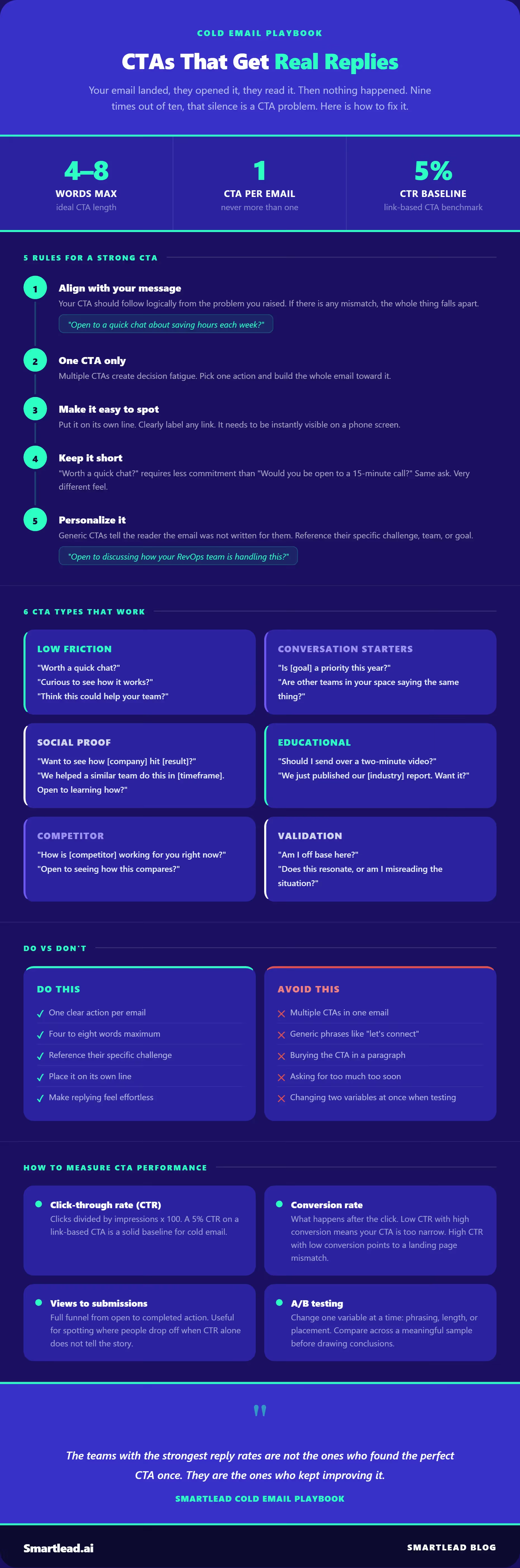
Here are tested CTA types with examples across different goals and tones.
Short and low-frictionThese work well for busy prospects who are unlikely to engage with anything that feels like effort.
Conversation startersUse these when you want to prompt the reader to reflect on a specific challenge rather than immediately committing to a meeting.
Social proof anglesThese borrow credibility from outcomes you have already delivered for others.
Educational anglesUseful when your prospect values information over sales conversations.
Competitor CTAsFor prospects currently using a competing product. These plant a question without being aggressive.
Validation CTAsThese lower the stakes of replying by making your email feel like a genuine question rather than a pitch.
Writing strong CTAs is half the job. The other half is knowing whether they are performing and what to change when they are not.
Click-through rate (CTR) measures how many people who saw your CTA clicked on it. A higher CTR means your CTA is compelling enough to act on in the moment. Calculate it as: clicks divided by impressions, multiplied by 100. A 5% CTR on a link-based CTA in cold email is a reasonable baseline to work from.
Conversion rate measures what happens after the click. If 50 people clicked your link and 10 booked a call, your conversion rate is 20%. Low CTR with high conversion suggests your CTA is too narrow and is only capturing the most motivated readers. High CTR with low conversion suggests a disconnect between what your CTA promises and what the landing page delivers.
Views to submissions ratio gives you a broader view of the full funnel from email open to completed action. This is useful for identifying where people are dropping off when CTR and conversion data alone do not tell the full story.
Bounce rate on linked pages tells you whether the destination your CTA points to is meeting expectations. If people click and immediately leave, the problem is probably the landing page, not the CTA itself.
A/B testing is the most direct way to improve CTAs over time. Run two versions of the same email with a single CTA variable changed, such as phrasing, length, or placement, and compare reply rates or CTR across a meaningful sample before drawing conclusions. Change one thing at a time or you will not know what actually moved the number.
The best cold email CTA is short, specific, and easy to say yes to. It connects naturally to the problem the email raises, asks for one thing only, and feels like a conversation opener rather than a closing pitch.
Keep testing. The CTA that works best for one audience, one industry, or one stage of the funnel may not work for another.
The teams with the strongest reply rates are not the ones who found the perfect CTA once. They are the ones who kept improving it.
Want to run better-performing cold email sequences?
Join us to elevate your outreach!

Founder, StackOptimise
Smartlead's combination of automation, unlimited inboxes, and easy campaign management has completely transformed how we run cold email campaigns.
.jpg)
Founder, Cold Email Hackers

We have about 15 companies and we use Smartlead for all of them.

Founder, DutchSave Media

One of the things I love about using Smartlead is the deliverability feature. If they landed in the bounce or spam folders, we could resolve this quickly.

Co-Founder, Growth Today

I want to continue to use Smartlead to make operations more seamless - the plan is to bring more clients here and build more SOPs.

Founder, FueltoFly

Smartlead listens to the agencies and customers and builds according to what people want, that has really made things easier for us.

Founder, OutboundSync

We build an infrastructure product, and OutboundSync communicates with Smartlead itself. I love the webhook and API. They're really well done and keep getting better.

Founder, Axoleads

With SmartDelivery, you can put all of that in the hands of the tool. It ensures your emails land in inboxes, and by running a simple test, you can see if you're hitting the mark.

Founder, Claygen
Deliverability is the cornerstone of cold email outreach. You could have the best email copy in the world, but if no one is seeing it, it's useless. I really love the feature where you can actually give client accesses to your clients.

Co-Founder, Cymate

I do not want to switch to another software. Pick a solution you trust, stick with it, and keep refining your copy.

CMO, Avalanche Capital

Managing large volumes of emails through multiple inboxes used to be a logistical nightmare. With Smartlead, the process is seamless. We book thousands of discovery calls through cold emails. These campaigns are generating leads at a scale we never thought possible.

Founder, Growth Engine X

We came for the unlimited inboxes, and we stayed for the API. 1.5M cold emails/month, 7,767+ inboxes managed.

Head of Community & Ecosystem, TxtCart

You cannot replace having 10,000 touches with potential clients. When you have that much distribution and reach, you really start to see incredible results. The simplicity of Smartlead made all the difference. It doesn't require you to be a technical wizard.

Founder, Hyperke

Smartlead has been a game-changer for us. It increased our appointment volume, improved ease of use, and offered valuable features. 80% increase in appointments/month, peak of 276 appointments in a single month.

Founder, Kinetyca

Smartlead has been our cold email backbone from day one. The platform evolves constantly, keeping pace with how deliverability and personalization need to work today. 21% overall reply rate, $175K in 4 months for multiple B2B clients.

Founder, Reachflow

Smartlead is centered around deliverability and constantly evolving. Their API is not like any other platform. Smartlead covers all our needs. The focus on core features like deliverability and API integration is unmatched.

CEO, Halfwarm

Our approach to crafting conversational emails led to reply rates that many of my peers thought were unattainable.

Co-Founder, letstrike

We've grown on zero capital, zero marketing, purely cold emailing - and that's the story we love to tell. The best approach is no approach if you can't handle domain meltdown. The second best is something like Smartlead that's built from the ground up for deliverability at scale.

Founder, Fenixtal

Smartlead's white-labeling and automation let us punch above our weight. The 12M euros sales potential? That's what happens when you combine human creativity with Smartlead's precision.

Co-Founder, Digital Creativs

Nine out of 10. Ninety percent of our clients are on Smartlead unless they come in with an existing setup. That's the default.

Co-Founder, BuildingReach

At the end of the day, you have to take a bet on one tool or another. It was a no-brainer taking that bet on Smartlead. We had to even turn down the volume of our marketing campaigns - Smartlead was capable of driving more volume than our sales team was able to fulfill.

Founder & MD, Prospectiv

Since starting the business in January of this year, we've already generated $200K in sales exclusively from cold email. Smartlead has been central to our operations and has exceeded our expectations.

Founder, Growthlynk

There's so much stuff built on top of it. I would be dead if I had to rebuild it with another tool. I can manage hundreds of senders easily. I can send hundreds of thousands of emails.

Founder, Corebits

The platform's HubSpot integration, real-time Slack updates, and advanced campaign customization have been game changers for our business and our clients'.

Founder, Apex Ascension

From day one, we've never used anything else.