If you’ve been running cold email campaigns for any length of time, you’ve probably noticed a pattern.
Today’s buyers don’t live in one channel. They move fluidly between email, LinkedIn, phone, and search, often within the same day.
When your outreach shows up in more than one of those places, it feels less like spam and more like a credible, human interaction.
That’s why high-performing sales teams no longer rely on single-channel outreach.
Instead, they intentionally design multichannel sequences that coordinate email, LinkedIn, and phone touches to build trust before asking for a meeting.
Research shows that outreach combining email, LinkedIn, and phone increases response rates by 287% compared to single-channel campaigns.
But there's a catch.
Most teams know multichannel works in theory. They've seen the stats. They understand buyers aren't just checking email anymore. But when they actually try to execute? It becomes a logistical nightmare.
Email runs in one tool. LinkedIn messages happen manually (or through a completely separate platform). Phone calls get tracked in spreadsheets if they're tracked at all. The context gets lost between systems.
Leads slip through cracks. What should feel like a coordinated conversation turns into disjointed noise that annoys prospects instead of engaging them.
This guide will show you exactly how to create multichannel outreach sequences that convert. without the chaos.
By the end, you'll have six proven templates you can copy, customize, and deploy this week.
Let's dive in.
Short answer: yes. But not in the way you might think.
Adding LinkedIn or phone touches to your email sequences doesn't just increase volume. It changes how prospects perceive your emails entirely.
According to analysis, LinkedIn messages average a 10.3% response rate compared to 5.1% for cold email. But before you abandon email entirely, consider this: cold email delivers an average ROI of $40 for every $1 spent and lets you reach far more prospects at scale than LinkedIn ever could.
So what happens when you use both together?
Sales teams consistently report something interesting: a prospect might ignore three emails in a row, then reply warmly after seeing a LinkedIn connection request from the same person. The name registers. Suddenly, the next email feels familiar instead of cold.
This is the real value of multi-channel outreach: you're building recognition before you ask for anything, and that recognition makes your emails land differently.
Think about your own behavior for a second. When you receive a cold email from someone you've never heard of, your first instinct is probably skepticism. Who is this person? Why are they contacting me? Is this spam?
But when that same email arrives after you've seen their name on LinkedIn, maybe noticed they viewed your profile, or saw them comment thoughtfully on an industry post? The mental calculation changes. This person is real. They're in my network. They're paying attention to what I care about.
That's not manipulation. That's how human trust actually builds—through repeated, relevant exposure across contexts.
Let's start with an uncomfortable truth: if you're only showing up in your prospect's inbox, you're probably invisible.
Here's why:
The average B2B buyer receives 120+ emails per day.
Your perfectly crafted cold email? It's competing with 119 other messages, internal communications, customer emergencies, and newsletter subscriptions they forgot they signed up for.
Meanwhile, that same buyer spends 3+ hours per day on LinkedIn, scrolling during coffee breaks, between meetings, and while pretending to pay attention to Zoom calls.
They answer phone calls from unknown numbers when they're expecting vendor callbacks or recruiting calls. They check SMS messages within 3 minutes on average.
Your prospects aren't single-channel. Your outreach shouldn't be either.
The real insight? These channels work better together than they do apart.
Sales teams consistently report something fascinating: a prospect might ignore three emails in a row, then reply warmly after seeing a LinkedIn connection request from the same person. The name registers. The context accumulates. Suddenly, the next email feels familiar instead of cold.
This is the core value of learning how to create multichannel outreach sequences: you're building recognition across contexts before you ask for anything. And that recognition completely changes how your messages land.
Before we get into tactics, let's clarify something important: there's a massive difference between strategic multichannel sequences and multi-channel spam.
Multi-channel spam looks like this:
Strategic multichannel sequences look like this:
Your multichannel sequences, Each touch should give the prospect a reason to move forward, without requiring a big commitment until they're ready.
The goal isn't to be everywhere at once. It's to be in the right places at the right times with the right message.
Not every channel pairing makes sense for every audience. When you build multichannel campaigns, the right combination depends on who you're targeting and how they actually communicate.
Here are the three combinations that deliver consistent results:
This is the starting point for most B2B outreach, and for good reason.
Email carries your detailed pitch. You have space to explain your value proposition, share case studies, include relevant links—all things that work better in long-form than they do in quick social messages.
LinkedIn adds the credibility layer. Prospects can see your headline, your content, your mutual connections, your recommendations. They can verify you're a real person solving real problems, not just another bot blasting generic templates.
This combination works especially well for reaching decision-makers at mid-market and enterprise companies who research before responding. If your ICP includes VPs, Directors, and C-suite executives at companies with 100+ employees, start here.
This pairing works better for time-sensitive offers, high-ticket sales, or deals where personal connection accelerates velocity.
A well-timed call after an email sequence can move a warm lead to a booked meeting faster than waiting for email replies. The human voice adds urgency and trust that text-based communication can't match.
This approach suits outbound teams focused on SMBs or founder-led companies, where the buyer often answers their own phone.
It's also effective for industries where relationships matter more than process, high-ticket consulting, enterprise software with complex implementations, or services requiring significant trust before purchase.
SMS is effective for prospects who've already opted in, webinar registrations, demo requests, event attendees, inbound form fills.
Cold SMS to people who haven't given consent can get you fined under TCPA regulations. But a short text to someone expecting your follow-up has a significantly better chance of being read than email number four sitting in their crowded inbox.
Use this combination when you need to re-engage warm leads who've gone quiet, follow up on time-sensitive offers, or provide quick updates that don't warrant a full email.
Here's your quick reference guide:
This is the points where most teams get stuck: they understand multichannel conceptually, but struggle with execution. The timing gets messy. The messaging feels disconnected. Prospects get overwhelmed instead of engaged.
This framework solves that problem by giving you a repeatable structure for designing cross-channel sequences that feel natural instead of aggressive.
Before you write a single message, understand how your prospects actually make decisions.
Ask yourself:
Map these answers into stages:
Your multichannel sequence should move prospects through these stages progressively, not try to jump from awareness to decision in one email.
Each channel has unique strengths. Use them strategically.
Email: Deliver detail, educate, share resources, provide links, and allow prospects to respond on their own timeline.
LinkedIn: Build credibility, establish real-person legitimacy, create social proof through connections and content, and offer a less formal communication path.
Phone: Create urgency, handle complex questions, build rapport through voice, and accelerate deals that are moving slowly through text-based channels.
SMS: Cut through noise for warm leads, deliver time-sensitive updates, and re-engage prospects who've gone quiet on other channels.
When you design cross-channel sequences, don't just copy the same message everywhere. Adapt your message to what each channel does best.
Timing matters as much as channel selection.
The golden rule: space touchpoints 24-48 hours apart so prospects notice them separately.
When you hit someone with email, LinkedIn, and phone on the same day, it doesn't feel coordinated—it feels like stalking. But when those touches arrive over several days, each one builds on the previous recognition.
Here's a proven rhythm for most B2B sequences:
Day 1: First email (introduce yourself, state the problem you solve)
Day 2: LinkedIn profile visit (no message, just the notification)
Day 3: LinkedIn connection request (brief, personalized note)Day 5: Follow-up email (different angle, add value)
Day 8: LinkedIn message OR second email (acknowledge previous touches)
Day 14: Final email (direct "last message" framing)
This gives you 5 touchpoints across 2 channels over 2 weeks, enough to stay visible without overwhelming the prospect.
If you're adding phone, days 6 and 10 work well, after your name has shown up multiple times but before the final email.
One of the biggest mistakes in multichannel sequences is treating each touchpoint like it's the first interaction.
Your Day 8 LinkedIn message should reference that you've sent emails. Your follow-up email should acknowledge that you've connected on LinkedIn. This creates continuity instead of confusion.
Bad Day 8 message:"Hi [Name], I wanted to reach out about [solution]..."
Good Day 8 message:"Hi [Name], sent a couple notes via email about [problem]. Thought LinkedIn might be easier for a quick conversation. Worth 15 minutes to discuss [specific outcome]?"
The second version acknowledges the journey, which makes it feel like a natural continuation instead of a separate cold outreach.
Static sequences follow a predetermined timeline regardless of what prospects do. Smart sequences adapt based on engagement signals.
If a prospect opens your email 3 times but doesn't reply: Trigger a LinkedIn message acknowledging their interest.
If a prospect accepts your LinkedIn connection but ignores messages: Shift back to email with a different value angle.
If a prospect clicks your pricing link: Immediately trigger a high-intent sequence (shorter, more focused on close).
If a prospect doesn't engage at all after 10 touchpoints: Remove them from active sequences and add to long-term nurture.
This is where learning how to create multichannel outreach sequences becomes less about rigid templates and more about responsive systems that react intelligently to buyer behavior.
The problem that's plagued outbound teams for years:
Email sequences run in one platform. LinkedIn outreach happens in another tool (or gets done manually). Phone calls live in your CRM. SMS requires yet another system. Context gets lost between all of them.
The result? What should be coordinated sequences become disjointed chaos. Reps manually export lists, upload them elsewhere, try to remember who's in which sequence, accidentally double-touch prospects, and ultimately give up because it's too complicated to manage.
Smartlead is solving this problem by becoming an AI-native multichannel outbound operating system.
Not a collection of stitched-together tools. Not integrations that sort-of-work-if-you-configure-them-right. A unified platform built from the ground up to coordinate email, LinkedIn, and soon calling—all in one place.
✅ Shared lead data across channels (every touchpoint visible in one timeline)
✅ Coordinated workflows (email sequence automatically triggers LinkedIn action based on engagement)
✅ Unified context (reps see complete prospect history regardless of channel)
✅ AI-powered orchestration through SmartAgents (intelligent automation that reacts to signals)
You run your email campaigns in Smartlead. Your LinkedIn outreach happens through native integrations with HeyReach and Aimfox. Your calling capability is coming soon to complete the stack. But everything operates as one coordinated system, not separate silos.
This is how you actually build multichannel campaigns at scale without losing your mind.
SmartAgents are AI-powered assistants inside Smartlead that automate your multichannel workflows. Instead of manually moving leads between platforms, checking engagement across three different dashboards, and trying to remember who needs what touch next, you describe what you want to happen in plain language—and SmartAgents execute it automatically.
This is what "AI-native" actually means: intelligence that coordinates actions across channels based on real-time signals, not just scheduled blasts that ignore how prospects actually engage.
Smartlead offers native integrations with two of the most powerful LinkedIn automation platforms—HeyReach and Aimfox. Both enable seamless email-to-LinkedIn coordination, with each offering unique advantages for different team needs.
HeyReach specializes in event-driven LinkedIn automation, making it perfect for teams that want real-time reactions to email engagement.
What You Can Build With HeyReach:
✅ Email reply → LinkedIn campaign enrollmentWhen a prospect replies to your Smartlead email, automatically add them to a LinkedIn nurture sequence
✅ No email response → LinkedIn re-engagementAfter your email sequence ends without response, trigger LinkedIn outreach with a fresh angle
✅ High-intent signal → Personalized LinkedIn DMWhen prospects click pricing pages or case studies, send immediate LinkedIn messages while they're hot
✅ Multi-channel warm lead syncAutomatically add engaged email leads to LinkedIn campaigns for coordinated touchpoints
Navigate to SmartAgents → Integrations in your Smartlead dashboard. Locate HeyReach in the integrations list and click Connect.
You'll be prompted to enter your HeyReach API key. Find this in your HeyReach account under Settings → API. Copy the key, paste it into Smartlead, and click Confirm Connection.
Once connected, you'll see a "Connected" status next to HeyReach, and the integration will be available for all your SmartAgent workflows.
From the left sidebar, click SmartAgents. You'll see the prompt screen: "What do you want to get done today?"
Describe your goal in plain language. For example:
"When someone replies to my Smartlead campaign, automatically add them to my HeyReach LinkedIn follow-up sequence."
Click Start Building.
SmartAgents will ask you to select your trigger type:
Event-Based Triggers (for real-time reactions):
Schedule-Based Triggers (for routine tasks):
For email-to-LinkedIn automation, choose Event-Based and select your specific trigger (e.g., "Email Reply").
Choose what the agent should monitor:
Select the campaign you want to monitor and the mailbox to track.
Then choose your event type:
Click Proceed to continue.
Important Note: Event-based triggers cannot be edited once created. If you need to change the trigger later, you'll need to create a new SmartAgent.
If you haven't connected HeyReach yet, you can do it during agent creation.
On the right sidebar, you'll see HeyReach API Key. Paste your key and click Connect.
Once connected, additional HeyReach action options will unlock in the workflow builder.
Under HeyReach Integration Actions, open the dropdown menu.
Available actions include:
For most email-to-LinkedIn workflows, select Add Leads to Campaign.
Under HeyReach Campaign Selection, choose which LinkedIn campaign should receive the leads from your Smartlead emails.
This might be:
Note: You must select existing HeyReach campaigns here. Make sure you've already created the LinkedIn campaigns you want to use in your HeyReach account.
Click Save Configuration.
SmartAgents will generate a visual workflow showing:
Review each step carefully to ensure the logic matches your goal.
Before deploying to live campaigns, click Test Run.
This simulates the workflow without actually affecting your campaigns. You'll see:
If results aren't as expected, refine your configuration and test again.
Once you're confident the workflow is correct, scroll to the bottom and click Deploy.
Your SmartAgent is now live and will run automatically whenever your trigger condition is met.
Note: For event-based agents, you may see "Run Unavailable", this is expected. The agent runs automatically when events occur (like email replies), not on-demand.
Aimfox excels at scheduled, high-volume LinkedIn automation, making it ideal for teams running structured daily syncs and enterprise-scale outreach.
What You Can Build With Aimfox:
✅ Daily qualified lead syncAutomatically push yesterday's engaged leads into LinkedIn campaigns every morning
✅ Industry-specific routingRoute leads to different Aimfox campaigns based on firmographic data (SaaS → Campaign A, E-commerce → Campaign B)
✅ Custom variable personalizationPass detailed lead data to Aimfox for highly personalized LinkedIn messages
✅ Multi-stage progressionAutomatically graduate leads from email-only to email+LinkedIn as engagement increases
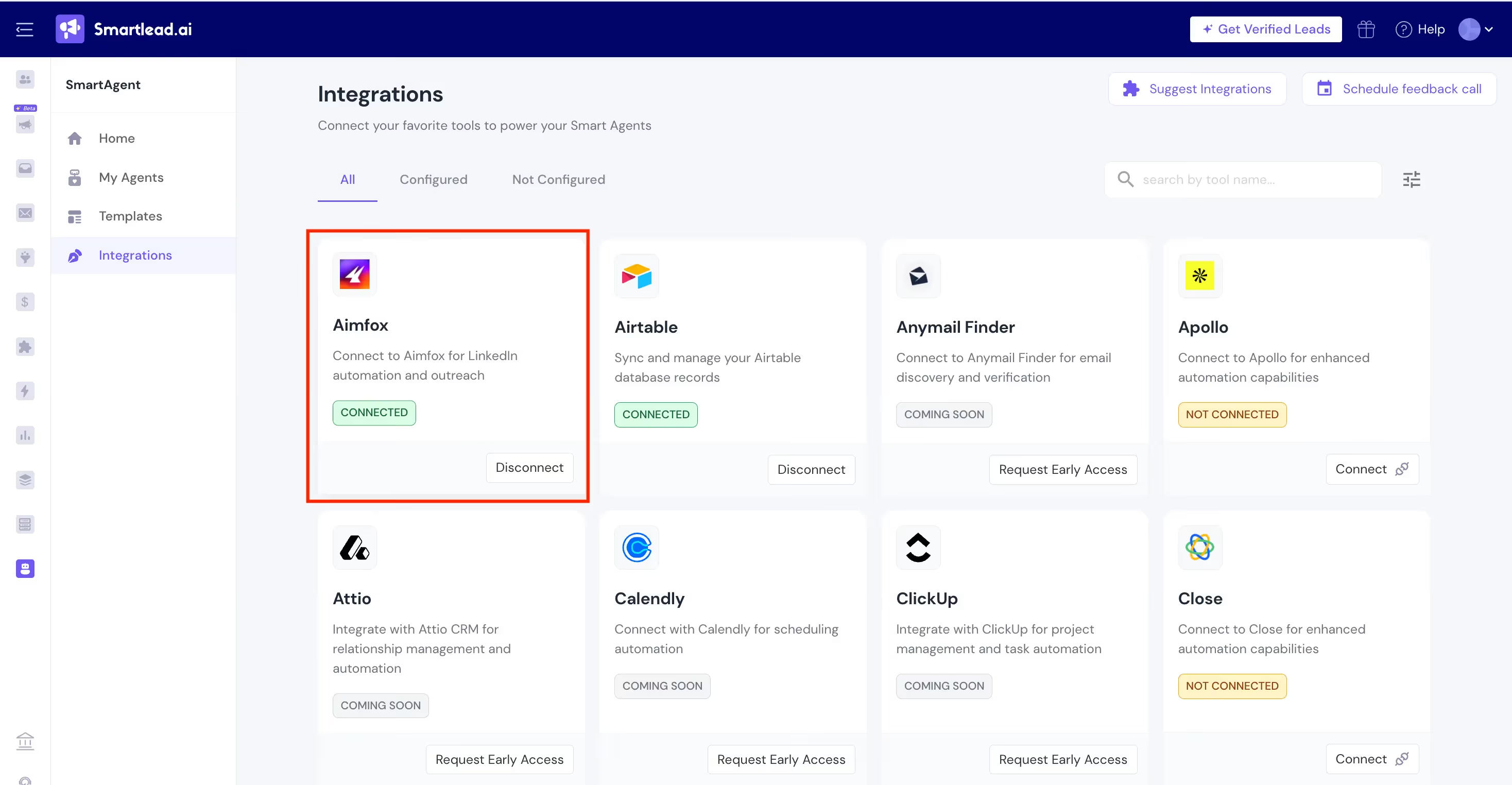
Go to SmartAgents → Integrations in your Smartlead dashboard.
Find Aimfox in the integrations list and click Connect.
Enter your Aimfox API credentials (find these in your Aimfox account under Settings).
Click Confirm Connection. Once connected, Aimfox will be available in the SmartAgent builder.
You have two options for creating an Aimfox workflow:
Option A: Use the Pre-Built Template (Recommended)
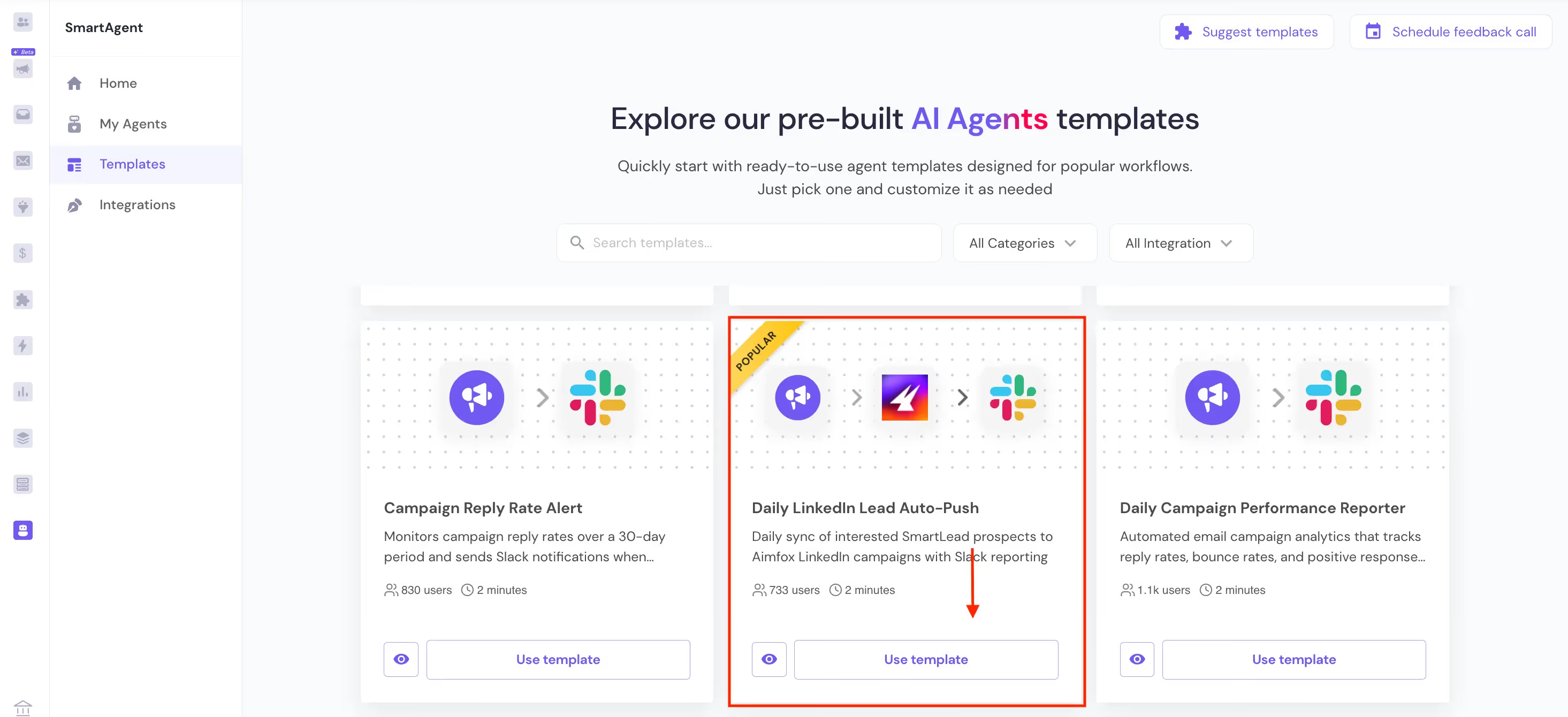
This automatically creates an agent with preconfigured steps. You'll only need to:
Option B: Build Manually (For Custom Workflows)
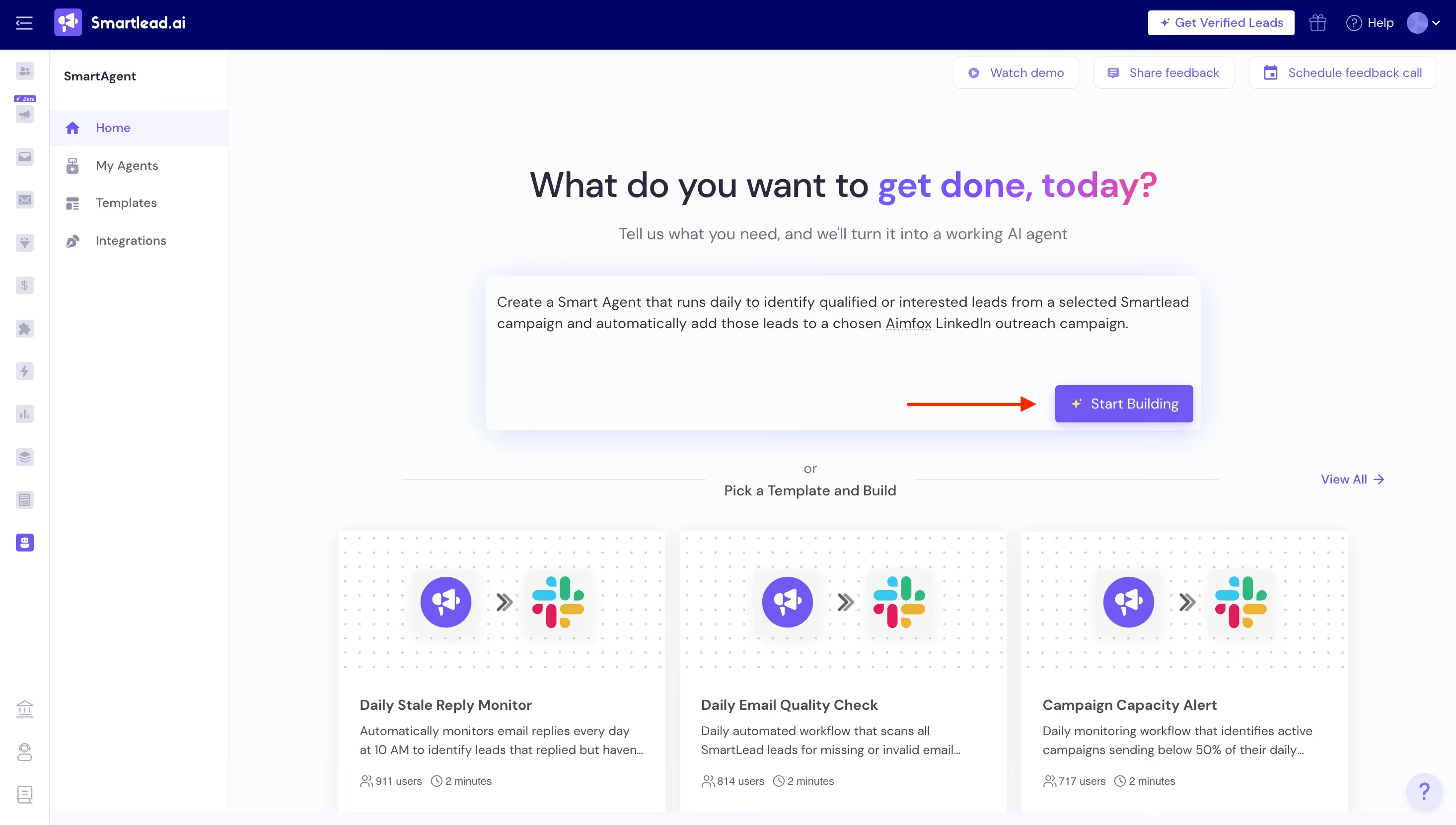
For Aimfox workflows, most teams use Schedule-Based Triggers since Aimfox excels at batch processing.
Schedule-Based Options:
Configure:
You can also use Event-Based Triggers with Aimfox:
Choose based on whether you want real-time reactions or scheduled batches.
Click Proceed to continue.
After setting your trigger, SmartAgents will generate a workflow. You'll see the complete flow on screen showing:
If you want to refine the workflow, you can edit the prompt or answer clarifying questions from the agent.
Once satisfied, click Build Agent.
Specify which Smartlead campaign should feed leads to Aimfox.
Select from your dropdown of active campaigns. This determines which email prospects will be synced to LinkedIn.
Click Save Configuration.
Now configure where leads should go in Aimfox:
Aimfox Workspace: Select which workspace (useful for agencies managing multiple clients)
Aimfox Campaign: Choose the specific LinkedIn campaign where leads should be added
Note: Your Aimfox campaigns must already exist. Create them in Aimfox first if you haven't yet.
Custom Variables (Optional): Map lead data fields for personalization in LinkedIn messages:
Click Save Configuration.
You can add Slack notifications to alert your team when syncs complete:
Slack Channel: Select which channel receives notifications
Notification Content: Customize what information gets shared (number of leads synced, campaign names, etc.)
Add the SmartAgents app to your chosen Slack channel (one-time setup).
Step 8: Review Complete Workflow
SmartAgents displays your full workflow visually, showing:
Review each step to ensure it matches your intended workflow.
Click Test Run to simulate the workflow.
The test will show:
If results don't match expectations, adjust your configuration and test again.
Once testing confirms everything works correctly, click Deploy.
Your agent will now run automatically based on your configured schedule (or event triggers).
You can monitor performance in My Agents where you can:
Let’s get tactical. Below are battle-tested multichannel outreach templates you can adapt to your use case and deploy this week.
Goal: Book discovery call with cold B2B prospectDuration: 14 days, 7 touchpointsChannels: Email (4x), LinkedIn (3x)Best for: Mid-market companies, decision-makers who research before engaging
Day 1 - Email #1:
Subject: Quick question about [specific challenge]
Hi [Name],
Noticed [Company] recently [specific trigger: funding round, new hire, product launch]. Teams at this stage often run into [specific problem related to trigger].
We helped [Similar Company 1] and [Similar Company 2] [achieve specific outcome]. Might be relevant?
Happy to share what we're seeing if useful.
[Your Name]
Day 2 - LinkedIn Profile Visit:
Visit their profile. No message yet. Let the notification create initial familiarity.
Day 3 - LinkedIn Connection Request:
Hi [Name] – Following up on my email about [problem]. Noticed you're leading [initiative mentioned in their profile] at [Company]. Would love to connect and share what's working for similar teams.
Day 6 - Email #2:
Subject: Re: Quick question about [specific challenge]
[Name],
Wanted to share a quick example. [Similar Company] was dealing with [same challenge] and saw [specific metric improvement] after implementing [your approach].
Here's a 2-min breakdown: [link to case study or video]
Worth 15 minutes to see if this applies to [their company]?
[Your Name]
Day 9 - LinkedIn Message (if connected):
Hey [Name] – Saw you're working on [specific initiative from profile]. We just published research on [related topic] that might help. Want me to send it over?
Day 12 - Email #3:
Subject: Last note – [specific value proposition]
[Name],
This is my last email (promise).
Quick question: Is [problem you solve] on your roadmap for [current quarter]?
If yes → let's talkIf no → no worries, I'll check back in [timeframe]
Either way, appreciate your time.
[Your Name]
Day 14 - LinkedIn Message (if still unresponsive):
[Name] – Sent a few notes about [problem] but haven't heard back. Should I close the loop on this, or worth a quick 15-minute conversation?
Goal: Fast-track prospects showing buying signals to demosDuration: 7 days, 6 touchpointsChannels: Email (3x), LinkedIn (3x)Best for: Prospects who've visited pricing pages, downloaded case studies, or opened emails 3+ times
Day 1 - Email:
Subject: Noticed you checked out [specific resource]
[Name],
Saw you looked at [pricing page/case study/resource]. That usually means [specific pain point] is top of mind.
Pulled together a custom breakdown of how [Similar Company] tackled this exact challenge. Should I send it over?
Happy to jump on a quick call if easier to walk through.
[Your Name]
Day 2 - LinkedIn Connection + Message:
Connection request: "Hi [Name] – Noticed you're evaluating [solution category]. Happy to share what's working for teams like yours."
After they accept: "Thanks for connecting! Sent you an email about [topic]. Let me know if a 15-minute call makes more sense than email back-and-forth."
Day 3 - Email:
Subject: Quick follow-up – [specific outcome they want]
[Name],
Following up on my note about [topic].
Three things teams like [Company] usually want to know:
I can answer all three in about 10 minutes on a call, or send over detailed answers if you prefer. What works better for you?
[Calendar link]
Day 5 - LinkedIn Message:
[Name] – Haven't heard back yet. Is [problem] still on your radar for [quarter], or should I check back later?
Day 6 - Email:
Subject: Still relevant for [Company]?
[Name],
Not sure if timing changed or you went another direction.
If [problem] is still a priority, I can get you answers fast. If not, totally understand—just let me know so I can close the loop.
Either way?
[Your Name]
Day 7 - LinkedIn Message:
[Name] – Last note from me. Worth chatting about [specific outcome], or should I assume timing's not right?
Goal: Revive prospects who went cold 3-6 months agoDuration: 10 days, 5 touchpointsChannels: Email (2x), LinkedIn (3x)Best for: Leads who engaged previously but didn't convert
Day 1 - LinkedIn Message:
[Name] – We talked a few months back about [specific topic]. I know timing wasn't right then.
Curious if things have changed since [specific company event or industry shift]?
Day 3 - LinkedIn Engagement:
Engage with their recent posts or share relevant content with a note: "Thought this might be interesting given [challenge they mentioned before]."
Day 5 - Email:
Subject: Has anything changed since [month]?
[Name],
We talked back in [month] about [specific problem]. You mentioned [specific reason for not moving forward at that time].
Curious if that's still the case, or if [recent company trigger/industry change] has shifted priorities?
If it's back on the radar, happy to revisit. If not, I'll check back in [timeframe].
[Your Name]
Day 8 - LinkedIn Connection (if not yet connected):
[Name] – Been following [Company]'s progress on [initiative visible from their LinkedIn]. Would love to reconnect now that you're [further along/past initial phase/etc.].
Day 10 - Email:
Subject: Closing the loop
[Name],
Last note from me.
If [problem] is back on your plate, let's talk. If not, I'll assume timing's still not right and will follow up again in [Q3/6 months/etc.].
Either way, best of luck with [specific initiative you know they're working on].
[Your Name]
Goal: Move demo attendees to proposal and closeDuration: 10 days, 6 touchpointsChannels: Email (3x), LinkedIn (3x)Best for: Keeping momentum after product demos
Day 1 - Email (Immediately After Demo):
Subject: Thanks for your time – next steps for [Company]
[Name],
Great discussing [specific topics from demo]. As promised:
Based on our conversation, next steps:
Does [proposed next meeting date] work to discuss [next logical topic]?
[Your Name]
Day 2 - LinkedIn Message:
[Name] – Following up on yesterday's demo. Did the [resource] answer your questions about [specific concern raised]? Happy to dive deeper on anything.
Day 4 - Email:
Subject: Quick follow-up – [specific concern from demo]
[Name],
You mentioned [specific challenge] during our call. Talked to our team and wanted to share how [Similar Company] handled this exact scenario:
[2-3 sentence explanation with specific outcome]
Worth discussing on a 10-minute call? Or I can send more detail if you prefer.
Day 7 - LinkedIn Engagement:
Like or comment on their recent posts, then send a message: "[Name] – Checking in on [Company]'s evaluation. Do you have what you need from us to move forward? Or are there questions we haven't answered?"
Day 9 - Email:
Subject: Where do we stand?
[Name],
Haven't heard back since our demo on [date]. Want to make sure I'm not becoming noise in your inbox.
Is there anything blocking next steps from your end? Budget questions? Technical concerns? Timeline shifts?
Let me know how I can help move this forward—or if you've decided to go another direction.
[Your Name]
Day 10 - LinkedIn Message:
[Name] – Sent a couple follow-ups since our demo. Should I close this out, or is [Company] still evaluating?
Goal: Convert conference/webinar attendees into pipelineDuration: 7 days, 5 touchpointsChannels: Email (3x), LinkedIn (2x)Best for: Capitalizing on warm connections from events
Day 1 - Email (Within 24 Hours):
Subject: Great meeting you at [Event Name]
[Name],
Really enjoyed our conversation about [specific topic discussed] at [Event]. You mentioned [specific challenge]—wanted to send over that [resource] I mentioned.
[Link to relevant resource]
Worth a follow-up conversation next week? I'm around [these times] if you want to dive deeper.
[Your Name]
Day 2 - LinkedIn Connection:
[Name] – Great connecting at [Event]! Let's stay in touch. Would love to continue the conversation about [topic].
Day 4 - Email:
Subject: Following up from [Event]
[Name],
Wanted to circle back on [specific topic from event]. I pulled together examples of how [Similar Company 1] and [Similar Company 2] have tackled [challenge you discussed].
Worth 15 minutes this week to walk through?
[Calendar link]
Day 6 - LinkedIn Message:
[Name] – Sent a couple notes since [Event]. Still want to chat about [topic], or is now bad timing?
Day 7 - Email:
Subject: Last note from [Event]
[Name],
This is my final follow-up from [Event].
If [challenge] is something you're actively working on, happy to continue the conversation. If not, no worries—appreciated meeting you and learning about what [Company] is working on.
Either way, feel free to reach out if anything changes.
[Your Name]
Even with the right templates and tools, teams still make predictable mistakes. Here's how to avoid them:
Copying your email into LinkedIn makes it obvious you're running automated blasts, not having real conversations.
The fix: Adapt for each channel's strengths. Email can be longer and more detailed. LinkedIn should be brief and conversational.
Running your sequence on autopilot regardless of how prospects engage wastes everyone's time.
The fix: Build conditional logic. If they open your email 5 times, trigger a different follow-up than if they haven't opened once. If they accept your LinkedIn connection, shift messaging to be warmer.
Being "persistent" without an endpoint turns you into a pest.
The fix: Every sequence needs a clear final touch that says "this is my last message." Most teams see 30-40% of their total replies come from the break-up email.
LinkedIn caps connection requests at 100/week. Cold SMS requires consent. Email domains need proper warmup.
The fix: Respect platform boundaries. Build sequences that stay within limits. Use Smartlead's email warmup to maintain deliverability. Never send cold SMS without explicit consent.
Not every lead deserves the same sequence intensity. High-value enterprise accounts warrant more personalization and touches than small SMB prospects.
The fix: Segment your sequences. Build different templates for different ICP tiers. Enterprise gets longer, more personalized sequences. SMB gets efficient, scalable outreach.
Don't overthink this. Here's your action plan to launch your first multichannel sequence in the next 7 days:
Day 1-2: Choose Your Template and Channels
Day 3-4: Set Up Your Integrations
Day 5: Test with Small Sample
Day 6-7: Deploy and Monitor
Week 2 and Beyond:
The key is starting simple and iterating based on real results, not trying to build the perfect sequence before you launch.
Multichannel outreach only works when it’s done right.
Without coordination, context, and consistency, multichannel efforts can quickly become fragmented. Messages feel disconnected. Follow-ups lose relevance. And instead of building trust, outreach starts to create noise.
That’s why the next evolution of outbound isn’t about adding more tools, it’s about orchestration.
Modern sales teams are moving toward unified systems that bring channels together, automate coordination, and preserve context across every touchpoint. The goal is simple: show up where buyers already are, with messages that feel timely, relevant, and human.
This is the shift Smartlead is built for, an AI-native approach to multichannel outbound where email and LinkedIn work together in one platform, supported by SmartAgents that manage workflows automatically, with calling on the roadmap to complete the experience.
You now have the framework. You understand the strategy. The next step is execution.
Ready to build your first automated multichannel sequence?
Start with Smartlead's email + LinkedIn coordination through HeyReach or Aimfox integrations. Set up your first SmartAgent in minutes and watch your response rates climb.
Join us to elevate your outreach!

Founder, StackOptimise
Smartlead's combination of automation, unlimited inboxes, and easy campaign management has completely transformed how we run cold email campaigns.
.jpg)
Founder, Cold Email Hackers

We have about 15 companies and we use Smartlead for all of them.

Founder, DutchSave Media

One of the things I love about using Smartlead is the deliverability feature. If they landed in the bounce or spam folders, we could resolve this quickly.

Co-Founder, Growth Today

I want to continue to use Smartlead to make operations more seamless - the plan is to bring more clients here and build more SOPs.

Founder, FueltoFly

Smartlead listens to the agencies and customers and builds according to what people want, that has really made things easier for us.

Founder, OutboundSync

We build an infrastructure product, and OutboundSync communicates with Smartlead itself. I love the webhook and API. They're really well done and keep getting better.

Founder, Axoleads

With SmartDelivery, you can put all of that in the hands of the tool. It ensures your emails land in inboxes, and by running a simple test, you can see if you're hitting the mark.

Founder, Claygen
Deliverability is the cornerstone of cold email outreach. You could have the best email copy in the world, but if no one is seeing it, it's useless. I really love the feature where you can actually give client accesses to your clients.

Co-Founder, Cymate

I do not want to switch to another software. Pick a solution you trust, stick with it, and keep refining your copy.

CMO, Avalanche Capital

Managing large volumes of emails through multiple inboxes used to be a logistical nightmare. With Smartlead, the process is seamless. We book thousands of discovery calls through cold emails. These campaigns are generating leads at a scale we never thought possible.

Founder, Growth Engine X

We came for the unlimited inboxes, and we stayed for the API. 1.5M cold emails/month, 7,767+ inboxes managed.

Head of Community & Ecosystem, TxtCart

You cannot replace having 10,000 touches with potential clients. When you have that much distribution and reach, you really start to see incredible results. The simplicity of Smartlead made all the difference. It doesn't require you to be a technical wizard.

Founder, Hyperke

Smartlead has been a game-changer for us. It increased our appointment volume, improved ease of use, and offered valuable features. 80% increase in appointments/month, peak of 276 appointments in a single month.

Founder, Kinetyca

Smartlead has been our cold email backbone from day one. The platform evolves constantly, keeping pace with how deliverability and personalization need to work today. 21% overall reply rate, $175K in 4 months for multiple B2B clients.

Founder, Reachflow

Smartlead is centered around deliverability and constantly evolving. Their API is not like any other platform. Smartlead covers all our needs. The focus on core features like deliverability and API integration is unmatched.

CEO, Halfwarm

Our approach to crafting conversational emails led to reply rates that many of my peers thought were unattainable.

Co-Founder, letstrike

We've grown on zero capital, zero marketing, purely cold emailing - and that's the story we love to tell. The best approach is no approach if you can't handle domain meltdown. The second best is something like Smartlead that's built from the ground up for deliverability at scale.

Founder, Fenixtal

Smartlead's white-labeling and automation let us punch above our weight. The 12M euros sales potential? That's what happens when you combine human creativity with Smartlead's precision.

Co-Founder, Digital Creativs

Nine out of 10. Ninety percent of our clients are on Smartlead unless they come in with an existing setup. That's the default.

Co-Founder, BuildingReach

At the end of the day, you have to take a bet on one tool or another. It was a no-brainer taking that bet on Smartlead. We had to even turn down the volume of our marketing campaigns - Smartlead was capable of driving more volume than our sales team was able to fulfill.

Founder & MD, Prospectiv

Since starting the business in January of this year, we've already generated $200K in sales exclusively from cold email. Smartlead has been central to our operations and has exceeded our expectations.

Founder, Growthlynk

There's so much stuff built on top of it. I would be dead if I had to rebuild it with another tool. I can manage hundreds of senders easily. I can send hundreds of thousands of emails.

Founder, Corebits

The platform's HubSpot integration, real-time Slack updates, and advanced campaign customization have been game changers for our business and our clients'.

Founder, Apex Ascension

From day one, we've never used anything else.