


Sign up now and get 50% off on your first month on any plan


Nobody's first cold call goes well.
Yours probably didn't either.
The too-fast intro, the "did I catch you at a bad time" that handed the prospect an easy exit, the dial tone before you finished your second sentence. Every rep has that call, and most of us remember it in uncomfortable detail.
Here's what separates the reps who stay stuck there from the ones who book meetings every week: it isn't talent, and it isn't a magic script.
It's a set of small, learnable habits. Calling when buyers actually pick up. Opening with a reason that earns the next 30 seconds. Treating the first objection as the start of the conversation instead of the end of it. Leaving voicemails that get returned often enough to matter.
That's what this guide is.
The 25 cold calling tips below are organized the way a call actually unfolds: preparation, opening lines, the body of the call, objections, voicemail, and follow-up. Use them as a pre-block checklist, or as a coaching framework for your team.
They come from rep-performance data, not folklore, and if you're building a full outbound motion around them, The Cold Calling Playbook is the deeper companion read.
Let's get into it.
Because they fix the parts of the call that rep-performance data shows are broken.
Most teams skip preparation, open with a question the prospect can say no to, treat objections as walls instead of signals, and leave voicemails that sound like every other voicemail in the inbox.
The cold calling tips that lift connect and conversion rates target those exact failures one at a time. None of them requires a personality transplant or a week of training.
Each one is scoped narrowly enough to drop into a coaching session this week, measure for a month, and keep or discard based on what your dispositions tell you.
Preparation is where the call is won or lost. Buyers can tell within seconds whether you know who they are or whether they're just the next row in a spreadsheet. The first six cold calling tips happen before you ever touch the dial button.
Pick two blocks of 60 to 90 minutes, ideally one in the late morning and one in the late afternoon.
Protect them on your calendar the way you'd protect a customer meeting. Calls sprinkled between emails and internal meetings suffer twice: you never build conversational rhythm, and you end up dialing during the dead hours when nobody picks up.
Reps who batch their dials consistently report higher connect rates and less call reluctance, because the tenth dial in a block is always easier than the first.
For most B2B prospects, the best time to cold call is between 10 and 11 a.m. or 4 and 5 p.m. local time.
The data here is unusually consistent: ZoomInfo found Tuesday and Wednesday alone account for 44% of all demos booked across 1.4M+ calls, and roundups of Gong, CallHippo, and Yesware studies land on the same midweek windows.
The logic maps to how a workweek feels: Mondays are crowded with internal meetings and catch-up, Fridays trail off after lunch, and midweek is when decision-makers are settled into execution mode.
Treat these benchmarks as a starting point, not gospel. Track your own dispositions per hour for 60 to 90 days and let your data shift the windows.
Calling a New York prospect at 8 a.m. Pacific lands at 11 a.m. their time, which is one of the best windows of the day.
Calling a Pacific prospect at their 8 a.m. means starting your calls at 11 a.m. ET.
It sounds obvious, yet distributed lists trip up even experienced teams, and calling outside reasonable hours is a compliance risk as well as a connect-rate killer.
The rules and safe-hour requirements are covered in our cold calling compliance guide.
If you run your calls through Smartlead, timezone awareness is built into the workflow, so leads surface for calling when it makes sense in their day, not yours.
The single highest-leverage preparation habit costs half a minute.
Before you dial, know one true thing about the prospect: the email they opened, the report they downloaded, the role they're hiring for.
Inside SmartDialer, this happens automatically. When you call a lead, their full email history stays visible on screen throughout the conversation, so you can reference the exact thread they engaged with while you're speaking.
If you're not on Smartlead, write a single line on top of each lead card, like "opened pricing email Tuesday" or "downloaded Q2 report."
That one line becomes your opener, and it's the difference between a cold call and a warm continuation.
The strongest cold calling techniques use a script for the opener and the first objection, then leave room for a real conversation.
Reps who read scripts straight through hit lower connect-to-meeting rates than reps who use the script as guardrails, because prospects can hear the difference between someone reading and someone listening.
Write your opener word for word, write your top three objection responses word for word, and improvise everything in between.
Smart Coach, Smartlead's AI coaching layer, adds prompts on top of your script so you get nudges in the moment instead of feedback a week later.
Every call needs a single objective: book the meeting, get the right contact, qualify out, or set a callback.
Pick one before the phone rings. Reps who dial without a target drift, and drifting calls end with "I will follow up by email," which is the outcome that produces nothing. One call, one goal, one clear ask at the end.
The opener decides whether you get the next 30 seconds.
Most reps lose the conversation in the first 15, not because the prospect hates cold calls, but because the opener sounded exactly like every other cold call they've received this month. These five cold calling tips fix the first breath of the conversation.
"Hey [Name], this is [Your Name] from Smartlead. I know I am calling out of the blue. Can I have 30 seconds to tell you why, and you can tell me if it is worth a longer conversation?"
That sentence beats every "how are you today" opener by a wide margin because it does three things at once: it acknowledges the interruption, it gives the prospect control, and it sets a tiny, easy-to-grant ask. People say yes to 30 seconds. They say no to pitches.
Right after the permission ask, give the reason, and make it specific.
For example: "We help B2B sales teams run cold email and calling in one sequence. I noticed your team is hiring SDRs, which usually means you are about to scale outbound."
A specific reason ties your call to something true about the prospect and answers the question running through their head, which is always "why me, and why now?" A vague reason ("I wanted to introduce myself") answers neither.
Once at the open, once at the ask. More than that sounds like a telemarketing script, and prospects flinch at it even if they can't articulate why. Names are seasoning, not the meal.
Reps who speak about 15% slower than their normal speed and a half-tone lower hit higher pickup-to-conversation rates.
Speed reads as nervousness, and nervousness reads as "low-priority telemarketer, safe to hang up on."
A measured pace signals that you expect to be listened to. Record yourself once and listen back. Almost everyone is faster than they think.
If you use SmartDialer, this is easy to audit: recording is on by default and every call generates a transcript with timestamps, so you can review your own pacing on real calls instead of guessing.
That question gives the prospect a free exit, and most will take it.
Instead, ask "I caught you between meetings, did I not?" If they say yes, you get 15 seconds to give them a reason to call back.
If they say no, you have the floor. Either answer keeps the conversation alive, which is more than the original question can claim.
Once you have the next 30 seconds, the body of the call is about earning the meeting, not closing the deal.
Reps who try to sell the product on a cold call lose both the sale and the meeting. These cold calling tips assume you have earned the right to speak and now need to earn the right to a calendar invite.
"How is your team handling [the problem] today?" Then count to three, silently.
The pause feels eternal to you and completely normal to them. Reps who fill the silence lose the call because they end up answering their own question.
Reps who let the prospect answer get usable intel, and often the prospect talks themselves into the problem better than any pitch could.
Mirroring, one of Chris Voss's tactical empathy techniques, gets the prospect to expand without feeling interrogated.
"We are using a manual process" becomes your prompt: "a manual process?" Said with genuine curiosity, it gets them to keep talking, which is the entire goal of the body of the call. The more they talk, the more reasons you have for the meeting ask.
"How many SDRs do you have running outbound?" then "and how much of their day is on the dialer versus in email?"
Numbers turn an abstract pain into a real ROI conversation later.
They also give your follow-up email substance: referencing "the 6 SDRs splitting time across two tools" lands harder than referencing "your outbound challenges."
"Smartlead customers run email and calling in the same sequence, which lifts reply rates versus email-only."
One outcome lands.
A feature list does not, because features force the prospect to do the translation work, and nobody does homework for a stranger on the phone. If you need proof points for this pitch, the benchmarks in our multi-channel outreach guide are a good place to start.
"Do you have 20 minutes on Thursday at 2 p.m. your time, or is Friday at 10 better?"
Two specific options convert better than "when works for you," which pushes the scheduling burden onto the prospect and stalls the close. Small changes like this can significantly improve your cold calling conversion rate by increasing the number of conversations that turn into booked meetings.
When the call ends inside SmartDialer, you log the outcome right away: the post-call screen lets you tag the call with a purpose (like Qualification Call), add tags, and capture up to 500 characters of notes while the conversation is still fresh, so the meeting details never live only in your memory.
Objections are signals, not stop signs. An objection means the prospect is engaged enough to push back, which is more than most cold calls achieve.
The next three cold calling tips treat the first objection as the start of the real conversation, not the end of it.
"That is a fair point" or "I get why you would say that" buys you the next sentence.
Reps who counter immediately trigger a defensive reflex and get hung up on. Reps who acknowledge first lower the temperature and keep the call alive. It costs you three seconds and it is the single most reliable objection habit you can build.
You already know what's coming, so prepare for it word for word:
A full breakdown of the top 8 objections and the scripts that handle them lives in our cold call objection handling guide.
Track which objection killed each call. Patterns emerge fast.
If "send me an email" kills 40% of your calls, your opener needs work, because prospects brush off callers who haven't earned attention. If "we already have a tool" kills 40%, your reason for calling needs to be sharper, because you're not differentiating.
This is where call tagging pays off: tag every call with its outcome and review the pattern weekly. SmartDialer's transcripts make the review concrete, since you can jump to the timestamped moment each objection landed and hear exactly what preceded it.
Around 80% of cold calls go to voicemail, which means your voicemail strategy handles the majority of your dials whether you have one or not. It's half the game and the part most reps neglect entirely.
Long voicemails get deleted, usually before the halfway mark.
The structure that works: name, company, one-sentence reason, tight window for a callback, and your number repeated twice.
That fits comfortably in 18 seconds. Write it once, practice it until it sounds unrehearsed, and resist the urge to add "just one more thing."
"I saw your post on [topic] last week" or "I noticed you are hiring SDRs" beats a generic pitch every time.
Specific references signal that a human chose to call this person, not that a list reached their row.
Since SmartDialer keeps the lead's email history in view while you call, the specific reference is usually sitting right in front of you: the subject line they opened is a ready-made voicemail hook.
A voicemail without a same-day text or email gets returned about 3 percent of the time.
A voicemail plus a 2-sentence follow-up email referencing the call gets returned 10 to 15 percent. The voicemail creates recognition, the email gives them a low-effort way to respond, and together they work like a single touch.
The same principles behind a good cold email follow-up apply here: reference the specific attempt, keep it to two sentences, propose one next step.
The follow-up cadence is where most reps lose deals they had already half-won. A great conversation followed by a week of silence is a wasted conversation. The last three cold calling tips fix that.
Reps who follow up the same day book meetings at 2 to 3x the rate of reps who wait.
The follow-up email should reference one specific thing from the call (or the voicemail) and propose a next step.
This is another place transcripts quietly earn their keep: instead of reconstructing the call from memory, pull the exact phrase the prospect used and echo it back.
"You mentioned the manual handoff between tools is eating an hour a day" is a follow-up line that gets replies.
The single biggest lift in modern outbound is multi-channel sequencing.
Email, wait, call, wait, email outperforms email-only by a wide margin in nearly every published benchmark, and ZoomInfo's cold calling benchmarks make the same case from the phone side.
In Smartlead, this is native rather than bolted on: you add a Call step directly inside the email Sequence Builder, and when a lead reaches that step, they automatically appear in SmartDialer's queue under Sequence Leads, waiting for a manual call with their full campaign context attached.
One campaign, one cadence, one source of truth. If you're designing that cadence from scratch, start with these email sequence examples.
Dials are a vanity metric, so track these instead:
Every call made through SmartDialer is logged automatically with duration, date, purpose, tags, and notes, and it all lands in one searchable Call Logs view, so the math above builds itself instead of living in a spreadsheet someone forgets to update.
A good cold calling connect rate depends heavily on whether you use local presence dialing.
For context on where the market sits, industry-wide benchmarks put the average connect rate around 16.6%, with verified direct-dial data pushing that higher and stale lists dragging it below 10%.
If your connect rate is consistently under 10%, look at your data source before you coach your reps. Our standalone guide on local presence dialing covers the area-code mechanics in depth, and if you're comparing platforms, see our breakdown of the best cold calling software in 2026.
SmartDialer is Smartlead's built-in dialer, and it was designed around the same idea running through every tip above: the best calls start with context and end with clean records. Here's how it works in practice, from your first number to your hundredth logged call.
You buy a dedicated calling number directly inside Smartlead: search by area code (say, 415 or 212), pick from available US local or toll-free numbers, and pay through a secure checkout. US numbers start at $1 per number per month, and once payment clears the number is provisioned automatically. There's no telephony setup, no separate account, and no waiting period. You can start calling immediately.
The simplest way to make a call is from a lead's conversation in Master Inbox.
Open any lead, click Call Lead, and the Start a Call modal appears. You pick which of your numbers to call from, confirm the client's number, and choose whether to record (recording is on by default, with a compliance reminder so you stay on the right side of local recording laws).
During the call, SmartDialer runs as a floating panel with a call timer, a recording indicator, mute, and an end-call button, while the lead's entire email history stays visible in the background. This is Tip 4 made automatic: you never have to remember the thread, because you're looking at it. If the prospect says "which email was that?", the answer is on your screen.
SmartDialer has its own section in Smartlead's left-hand navigation, and the Call in Queue tab is where calling teams live. It splits into two views:
If leads have been sitting in the queue for more than 7 days, a Leads Waiting Over 7 Days banner appears at the top with a shortcut to view them, so nothing quietly rots at the bottom of the list. There's also a Direct Dial button for calling any number on demand, useful for the referral you just got or the number scribbled on a notepad.
When a call ends, SmartDialer prompts you to log the details while they're fresh: a purpose (like Qualification Call or Prospecting Call), tags, and notes up to 500 characters.
Skip it and the call still saves, but the 40 seconds of logging is what makes Tip 25 possible at scale.
Every recorded call generates an AI-powered transcript automatically, with timestamped sections and speaker separation.
That turns call review from "vaguely remember how it went" into "jump to minute 3 where the pricing objection landed." Coaches use it to review objection handling (Tip 19), reps use it to write follow-ups that quote the prospect's own words (Tip 23), and everyone uses it to settle the question of what was actually said.
All of it lands in two shared views: the lead's Master Inbox timeline, where calls sit alongside emails so the full relationship history lives in one thread, and the Call Logs tab, a searchable record of every call ever made through SmartDialer with contact, transcript, purpose, tags, duration, date, and notes.
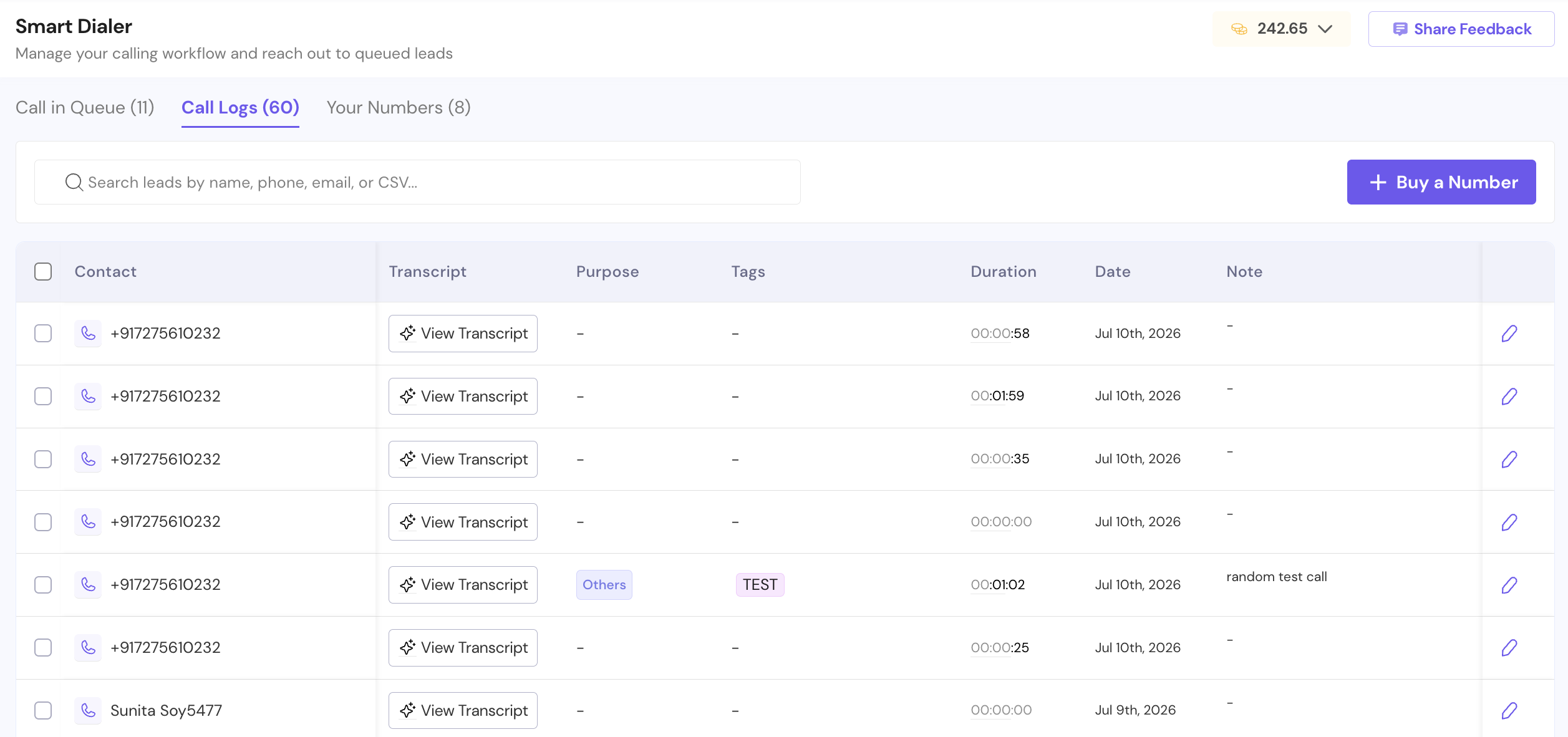
A Your Numbers tab manages every line your workspace owns, including which team member each number is assigned to.
SmartDialer plans start at $9/month and scale to $699/month depending on minutes and users.
Calls are billed per minute, recording and transcription bill at a higher per-minute rate, and higher tiers include more minutes at lower per-minute costs, with some tiers offering unlimited minutes. You'll find the current plans under Profile, then Settings, then Subscription, then SmartDialer in your account
Here's a hard truth. You can memorize every cold calling tip in this guide and still leave performance on the table if you're not reviewing your calls, tracking what works, and building on each conversation.
Most reps are doing this manually. They're scribbling notes after calls, relying on memory to recall how a prospect reacted, and switching between five tabs just to pull up an email before dialing. That's not a workflow. That's friction.
Smartlead's SmartDialer was built to eliminate exactly that.
SmartDialer is a fully integrated calling solution built directly inside Smartlead. It's not a standalone tool you have to jump between. It lives inside your Master Inbox, right next to every email thread, reply, and campaign interaction for each lead. That means when you pick up the phone, you're not starting from scratch. You have full context, right in front of you.
Here's what that looks like in practice:
Every call is automatically logged to the lead's timeline the moment it ends, sitting right alongside their email history and campaign activity. Your entire sales conversation, across every channel, lives in one place.
AI-powered call transcripts are generated automatically after every call, with timestamps and speaker separation. Instead of wondering where a conversation went sideways, you can go back, find the exact moment, and fix it on the next call.
Call recording is on by default, so nothing gets lost. And when the call ends, you're prompted to add a purpose, tags, and notes immediately, while the details are still fresh.
You can reference the full email thread while you're on the call, which means you're never caught off guard. If they mention something from a campaign you sent two weeks ago, you'll see it right there.
This matters because the cold calling tips that actually move the needle, things like using social proof at the right moment, handling objections with the bridge technique, or timing your strategic pauses, only get better when you can review, learn, and iterate on every call you make.
SmartDialer gives you that feedback loop. And it doesn't require a complex setup or a big budget to get started.
Plans start from $9/month. US local and toll-free numbers start at $1/month. Recording and AI transcription are built in.
If you're serious about improving your connect and conversion rates, SmartDialer is the fastest way to turn these cold calling tips from theory into a repeatable system.
Head to your Master Inbox from the left-hand navigation.
.avif)
Open any lead conversation and click "Call Lead." If you don't have a number yet, you'll be prompted to buy one.
.avif)
Search by area code, pick from available US local or toll-free numbers, and complete payment securely via Stripe. Your number is provisioned automatically. No manual setup, no waiting.
.avif)
Once your number is active, open any lead in Master Inbox and click "Call Lead."
A modal will pop up where you can confirm the lead's number, select your calling number if you have multiple, and toggle call recording on or off (it's on by default, and we'd recommend keeping it that way).
Hit "Start Call" and you're live.
While you're on the call, SmartDialer runs as a floating panel with a live call timer, mute and end call controls, and the full email thread visible in the background. You'll always know exactly who you're talking to and what's already been said.
When the call ends, SmartDialer prompts you to add a call purpose, tags, and notes before you move on. Takes 30 seconds. This is where most reps skip a step they'll regret later, so build the habit of logging immediately while the call is still fresh.
If recording was enabled, your AI transcript is generated automatically after the call ends.
Click "View Transcript" to open a timestamped, speaker-separated breakdown of the entire conversation. Use it to pinpoint objections, review your phrasing, and sharpen your approach before the next call.
Every call, every note, and every transcript sits in the lead's timeline right alongside their email history. Your entire sales conversation in one place, across every channel.
SmartDialer plans start from $9/month and go up to $699/month, depending on the number of minutes and users selected.
US local and toll-free numbers start at $1 per number / month.
You can view available plans, pricing tiers, and estimated minutes inside your account:
Profile → Settings → Subscription → SmartDialer
Pricing updates dynamically based on your selected plan.
Tuesday through Thursday between 10 and 11 a.m. or 4 and 5 p.m. in the prospect's local timezone tends to outperform other windows, a pattern consistent across multiple large-scale studies. Avoid early Monday and late Friday. Track your own dispositions by hour and adjust over 60 to 90 days of data.
Without local presence, 5 to 10 percent is a realistic range. With local presence dialing, 15 to 25 percent is achievable because mobile carriers flag fewer matched-area-code numbers as spam. Connect rate alone is not the goal. Conversation rate and meeting rate matter more.
Under 20 seconds. Include name, company, a one-sentence reason that is specific to the prospect, a tight callback window, and your number repeated twice. Always pair the voicemail with a follow-up email or text within 5 minutes.
Lead with permission, not a pitch. For example: "Hey [Name], this is [You] from [Company]. I know this is out of the blue, can I have 30 seconds to tell you why I am calling, and you can tell me if it is worth a longer conversation?" Then give a specific reason tied to the prospect.
Between 50 and 80 connected dials per day is typical for inside sales SDRs, though the right number depends on your industry and ACV. Outcome metrics (meetings booked, show rate) matter more than dial volume.
"I caught you between meetings, did I not?" beats "did I catch you at a bad time" because the second question gives the prospect a free exit. The first frames the interruption as expected and invites a short conversation.
Acknowledge first, then earn the meeting. For example: "Happy to, and I will. Before I do, what would have to be true in the email for it to be worth a 15-minute call next week?" That converts a brush-off into a qualifying question. More scripts like this live in our objection handling guide.
Use a script for the opener and the top 3 objections, then leave the body of the call open. Reps who read scripts straight through hit lower meeting-book rates than reps who use the script as guardrails and listen to the prospect.
Yes. Recording is on by default (you can turn it off before any call starts), and every recorded call generates an AI-powered transcript with timestamps and speaker separation. Recordings and transcripts are saved to the lead's timeline in Master Inbox and to the central Call Logs, so they're always searchable later.
Pairing calls with email in the same sequence outperforms email-only or calls-only by a wide margin in published benchmarks. Smartlead lets you add a Call step directly inside the email Sequence Builder, and leads that reach it queue automatically in SmartDialer under Sequence Leads, so calls and emails run in one cadence. Our multi-channel outreach guide covers how to structure it.
You don't need to implement all 25 this week.
Pick the three that target your weakest number.
If your connect rate is low, start with timing and local presence (tips 2, 3, and the connect rate benchmarks above). If you connect but conversations die early, fix the opener (tips 7 to 11).
If calls go well and meetings still don't get booked, work the ask and the follow-up (tips 16, 23, and 24).
Run the change for a month, check your dispositions, then pick the next three. That's how calling programs improve: one measured habit at a time, not one motivational offsite at a time.
And if the friction is the tooling itself, the tab-switching, the forgotten context, the notes that never get written, that's the part you can fix today.
SmartDialer puts the email thread next to the dial button, records and transcribes every conversation, queues your sequence leads automatically, and logs everything without a spreadsheet in sight. The habits still have to be yours.
The busywork doesn't.

Founder, StackOptimise
Smartlead's combination of automation, unlimited inboxes, and easy campaign management has completely transformed how we run cold email campaigns.
.jpg)
Founder, Cold Email Hackers

We have about 15 companies and we use Smartlead for all of them.

Founder, DutchSave Media

One of the things I love about using Smartlead is the deliverability feature. If they landed in the bounce or spam folders, we could resolve this quickly.

Co-Founder, Growth Today

I want to continue to use Smartlead to make operations more seamless - the plan is to bring more clients here and build more SOPs.

Founder, FueltoFly

Smartlead listens to the agencies and customers and builds according to what people want, that has really made things easier for us.

Founder, OutboundSync

We build an infrastructure product, and OutboundSync communicates with Smartlead itself. I love the webhook and API. They're really well done and keep getting better.

Founder, Axoleads

With SmartDelivery, you can put all of that in the hands of the tool. It ensures your emails land in inboxes, and by running a simple test, you can see if you're hitting the mark.

Founder, Claygen
Deliverability is the cornerstone of cold email outreach. You could have the best email copy in the world, but if no one is seeing it, it's useless. I really love the feature where you can actually give client accesses to your clients.

Co-Founder, Cymate

I do not want to switch to another software. Pick a solution you trust, stick with it, and keep refining your copy.

CMO, Avalanche Capital

Managing large volumes of emails through multiple inboxes used to be a logistical nightmare. With Smartlead, the process is seamless. We book thousands of discovery calls through cold emails. These campaigns are generating leads at a scale we never thought possible.

Founder, Growth Engine X

We came for the unlimited inboxes, and we stayed for the API. 1.5M cold emails/month, 7,767+ inboxes managed.

Head of Community & Ecosystem, TxtCart

You cannot replace having 10,000 touches with potential clients. When you have that much distribution and reach, you really start to see incredible results. The simplicity of Smartlead made all the difference. It doesn't require you to be a technical wizard.

Founder, Hyperke

Smartlead has been a game-changer for us. It increased our appointment volume, improved ease of use, and offered valuable features. 80% increase in appointments/month, peak of 276 appointments in a single month.

Founder, Kinetyca

Smartlead has been our cold email backbone from day one. The platform evolves constantly, keeping pace with how deliverability and personalization need to work today. 21% overall reply rate, $175K in 4 months for multiple B2B clients.

Founder, Reachflow

Smartlead is centered around deliverability and constantly evolving. Their API is not like any other platform. Smartlead covers all our needs. The focus on core features like deliverability and API integration is unmatched.

CEO, Halfwarm

Our approach to crafting conversational emails led to reply rates that many of my peers thought were unattainable.

Co-Founder, letstrike

We've grown on zero capital, zero marketing, purely cold emailing - and that's the story we love to tell. The best approach is no approach if you can't handle domain meltdown. The second best is something like Smartlead that's built from the ground up for deliverability at scale.

Founder, Fenixtal

Smartlead's white-labeling and automation let us punch above our weight. The 12M euros sales potential? That's what happens when you combine human creativity with Smartlead's precision.

Co-Founder, Digital Creativs

Nine out of 10. Ninety percent of our clients are on Smartlead unless they come in with an existing setup. That's the default.

Co-Founder, BuildingReach

At the end of the day, you have to take a bet on one tool or another. It was a no-brainer taking that bet on Smartlead. We had to even turn down the volume of our marketing campaigns - Smartlead was capable of driving more volume than our sales team was able to fulfill.

Founder & MD, Prospectiv

Since starting the business in January of this year, we've already generated $200K in sales exclusively from cold email. Smartlead has been central to our operations and has exceeded our expectations.

Founder, Growthlynk

There's so much stuff built on top of it. I would be dead if I had to rebuild it with another tool. I can manage hundreds of senders easily. I can send hundreds of thousands of emails.

Founder, Corebits

The platform's HubSpot integration, real-time Slack updates, and advanced campaign customization have been game changers for our business and our clients'.

Founder, Apex Ascension

From day one, we've never used anything else.