Sign up now and get 50% off on your first month on any plan

Cold email campaigns fail when timing is wrong.
Most outbound teams personalize surface details but miss real account signals. That is where automated cold email personalization tools change the game. Signal intelligence gives you timing and context.
Smartlead turns that intelligence into execution at scale. When signal-based messaging is paired with Smartlead’s deliverability-first infrastructure, cold email becomes timely, relevant, and repeatable.
The real advantage is not just detecting a trigger. It is turning that trigger into campaign-ready copy and launching it inside Smartlead before the moment passes.
This guide shows how to turn account signals into Smartlead campaigns using a structured signal-to-sequence workflow built for execution speed.
Signals do two things that generic personalization cannot:
Instead of writing another generic note, you can open with something real, tie it to what is happening in the industry, and make a small request that feels natural.
This is the end‑to‑end flow you can run in under ten minutes once it is set up.
Tools like ConnectCurator can monitor accounts for key triggers such as funding, product launches, pricing changes, leadership moves, hiring trends, partnerships, and more.

A single signal can support multiple angles. The best angle connects the trigger to a buyer's concern.
Examples:
Pick one angle and commit to it. Do not stack multiple triggers in the same first email.
Industry reports include the sections that matter for outreach:
A well-designed workflow should let you generate outreach in two strong directions: signal‑led messages (when timing is the priority) or industry‑led messages (when positioning is the priority).
Either way, the copy is grounded in buyer context and your company’s positioning so it reads like a point of view and not a generic trigger mention.
Most teams start with a signal‑led opener, then layer an industry‑led variant for A/B testing.
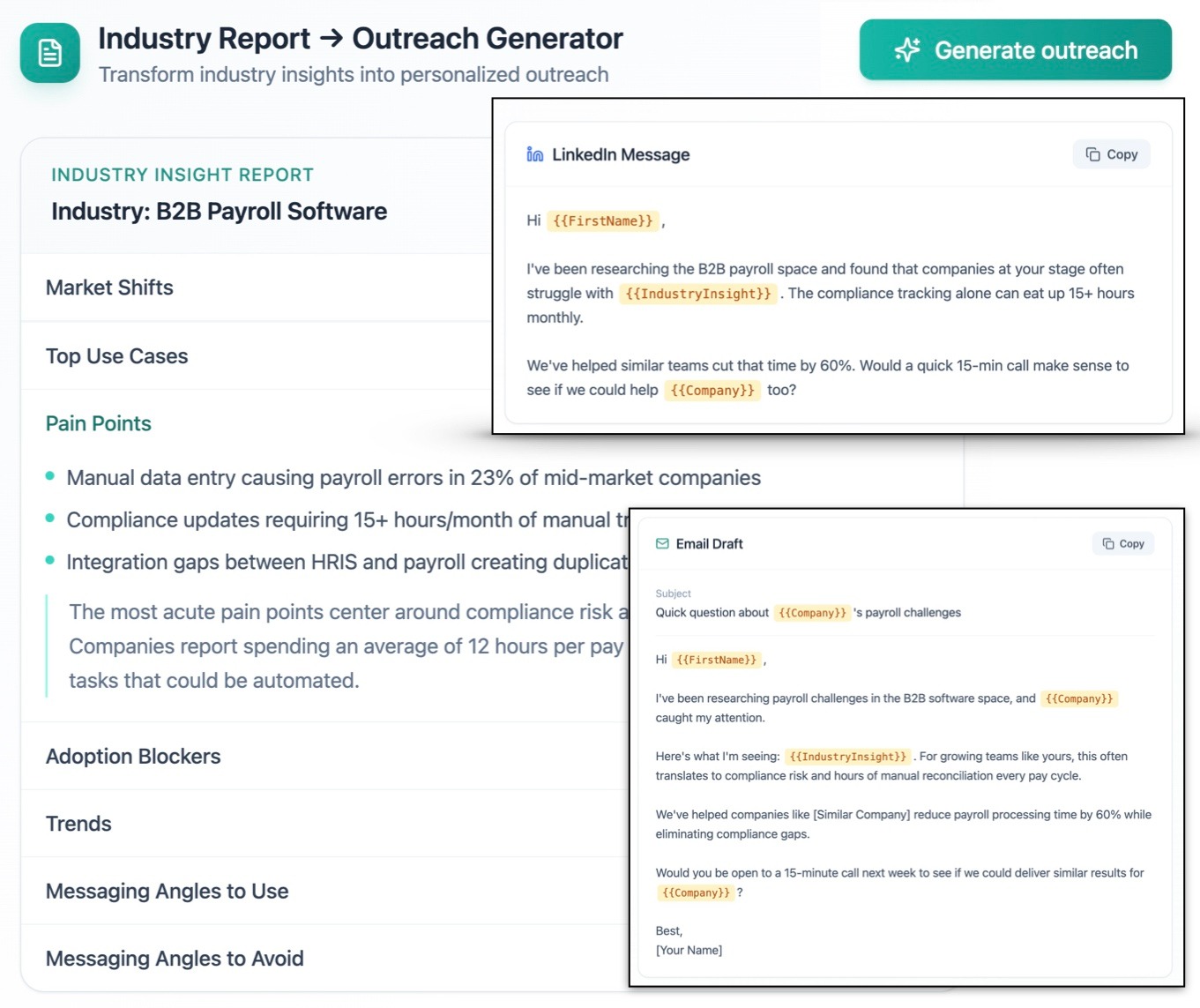
Your workflow should allow you to generate email copies using either the signal or the industry report, then refine it to your tone. Keep it short and specific.
A strong first email usually includes:
You can also generate a LinkedIn variant so outreach stays consistent across channels.
Once the email is ready, export it directly into Smartlead and place it into an existing campaign or create a new one.
Smartlead lets you build multi‑step sequences and personalize variables inside the editor. If you use the Smartlead API, follow their documentation for activation and authentication.
That is the core loop: signal → copy → Smartlead campaign.

If you are new to Smartlead, here is a practical setup path that matches how high performing teams run signal based campaigns.
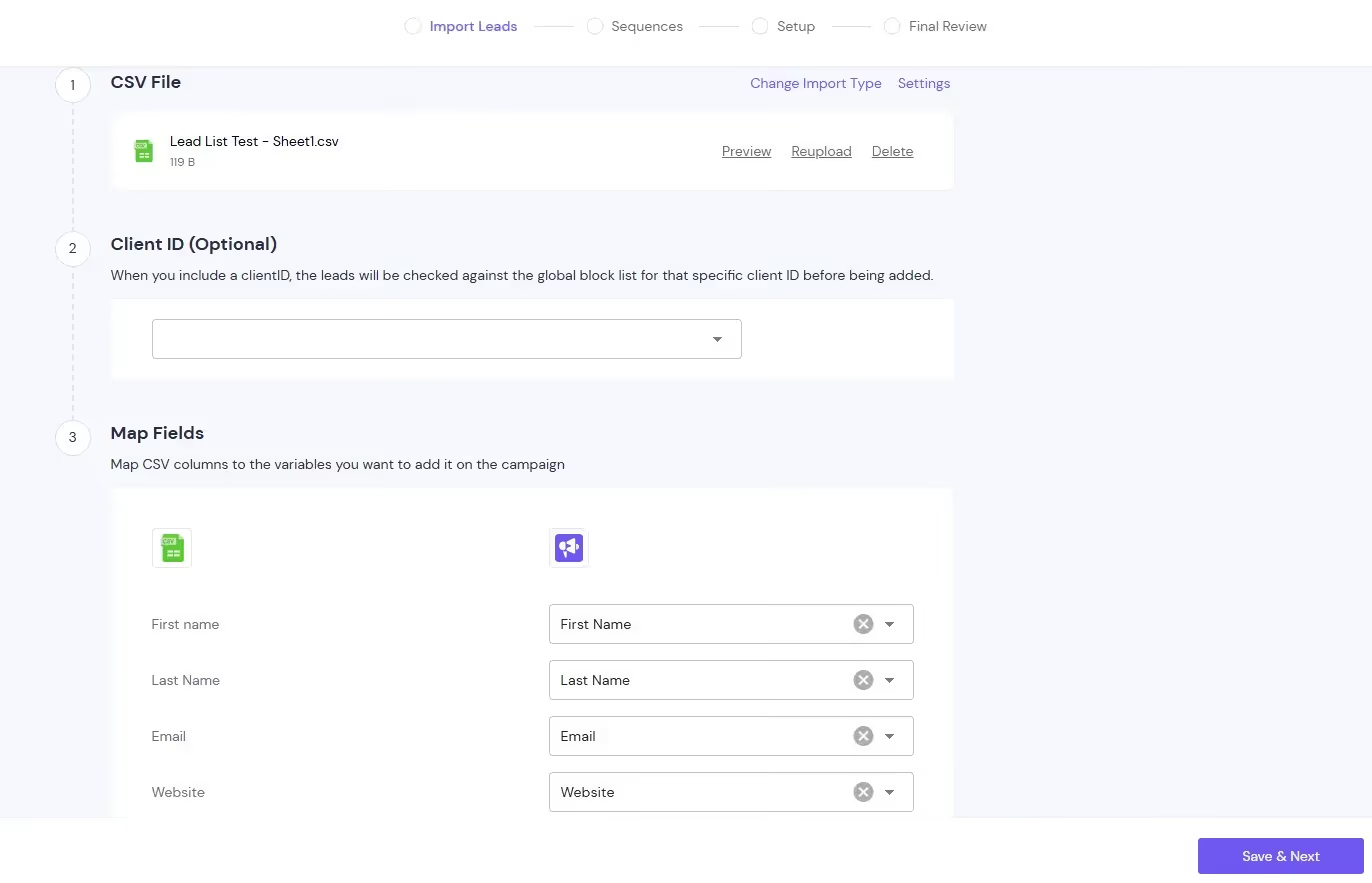
Start by creating a new campaign and uploading a CSV.
During mapping, make sure your columns match the personalization you plan to use later, such as first name, company, title, industry, and any signal fields you want to reference.
Smartlead’s campaign creation flow walks through upload, mapping, sequence setup, and scheduling.

Keep the sequence tight so it stays human and deliverability safe.
A common best practice is to keep follow-ups limited and Smartlead’s campaign guide notes that industry practice is to limit sequences to about four to five emails. Set realistic delays between steps and avoid stacking too many asks in the same thread.
Create two message variants for the first email so you can compare a signal led opener against an industry led opener.
Smartlead supports adding variants and configuring distribution for testing. This makes it easy to see which angle produces higher reply rate and positive replies before you scale.
Insert variables in the subject line and body copy using Smartlead’s variable format. Variables act as placeholders that pull data from your lead file, such as first name or company name.
For list quality issues, add fallbacks so a missing field does not break the sentence. Smartlead documents both variables and conditional logic using Liquid syntax for fallbacks.
If you are sending from new inboxes, warm them up before running full volume. Smartlead’s deliverability guidance commonly recommends warming up inboxes and then keeping daily sending conservative per inbox to protect reputation.
For example around ten to fifteen emails per day with an upper cap around twenty per inbox.
Before scaling a winning sequence, run a deliverability check using SmartDelivery so you can spot spam placement issues early.
After launch, use Smartlead analytics to track sent volume and reply rate at the campaign level. This is where separating campaigns by trigger category pays off, because you can compare performance across funding, hiring, partnerships, or pricing changes and scale only what is working.

In a modern outbound stack, roles should be clearly divided:
Signal intelligence layer:
Execution and scaling layer:
Smartlead is the execution and scaling engine in this model. Signal intelligence informs the message, but Smartlead turns it into structured campaigns, protected infrastructure, and measurable revenue outcomes.
For example, inside Smartlead you can create separate campaigns for funding signals versus hiring signals, monitor reply rate by trigger category, and double down on the sequences that convert without compromising deliverability.
That division keeps the workflow clean. Intelligence feeds execution, and Smartlead handles scale.
Use these as patterns and swap in the signal and industry insight.
Write like someone who noticed a real change, not like a system that scraped a headline.
Mention the specific trigger, explain why it matters, and connect it to a clear buyer pain point. Avoid generic praise without insight.
Use one trigger and one insight
Pair the most relevant signal with one strong industry insight. Stacking multiple triggers makes the message feel automated and harder to reply to.
Keep it short
Four to six sentences outperform long explanations. If it requires scrolling, it is too long.
Ask a simple question
A yes or no or short one line answer question drives more replies than a multi part ask.
Save high performers as templates
Turn winning messages into a baseline and personalize only the first two lines.
Test opening lines inside Smartlead
Keep the rest of the sequence constant so you can clearly attribute performance changes to the variable you are testing.
Start with a small account segment and one trigger category (for example, funding or pricing changes).
Inside Smartlead:
Create two campaign variants:
Variant A: signal-led opener
Variant B: industry-led opener
Keep the sequence structure identical (same steps, same delay logic). Only change the opening message. This keeps attribution clean.
Upload a controlled lead batch and monitor:
Reply rate:
Positive reply rate
Meetings booked
Avoid optimizing for opens. Smartlead users know deliverability and replies are what matter.
After two weeks:
Pause the weaker campaign
Duplicate the winner
Test a new opening line or subject variation
Scale across additional inboxes if reply quality holds
This approach aligns with Smartlead’s infrastructure mindset: controlled tests, deliverability-safe scaling, and performance measured by real conversations and not just vanity metrics.
Signals are the difference between outbound that feels random and outbound that drives replies.
Signal intelligence creates opportunity. Smartlead turns that opportunity into structured campaigns, protected infrastructure, and scalable revenue generation.
When combined with automated cold email personalization tools, Smartlead becomes the engine that turns real-time account signals into predictable outbound performance.

Join us to elevate your outreach!

Founder, StackOptimise
Smartlead's combination of automation, unlimited inboxes, and easy campaign management has completely transformed how we run cold email campaigns.
.jpg)
Founder, Cold Email Hackers

We have about 15 companies and we use Smartlead for all of them.

Founder, DutchSave Media

One of the things I love about using Smartlead is the deliverability feature. If they landed in the bounce or spam folders, we could resolve this quickly.

Co-Founder, Growth Today

I want to continue to use Smartlead to make operations more seamless - the plan is to bring more clients here and build more SOPs.

Founder, FueltoFly

Smartlead listens to the agencies and customers and builds according to what people want, that has really made things easier for us.

Founder, OutboundSync

We build an infrastructure product, and OutboundSync communicates with Smartlead itself. I love the webhook and API. They're really well done and keep getting better.

Founder, Axoleads

With SmartDelivery, you can put all of that in the hands of the tool. It ensures your emails land in inboxes, and by running a simple test, you can see if you're hitting the mark.

Founder, Claygen
Deliverability is the cornerstone of cold email outreach. You could have the best email copy in the world, but if no one is seeing it, it's useless. I really love the feature where you can actually give client accesses to your clients.

Co-Founder, Cymate

I do not want to switch to another software. Pick a solution you trust, stick with it, and keep refining your copy.

CMO, Avalanche Capital

Managing large volumes of emails through multiple inboxes used to be a logistical nightmare. With Smartlead, the process is seamless. We book thousands of discovery calls through cold emails. These campaigns are generating leads at a scale we never thought possible.

Founder, Growth Engine X

We came for the unlimited inboxes, and we stayed for the API. 1.5M cold emails/month, 7,767+ inboxes managed.

Head of Community & Ecosystem, TxtCart

You cannot replace having 10,000 touches with potential clients. When you have that much distribution and reach, you really start to see incredible results. The simplicity of Smartlead made all the difference. It doesn't require you to be a technical wizard.

Founder, Hyperke

Smartlead has been a game-changer for us. It increased our appointment volume, improved ease of use, and offered valuable features. 80% increase in appointments/month, peak of 276 appointments in a single month.

Founder, Kinetyca

Smartlead has been our cold email backbone from day one. The platform evolves constantly, keeping pace with how deliverability and personalization need to work today. 21% overall reply rate, $175K in 4 months for multiple B2B clients.

Founder, Reachflow

Smartlead is centered around deliverability and constantly evolving. Their API is not like any other platform. Smartlead covers all our needs. The focus on core features like deliverability and API integration is unmatched.

CEO, Halfwarm

Our approach to crafting conversational emails led to reply rates that many of my peers thought were unattainable.

Co-Founder, letstrike

We've grown on zero capital, zero marketing, purely cold emailing - and that's the story we love to tell. The best approach is no approach if you can't handle domain meltdown. The second best is something like Smartlead that's built from the ground up for deliverability at scale.

Founder, Fenixtal

Smartlead's white-labeling and automation let us punch above our weight. The 12M euros sales potential? That's what happens when you combine human creativity with Smartlead's precision.

Co-Founder, Digital Creativs

Nine out of 10. Ninety percent of our clients are on Smartlead unless they come in with an existing setup. That's the default.

Co-Founder, BuildingReach

At the end of the day, you have to take a bet on one tool or another. It was a no-brainer taking that bet on Smartlead. We had to even turn down the volume of our marketing campaigns - Smartlead was capable of driving more volume than our sales team was able to fulfill.

Founder & MD, Prospectiv

Since starting the business in January of this year, we've already generated $200K in sales exclusively from cold email. Smartlead has been central to our operations and has exceeded our expectations.

Founder, Growthlynk

There's so much stuff built on top of it. I would be dead if I had to rebuild it with another tool. I can manage hundreds of senders easily. I can send hundreds of thousands of emails.

Founder, Corebits

The platform's HubSpot integration, real-time Slack updates, and advanced campaign customization have been game changers for our business and our clients'.

Founder, Apex Ascension

From day one, we've never used anything else.