


Sign up now and get 50% off on your first month on any plan

There is a version of cold email that works fine at small scale.
You have five inboxes, two active clients, and a spreadsheet that more or less tells you what is happening.
You check your campaigns every morning, respond to replies yourself, and keep an eye on deliverability because you know each inbox by name.
Then you get your next ten clients. And the ten after that.
Suddenly you have 80 inboxes across four providers, campaigns running for clients in three different industries, replies coming in at all hours, and a team of two trying to manage it from a collection of browser tabs.
The spreadsheet stopped working six clients ago. Deliverability problems on one client's domain are not getting caught until reply rates have already dropped. A positive reply sat in a secondary inbox for three days before anyone saw it.
This is the moment most agencies realize they have been building a cold email operation the wrong way.
This post covers what actually changes when you cross into the 50-to-250-inbox range, the specific problems that break agencies at that threshold, and how the agencies that scale cleanly set up their infrastructure before the cracks appear.
The transition from small-scale to agency-scale cold email is not a linear increase in the same problems. It is a qualitative shift in the kind of problems you face.
Below 20 inboxes, most cold email platforms can hold together with manual management. You know which accounts are warmed and which are not. You can check each inbox when a reply comes in. You can tell at a glance whether a campaign is performing or degrading.
Above 50 inboxes, none of that is possible without automated systems behind it. The math alone makes manual management a liability.
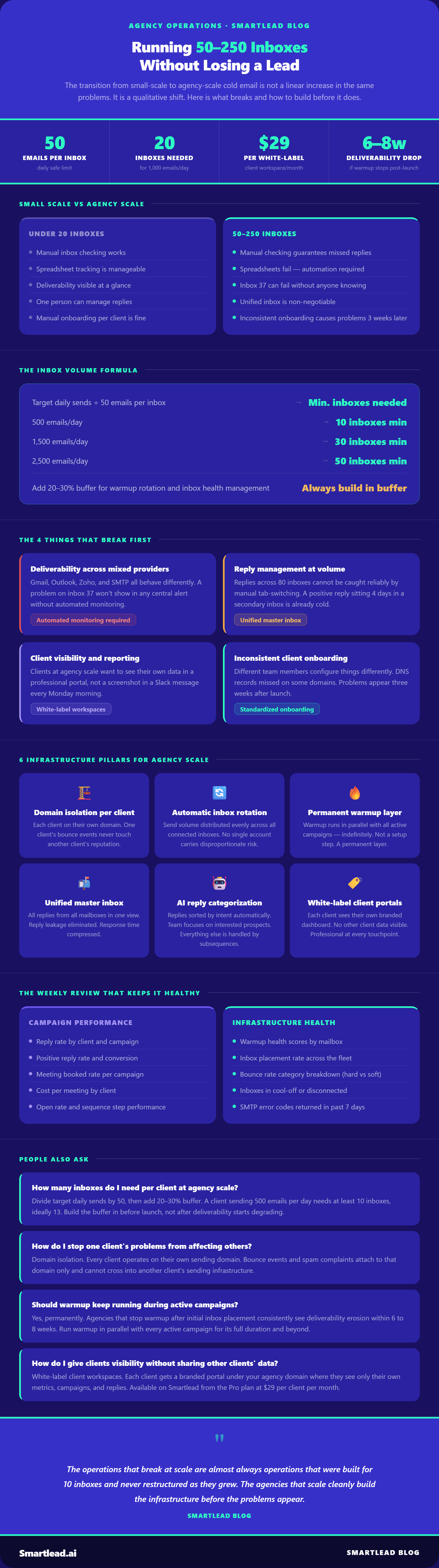
Fifty inboxes sending 30 to 50 emails per day each means 1,500 to 2,500 emails going out daily across your operation.
That is 1,500 to 2,500 potential reply events per day, spread across multiple providers, multiple clients, and multiple campaigns running at different stages of their sequences. A warmup problem on inbox 37 will not announce itself.
A bounce rate creeping above 4% on a client's sending domain will not show up in any central alert. A positive reply sitting in a secondary Outlook inbox over the weekend will cool off before Monday morning.
The operations that break at scale are almost always operations that were built for 10 inboxes and never restructured as they grew.
At five inboxes, deliverability is manageable. At 50, it becomes a monitoring problem that cannot be solved manually.
Each inbox has its own reputation trajectory. A domain warming on Google Workspace behaves differently from one on Outlook 365, which behaves differently from one on Zoho. The SMTP settings, the sending limits, the authentication requirements, and the spam filter behavior differ across providers.
When you are running a mixed fleet of 80 to 100 inboxes across three or four providers, the probability that one of them is experiencing a deliverability degradation on any given day is high. The question is whether you find out on day one or day seven.
Inbox rotation distributes send volume across all connected inboxes automatically, which protects individual sender reputation by preventing any single account from carrying too much daily volume. At 50 emails per inbox per day, 20 inboxes gives you 1,000 cold emails per day safely. At that distribution, no single inbox is the single point of failure.
But rotation alone is not enough without monitoring. An inbox that is silently returning bad SMTP codes while still appearing active in a campaign is not being protected by rotation. It is being actively damaged by it, because the rotation keeps feeding volume to a compromised account.
Monitoring warmup health scores and bounce rates at the individual inbox level, across a fleet of 50 to 250 accounts, requires automated diagnostics rather than manual spot-checking.
At five clients and ten inboxes, a team member can realistically log into each inbox and check for replies. At 15 clients and 80 inboxes, that same process requires an unreasonable amount of time and still misses things.
Replies arrive at random hours. Different clients use different providers. A reply landing in a secondary inbox at 6pm on a Friday does not get seen until Monday, by which point the prospect has already mentally moved on.
At agency scale, that is not an edge case. It is a structural problem that happens dozens of times per week across a large operation.
A unified master inbox that consolidates all replies from all connected mailboxes into a single view is not a convenience at this scale.
It is a requirement. When every reply from every client's campaign surfaces in one place, regardless of which inbox it landed in or which provider it came from, the response time problem becomes manageable. Without it, reply leakage is a guarantee.
The second layer on top of the unified inbox is AI reply categorization. At 80 inboxes running active campaigns, your team is not just missing replies because of the multi-inbox problem.
They are also spending significant time reading through replies to determine which ones require immediate attention and which ones are out-of-office responses or unsubscribes. AI categorization sorts replies by intent automatically, so the team works through interested responses first and handles everything else in the appropriate order.
An agency at small scale can send clients a screenshot and a summary. An agency at large scale cannot do that without a full-time person doing nothing but producing client reports.
The clients you take on at agency scale have different expectations than early clients. They want to see their data.
They want to understand what is happening with their campaigns without needing to schedule a call. And they want to feel that the platform serving them is professional, not a view into someone else's account.
White-label client workspaces solve this at a structural level. Each client gets a branded portal under your domain, where they can see their own campaign metrics, watch their email reputation grow, and access their replies from the master inbox. They are not seeing any other client's data. They are not seeing Smartlead's branding. They are experiencing a platform that looks like yours.
White-labeling on Smartlead is available as an add-on at $29 per month per client workspace, which is cost-effective even at ten or fifteen clients. The alternative is manually building and maintaining some version of this reporting process, which scales in headcount rather than in cost.
At small scale, you can onboard a new client manually. You set up the domain, configure the DNS records, connect the inboxes, configure warmup, and launch the campaign. Done in an afternoon.
At agency scale, that same process repeated for every new client becomes a source of inconsistency.
Different team members configure things differently. Some inboxes get warmed up properly, some do not. SPF, DKIM, and DMARC get set up correctly on some domains and missed on others. A client onboarded in a hurry ships with a configuration that will cause problems three weeks later.
The agencies that operate cleanly at scale run every new client through an identical onboarding checklist, automated wherever possible. Domain purchase, DNS authentication, inbox connection, warmup activation, campaign configuration.
Each step is templated and verified before anything goes live. Smartlead's SmartSenders infrastructure handles domain and inbox setup in two clicks, which removes the configuration variance that causes problems when every new client is a manual process.
The difference between agencies that scale and agencies that hit a ceiling is structural, not technical. The tools exist. The question is whether the operation is designed around them from the start or bolted together as problems appear.
Each client should operate on their own sending domain or subdomain, isolated from every other client.
This is not just about branding. It is about reputation isolation. If one client's campaign generates a high bounce rate or spam complaints, those events should not be able to affect the sending reputation of any other client.
Within each client's domain, use dedicated subdomains for different campaign types or audiences if send volume requires it. A client sending 500 emails per day to two separate industries should not be running both through the same inbox pool.
The standard operating limit is 50 emails per inbox per day for cold outreach. At that limit, the math determines your inbox requirements. A client sending 500 emails per day needs 10 inboxes minimum. A client at 1,500 per day needs 30 inboxes.
Building this buffer in before launch rather than scrambling to add inboxes when deliverability starts degrading is the difference between a smooth operation and a reactive one.
Automatic inbox rotation distributes sends evenly across the connected pool, so no inbox carries disproportionate volume. New inboxes added mid-campaign are pulled into the rotation automatically without manual adjustment.
Warmup is not a setup step that you complete and move on from. It is a permanent layer running in parallel with all active campaigns, across every inbox in the operation.
The agencies that encounter deliverability problems at scale are almost always the ones that ran warmup until inbox placement looked healthy and then switched it off to free up resources.
Teams that leave warmup off after launch see deliverability erosion within six to eight weeks as the positive engagement signals that warmup was generating stop accumulating.
At 100-plus inboxes, bulk warmup configuration makes this manageable. Rather than configuring warmup settings for each inbox individually, you update warmup parameters across selected inboxes simultaneously. Warmup stays on. Volume, reply rate, and daily ramp settings get adjusted across the full fleet in minutes rather than hours.
Not all replies require the same response speed or the same follow-up path. A prospect expressing genuine interest needs a response within hours. An out-of-office needs to be held until the prospect returns. A soft negative like "reach out in Q2" needs to be tagged and added to a re-engagement sequence. An unsubscribe needs to be actioned and the lead removed.
At small scale, a human makes these decisions for every reply. At agency scale, that process does not work.
AI reply categorization handles the triage layer automatically, sorting replies by intent so your team focuses their time on the replies that can move forward, and automated subsequences handle the rest.
Subsequences triggered by reply intent mean that a prospect who says "not right now" does not fall off the map. They enter a re-engagement sequence that brings them back at the right interval. A prospect who says they are out of office gets a follow-up timed to when they return. Every reply is handled systematically rather than depending on a team member remembering to circle back.
At agency scale, the operations that stay healthy are the ones doing a structured weekly review of infrastructure health alongside campaign performance. These are different reviews requiring different data.
Campaign performance review covers what most agencies already track: reply rates, positive reply rates, open rates, meeting booked rates, and cost per meeting by client and by campaign. This tells you whether your outreach is working.
Infrastructure health review covers what most agencies do not track consistently enough: warmup health scores and inbox placement rates by mailbox, bounce rate trends and category breakdown (hard vs soft), which inboxes are in cool-off or disconnected, and whether any domain has returned SMTP error codes in the last seven days.
Combining both in a single weekly review, rather than treating infrastructure as something you check reactively when a problem appears, is the operational habit that separates agencies at 20 clients from agencies at 50.
The standard limit is 50 cold emails per inbox per day. Divide your target daily send volume by 50 to get your minimum inbox count, then add 20 to 30% buffer for warmup rotation and inbox health management. A client sending 500 emails per day needs a minimum of 10 inboxes.
A client at 2,000 per day needs at least 40, ideally 50 with buffer. Building this buffer in before launch protects deliverability as volume ramps up rather than requiring reactive inbox addition when reputation starts degrading.
Domain isolation. Each client operates on their own sending domain or subdomain, completely separate from every other client in your operation. When one client's campaign generates bounce events or spam complaints, those signals attach to their domain only.
Your other clients' domains are unaffected. This separation is non-negotiable at agency scale and should be built into your standard onboarding process from the start, not added later as a fix.
A unified master inbox that consolidates all replies from all connected mailboxes into a single view is the only practical solution at this scale. Manual inbox rotation, where team members log into individual accounts to check for replies, cannot cover 50-plus inboxes reliably without significant time investment and guaranteed leakage. Combined with AI reply categorization that sorts replies by intent automatically, a unified inbox lets a small team manage reply volume from a large operation without missing positive responses.
Yes, permanently. Warmup should run in parallel with every active campaign for the full duration of that campaign and beyond.
Agencies that stop warmup after initial inbox placement improves consistently see deliverability erosion within six to eight weeks. At agency scale with 50 to 250 inboxes, running warmup across the full fleet using bulk update settings keeps the entire operation healthy without requiring individual inbox configuration.
White-label client workspaces. Each client gets a branded portal under your agency domain where they can see their own campaign metrics, email reputation, and replies, without seeing anything that belongs to another client or to your backend operations.
On Smartlead, white-label workspaces are available from the Pro plan onwards at $29 per month per client. It is significantly cheaper than the alternative, which is manually building and maintaining a reporting layer for every client relationship.
Inbox rotation distributes your daily send volume automatically across all connected inboxes within a campaign. Instead of one inbox sending 500 emails per day and accumulating disproportionate reputation risk, 10 inboxes each send 50.
No single inbox becomes a point of failure. If one inbox encounters a deliverability issue, the other nine continue sending while the affected inbox is diagnosed and repaired. At small scale this matters less.
At 50-plus inboxes running multiple client campaigns simultaneously, automatic rotation is the mechanism that keeps individual inbox health stable under volume.


Founder, StackOptimise
Smartlead's combination of automation, unlimited inboxes, and easy campaign management has completely transformed how we run cold email campaigns.
.jpg)
Founder, Cold Email Hackers

We have about 15 companies and we use Smartlead for all of them.

Founder, DutchSave Media

One of the things I love about using Smartlead is the deliverability feature. If they landed in the bounce or spam folders, we could resolve this quickly.

Co-Founder, Growth Today

I want to continue to use Smartlead to make operations more seamless - the plan is to bring more clients here and build more SOPs.

Founder, FueltoFly

Smartlead listens to the agencies and customers and builds according to what people want, that has really made things easier for us.

Founder, OutboundSync

We build an infrastructure product, and OutboundSync communicates with Smartlead itself. I love the webhook and API. They're really well done and keep getting better.

Founder, Axoleads

With SmartDelivery, you can put all of that in the hands of the tool. It ensures your emails land in inboxes, and by running a simple test, you can see if you're hitting the mark.

Founder, Claygen
Deliverability is the cornerstone of cold email outreach. You could have the best email copy in the world, but if no one is seeing it, it's useless. I really love the feature where you can actually give client accesses to your clients.

Co-Founder, Cymate

I do not want to switch to another software. Pick a solution you trust, stick with it, and keep refining your copy.

CMO, Avalanche Capital

Managing large volumes of emails through multiple inboxes used to be a logistical nightmare. With Smartlead, the process is seamless. We book thousands of discovery calls through cold emails. These campaigns are generating leads at a scale we never thought possible.

Founder, Growth Engine X

We came for the unlimited inboxes, and we stayed for the API. 1.5M cold emails/month, 7,767+ inboxes managed.

Head of Community & Ecosystem, TxtCart

You cannot replace having 10,000 touches with potential clients. When you have that much distribution and reach, you really start to see incredible results. The simplicity of Smartlead made all the difference. It doesn't require you to be a technical wizard.

Founder, Hyperke

Smartlead has been a game-changer for us. It increased our appointment volume, improved ease of use, and offered valuable features. 80% increase in appointments/month, peak of 276 appointments in a single month.

Founder, Kinetyca

Smartlead has been our cold email backbone from day one. The platform evolves constantly, keeping pace with how deliverability and personalization need to work today. 21% overall reply rate, $175K in 4 months for multiple B2B clients.

Founder, Reachflow

Smartlead is centered around deliverability and constantly evolving. Their API is not like any other platform. Smartlead covers all our needs. The focus on core features like deliverability and API integration is unmatched.

CEO, Halfwarm

Our approach to crafting conversational emails led to reply rates that many of my peers thought were unattainable.

Co-Founder, letstrike

We've grown on zero capital, zero marketing, purely cold emailing - and that's the story we love to tell. The best approach is no approach if you can't handle domain meltdown. The second best is something like Smartlead that's built from the ground up for deliverability at scale.

Founder, Fenixtal

Smartlead's white-labeling and automation let us punch above our weight. The 12M euros sales potential? That's what happens when you combine human creativity with Smartlead's precision.

Co-Founder, Digital Creativs

Nine out of 10. Ninety percent of our clients are on Smartlead unless they come in with an existing setup. That's the default.

Co-Founder, BuildingReach

At the end of the day, you have to take a bet on one tool or another. It was a no-brainer taking that bet on Smartlead. We had to even turn down the volume of our marketing campaigns - Smartlead was capable of driving more volume than our sales team was able to fulfill.

Founder & MD, Prospectiv

Since starting the business in January of this year, we've already generated $200K in sales exclusively from cold email. Smartlead has been central to our operations and has exceeded our expectations.

Founder, Growthlynk

There's so much stuff built on top of it. I would be dead if I had to rebuild it with another tool. I can manage hundreds of senders easily. I can send hundreds of thousands of emails.

Founder, Corebits

The platform's HubSpot integration, real-time Slack updates, and advanced campaign customization have been game changers for our business and our clients'.

Founder, Apex Ascension

From day one, we've never used anything else.