Email Deliverability

Email Warmup Failure: What Silent Problems Look Like and How to Catch Them Early

Rajashree
9
Min
Published On
April 10, 2026
Updated On :
April 10, 2026
Recreated On:
This is some text inside of a div block.

Heading

This is some text inside of a div block.
Min
Created On:
This is some text inside of a div block.
Updated On:
This is some text inside of a div block.

Your campaigns are running. Emails are going out. Open rates look normal.

But over the last three weeks, reply rates have dropped 40%. No error in the dashboard. No alert. No explanation.

That is what email warmup failure looks like most of the time. Not a crash. A slow bleed.

Most warmup problems do not announce themselves. There is no banner, no notification that your mailbox has been ejected from the warmup pool. Your campaigns keep running. Your dashboard still shows the account as active. And the whole time, your sender reputation is quietly degrading with every email that goes out.

By the time the numbers look wrong, you are already weeks behind where you should be.

This post breaks down what warmup failure actually looks like under the hood, why it happens, and the specific signals you can check before the damage becomes a deliverability crisis.

TLDR

TL;DR

What this covers: How email warmup fails silently and why reply rates drop before dashboards show issues.
Core problem: Warmup failure does not trigger alerts. It degrades sender reputation gradually.
Early signals: Reply rates drop while open rates hold, warmup activity stalls, bounce types shift to soft bounces.
Common causes: Disconnected accounts, pool ejection, low-quality warmup pool, or premature volume scaling.
What to check weekly: Inbox placement rate, warmup activity, bounce categories, and pool tier status.
Key takeaway: If reply rates drop, check infrastructure first. Warmup issues appear weeks before campaign metrics reflect them.

What Email Warmup Is Actually Doing

Before you can catch warmup failure early, it helps to understand what warmup is doing in the first place.

When you add a mailbox to Smartlead and enable warmup, that mailbox joins a shared pool alongside other verified mailboxes. Smartlead's system then automatically sends warmup emails between mailboxes in the pool, simulating the kind of real human engagement that inbox providers use to assess sender reputation. This includes opening emails, saving them from spam, replying, and marking them as important.

To keep warmup emails from being flagged as automated, each mailbox is assigned a unique two-word identifier injected directly into the warmup email body. The email reads like a normal human message rather than a template, and it gives you a clean way to filter warmup emails without accidentally deleting them.

None of that works if the mailbox gets removed from the pool. Understanding why that happens is where early detection starts.

Why Warmup Gets Disabled Without Warning

There are several ways a mailbox can be ejected from the warmup pool, and almost none of them come with a real-time notification.

Smartlead validates every address in the warmup pool every six hours. If a mailbox fails that check, it goes through a slower try-catch verification. If it fails that, it goes through a six-step SMTP check. Any mailbox that cannot clear those gates gets removed from the pool automatically.

The reasons a mailbox might fail those checks often have nothing to do with the mailbox itself being broken.

A credit card expiring and causing the account to stop accepting mail. MX records changing or lapsing. A DMARC policy that rejects emails from third-party senders. An inbox that is full.

Filters that block emails containing certain words. A temporary clog on the ESP side that queues rather than delivers.

In any of these cases, Smartlead sees a bounce, removes the mailbox from the pool, and places it in a cool-off period. After four hours, the system sends a test email to see if the mailbox is accepting again.

If it is, the mailbox is added back with no damage done. If it is still not accepting emails, the mailbox stays off the pool until you manually verify it is sending and receiving correctly and contact support with proof.

The problem is that none of this surfaces in real time. You might not discover the ejection until warmup stats go flat or deliverability on a live campaign starts dropping.

Why Warmup Failure Is Hard to See

Most deliverability problems give you a clear signal. A failed OAuth token throws an error in your mailbox settings. A disconnected account shows as inactive. A hard bounce spike is visible in campaign stats the same day.

Warmup failure works differently. It degrades gradually, and the metrics most teams watch daily are the last ones to reflect it.

Inbox placement shifts before open rates catch up.

Receiving servers start routing emails to the promotions tab or filtering them before your tracked open rate drops noticeably. And reply rate, the number that actually matters, is the last indicator to move. By the time your reply rate falls off, the warmup problem causing it has often been present for two to three weeks already.

That delay is where most teams lose pipeline. They see the reply rate drop, assume it is a copy problem or an ICP problem, and spend weeks testing new sequences on infrastructure that is already compromised.
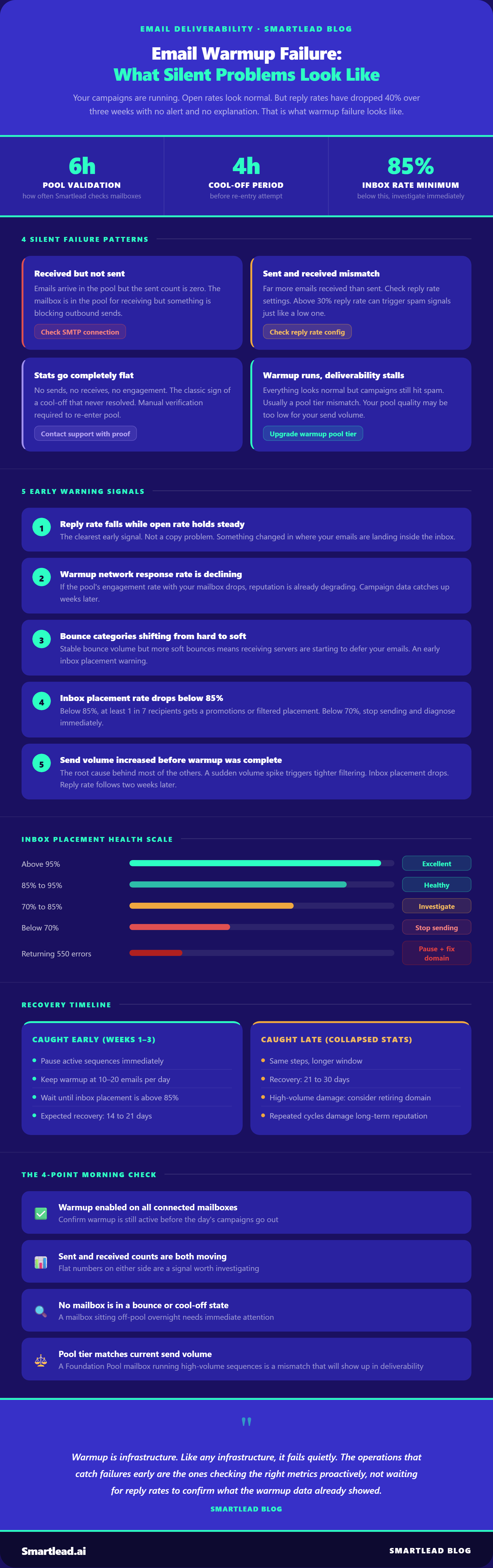
The Four Most Common Silent Failure Patterns

Warmup Emails Are Being Received But Not Sent

This is one of the most confusing patterns because the dashboard looks active. Emails are coming in. The account appears to be in the pool. But when you look at the sent count, it is zero or near zero.

This usually means the mailbox is still in the pool for receiving purposes but something is preventing outbound sends. Check whether the SMTP connection is live, whether daily sending limits have been reached, and whether the account has hit any ESP-level restrictions on outbound volume.

The Sent and Received Counts Are Wildly Mismatched

If you are seeing significantly more emails received than sent, this used to be a reporting issue in Smartlead. The platform previously counted every recipient of a warmup email as a received email, not just actual replies. That logic has since been corrected, so received emails should now track more closely with actual replies.

If you are still seeing a large mismatch after that update, check whether your reply rate settings are misconfigured. A reply rate above 30% is not recommended unless you have a specific reason for it. An unnaturally high reply rate can trigger spam signals just as much as a low one.

Warmup Stats Go Flat With No Explanation

You check your warmup stats and the numbers stop moving entirely. No emails sent. No emails received. No engagement. The account looks active in your Email Accounts tab but warmup activity has dropped to zero.

This is the classic sign of a cool-off period that never resolved. The mailbox bounced, got removed from the pool, failed the four-hour recheck, and has been sitting off the pool ever since. The fix requires manually verifying that the mailbox can both send and receive emails, then contacting Smartlead support with proof of both before the account can be re-added.

Warmup Is Running But Deliverability Is Not Improving

This is the subtlest pattern and the hardest one to catch. The warmup looks fine on paper, emails are going out, engagement looks normal, but live campaigns are still hitting spam. Open rates are low, reply rates are flat, and new domains are not building the reputation you expected.

This usually points to a pool quality problem rather than a configuration problem. Your warmup pool tier determines the quality of warmup interactions your mailbox receives. Foundation Pool mailboxes get a different quality of warmup than Premium or Ultra Premium Pool mailboxes. If your mailbox is on a lower pool tier than your sending volume requires, the warmup will technically be running while not actually moving the needle on reputation.

The Five Signals of Silent Warmup Failure

1. Reply rate falls while open rate holds steady.

This is the clearest early signal. If your open rate is stable but replies have stopped, the problem is not your copy and it is not your targeting.

Something changed in where your emails are actually landing inside the recipient's inbox.

Emails opened in the promotions tab do not convert the same way as primary inbox placements.

2. Your warmup network response rate is declining.

Warmup works because a pool of inboxes is exchanging emails with your mailbox, opening them, and marking them as important.

Most warmup platforms show a warmup health score or response rate from that network. If that rate starts declining, your mailbox reputation is already degrading inside the pool. It will show up in campaign data later, not immediately. Catching it here is catching it early.

3. Bounce categories are shifting from hard to soft.

A hard bounce means the email address does not exist. A soft bounce means the receiving server temporarily rejected the email, often because it is being deferred.

A steady hard bounce rate is normal and manageable. The same rate shifting increasingly toward soft bounces is a different problem. It often means receiving servers are starting to defer your emails rather than accept them. That is an early inbox placement warning.

4. Inbox placement rate is below 85%.

A healthy mailbox should land in the primary inbox more than 85% of the time. Below 85% means your emails are reaching promotions or getting filtered for at least one in seven recipients.

Below 70%, the mailbox is in real trouble and running active sequences on it is making things worse. Read more on healthy inbox placement benchmarks.

5. You increased send volume before warmup was complete.

A mailbox sending 20 warmup emails per day gets pushed to 150 sends per day because pipeline targets moved up.

Receiving servers that had been building trust with your mailbox see a sudden volume spike and respond by tightening filtering.

Your inbox placement rate drops. Your reply rate follows two weeks later. This is one of the fastest paths to a deliverability problem and it does not look like a mistake in the moment. The consequences arrive later and without explanation.

How to Check Your Pool Status Before It Becomes a Problem

Smartlead now shows your warmup pool tier and eligibility status directly in the Email Accounts tab. When you log in and navigate to Email Accounts, there is a banner at the top showing your current pool and a "See how to upgrade" button if you qualify for a higher tier.

Clicking that opens the full pool status view, which shows your current pool level, your progress toward the next tier, your overall pool score out of 100, and exactly which criteria are holding you back.

Pool eligibility is calculated across six factors: account age, authentication hygiene (SPF, DKIM, DMARC), bounce rate, sending volume, reply rate, and ESP diversity. Each factor shows your current value against the required benchmark, so you can see specifically what needs to improve.

The pool tiers are Foundation, Growth, Premium, and Ultra Premium. Ultra Premium is available to qualifying Pro and Unlimited Smart plan users and is currently free for all qualified mailboxes. Being on an eligible plan does not automatically grant access. You still need to meet all criteria shown in the pool status view and complete the upgrade flow.

Checking this view once a week takes about ninety seconds and tells you more about your actual warmup health than any single metric in your campaign dashboard.

How to Catch It Before It Costs Pipeline

Keep warmup health separate from campaign health in your weekly review.

Most teams check one place: the campaign dashboard. Warmup health is a different signal. Smartlead surfaces mailbox health independently from campaign analytics. A declining warmup score or inbox placement rate in that view tells you something is wrong before it shows up in your campaign reply rate.

Set a baseline inbox placement rate and monitor it weekly.

When a mailbox is healthy, note the inbox placement rate. That number becomes your baseline. When it starts dropping toward 90%, investigate before increasing volume.

Watch bounce categories, not just bounce volume.

Total bounce rate is a useful metric. Bounce category breakdown is more useful. A bounce rate that is stable in volume but shifting from hard to soft bounces is telling you something the top-line number will not.

Do not run active sequences and warmup simultaneously in the first two weeks.

This is the most common mistake among teams that are genuinely trying to warm up correctly. They start warmup, see the score climbing, and launch sequences before the warmup period is complete. For new mailboxes, wait until warmup is complete and inbox placement is stable before starting sequences. The recommended warmup timeline is two to four weeks minimum.

Run infrastructure diagnostics before changing copy.

If your reply rate has dropped, start with infrastructure. Running diagnostics will tell you whether the problem is warmup health, mailbox connectivity, bounce thresholds, or something else entirely. Changing copy first when infrastructure is compromised wastes two to three weeks of effort.

The Outlook Problem That Warmup Alone Cannot Fix

One failure pattern worth separating out is Outlook-specific SMTP rejections. These are 550 5.7.x error codes that Microsoft returns when a sending domain or IP is blocked, and they interact with warmup in a way that is not always obvious.

A 550 5.7.708 error means Outlook is blocking traffic from that tenant because of low reputation or a trial license. A 550 5.7.501 means the domain itself is banned or blacklisted. A 550 5.7.750 means Outlook has identified bulk or spam-like behavior from the domain.

In all of these cases, warmup cannot fix the problem on its own. The mailbox needs to be paused from live sending, the underlying domain or IP issue needs to be resolved, and then warmup needs to rebuild the domain's reputation at a reduced volume before live campaigns resume.

Running warmup through a domain that is actively returning 550 errors does not help. It compounds the damage because the warmup activity itself is being rejected, generating more bounce signals, which makes the reputation problem worse. Check the specific error code first. Each 550 5.7.x code points to a different root cause. Without knowing the code, you are guessing at the fix.

Recovery Timeline

If caught early (within the first two to three weeks of decline):Pause active sequences on the affected mailbox. Keep warmup running at 10 to 20 emails per day. Do not increase volume until inbox placement stabilizes above 85%. Expect 14 to 21 days to reach reliable inbox placement again.

If caught late (after reply rates have already collapsed significantly):Same steps, with a longer recovery window of 21 to 30 days. If the mailbox domain has been sending at high volume for weeks with degraded placement, consider retiring it and starting fresh on a new domain. Domains that are repeatedly pushed into damage take longer to recover with each cycle.

The difference between early and late detection is roughly two weeks of recovery time and the domain's long-term sending reputation.

Frequently Asked Questions

How long does email warmup take?

For a fresh domain, the standard warmup period is two to four weeks, though high-volume senders often run it for six to eight weeks before scaling campaigns.

The key is not a fixed timeline but hitting the right metric gates: inbox placement above 85%, bounce rate under 2%, and a stable warmup health score before increasing send volume. Rushing past those gates is one of the most common causes of warmup failure.

What happens if I skip email warmup?

Skipping warmup means sending from a domain with no established reputation. Email providers treat sudden high-volume sending from a new domain the same way they treat spam, because statistically it looks the same.

The result is emails routed to spam or promotions, open and reply rates that never recover, and in serious cases a blacklisted domain that takes months to rehabilitate. The cost of skipping warmup is always higher than doing it.

Should I stop warmup once my campaign is live?

No. This is one of the most common mistakes. Teams run warmup for two to three weeks, see inbox placement improve, and switch it off when campaigns go live.

Teams that stop warmup after launch typically see deliverability erosion within six to eight weeks as the positive signals that warmup was generating stop accumulating. Run warmup in parallel with campaigns indefinitely.

Why is my warmup running but deliverability is not improving?

The most likely cause is a pool quality problem. Not all warmup networks are equal. If your mailbox is on a lower-tier pool, the warmup interactions being generated are weaker reputation signals than what higher-tier pools produce.

Check your warmup pool tier in Smartlead's Email Accounts tab and review whether you qualify for an upgrade. The second most common cause is running high-volume sequences at the same time as warmup, which competes with the reputation signals you are trying to build.

Does warmup work differently for Gmail vs Outlook?

Both require the same warmup process, but Outlook is more sensitive to domain age and sending pattern consistency in the early days. Gmail focuses more heavily on engagement signals and domain reputation.

For senders whose prospect lists skew heavily toward Microsoft 365 or Outlook users, a slightly more gradual ramp in the first two weeks reduces the risk of Outlook-specific filtering triggers like the 550 5.7.x error codes.

How do I know if my mailbox was removed from the warmup pool?

The most reliable signal is warmup stats going completely flat: zero sends, zero receives, zero engagement, even though the account shows as active in your Email Accounts tab.

This is the classic sign of a cool-off period that never resolved. To confirm, check whether the mailbox can both send and receive emails independently. If it cannot, contact Smartlead support with screenshots of both before the account can be re-added to the pool.

Can warmup fix a domain that is already blacklisted?

Not directly. If a domain is returning 550 5.7.x errors from Outlook or has been listed on a major blocklist like Spamhaus, the underlying issue needs to be resolved first: blocklist removal, correcting SPF, DKIM, and DMARC records, or moving to a dedicated IP.

Running warmup through a blacklisted domain compounds the damage because the warmup emails are rejected as bounces, which worsens the reputation signal. Fix the domain first, then rebuild reputation through warmup at reduced volume.

What is a healthy reply rate for warmup?

Between 20% and 30% is the recommended range. Below 20%, the engagement signals from your warmup pool are weaker than they need to be. Above 30%, an unnaturally high reply rate can look suspicious to inbox providers and trigger spam signals. Do not adjust above 30% unless you have a specific reason and understand the deliverability implications.

The Morning Check That Catches Most of This Early

Each morning, before campaigns go out, four checks are worth running through.

First, confirm that warmup is still enabled and active for all connected mailboxes. Second, check that sent and received warmup email counts are both moving. Third, verify that no mailbox has returned a bounce or is sitting in a cool-off state. Fourth, note whether any mailbox has a warmup pool tier that is mismatched with its current send volume.

None of these checks take more than a few minutes. The cost of skipping them is a week of degraded deliverability and a campaign performance drop that takes considerably longer to explain and recover from.

Warmup is infrastructure. Like any infrastructure, it fails quietly. The operations that catch failures early are the ones checking the right metrics proactively, not waiting for reply rates to confirm what the warmup data already showed.

Check Your Mailbox Health Before Your Next Campaign Send

Get started now

Table of Content

Share this article

Author’s Details

Rajashree

Rajashree specializes in strategizing and planning B2B SaaS product marketing content. As a writer turned researcher, she has a deep-rooted affinity for writing data-driven content. With over 8 years of experience in the industry, Rajashree has documented her insights in a series of blogs covering genres such as SEO, Content Marketing, Lead Generation, and Email Marketing. Rajashree’s strategic approach and comprehensive industry knowledge make her a trusted authority in creating content that enhances brand visibility and supports business growth.

linkdin-icon

Edited by:

Lorem ipsum dolor sit amet, consectetur adipiscing elit. Suspendisse varius enim in eros elementum tristique. Duis cursus, mi quis viverra ornare, eros dolor interdum nulla, ut commodo diam libero vitae erat. Aenean faucibus nibh et justo cursus id rutrum lorem imperdiet. Nunc ut sem vitae risus tristique posuere.

powerful-icon-3

Subscribe to get all our latest blogs

Join us to elevate your outreach!

Thank you! Your submission has been received!
Oops! Something went wrong while submitting the form.

Related blogs

No items found.

Frequently asked questions

General Questions

What is Smartlead's cold email outreach software?

Email automation FAQs- Smartlead

Smartlead's cold email outreach tool helps businesses scale their outreach efforts seamlessly. With unlimited mailboxes, fully automated email warmup functionality, a multi-channel infrastructure, and a user-friendly unibox, it empowers users to manage their entire revenue cycle in one place. Whether you're looking to streamline cold email campaigns with automated email warmups, personalization fields, automated mailbox rotation, easy integrations, and spintax, improve productivity, or enhance scalability with subsequences based on lead’s intentions, automated replies, and full white-label experience, our cold email tool implifies it in a single solution.

What is Smartlead, and how can it enhance my cold email campaigns?

Email automation FAQs- Smartlead

Smartlead is a robust cold emailing software designed to transform cold emails into reliable revenue streams. Trusted by over 31,000 businesses, Smartlead excels in email deliverability, lead generation, cold email automation, and sales outreach. A unified master inbox streamlines communication management, while built-in email verification reduces bounce rates.
Additionally, Smartlead offers essential tools such as CNAME, SPF Checker, DMARC Checker, Email Verifier, Blacklist Check Tool, and Email Bounce Rate Calculator for optimizing email performance. 

How does Smartlead's unlimited mailboxes feature benefit me?

Email automation FAQs- Smartlead

Our "unlimited mailboxes" feature allows you to expand your email communications without restrictions imposed by a mailbox limit. This means you won't be constrained by artificial caps on the number of mailboxes you can connect and use. This feature makes Smartlead the best cold email software and empowers you to reach a wider audience, engage with more potential customers, and manage diverse email campaigns effectively.

How does Smartlead, as a cold emailing tool, automate the cold email process?

Email automation FAQs- Smartlead

Smartlead’s robust cold email API and automation infrastructure streamline outbound communication by transforming the campaign creation and management processes. It seamlessly integrates data across software systems using APIs and webhooks, adjusts settings, and leverages AI for personalised content.

The cold emailing tool categorises lead intent, offers comprehensive email management with automated notifications, and integrates smoothly with CRMs like Zapier, Make, N8N, HubSpot, Salesforce, and Pipedrive. Smartlead supports scalable outreach by rapidly adding mailboxes and drip-feeding leads into active campaigns Sign Up Now!

What do you mean by "unibox to handle your entire revenue cycle"?

Email automation FAQs- Smartlead

The "unibox" is one of the unique features of Smartlead cold email outreach tool, and it's a game-changer when it comes to managing your revenue cycle. The master inbox or the unibox consolidates all your outreach channels, responses, sales follow-ups, and conversions into one centralized, user-friendly mailbox.

With the "unibox," you gain the ability to:
1. Focus on closing deals: You can now say goodbye to the hassle of logging into multiple mailboxes to search for replies. The "unibox" streamlines your sales communication, allowing you to focus on what matters most—closing deals.

2. Centralized lead management: All your leads are managed from one central location, simplifying lead tracking and response management. This ensures you take advantage of every opportunity and efficiently engage with your prospects.

3. Maintain context: The "unibox" provides a 360-degree view of all your customer messages, allowing you to maintain context and deliver more personalized and effective responses.

How does Smartlead ensure my emails don't land in the spam folder?

Email automation FAQs- Smartlead

Smartlead, the best cold email marketing tool, ensures your emails reach the intended recipients' primary inbox rather than the spam folder. 

Here's how it works:
1. Our "unlimited warmups" feature is designed to build and maintain a healthy sending reputation for your cold email outreach. Instead of sending a large volume of emails all at once, which can trigger spam filters, we gradually ramp up your sending volume. This gradual approach, combined with positive email interactions, helps boost your email deliverability rates.

2. We deploy high-deliverability IP servers specific to each campaign. 

3. The ‘Warmup’ feature replicates humanized email sending patterns, spintax, and smart replies.
 
4. By establishing a positive sender reputation and gradually increasing the number of sent emails, Smartlead minimizes the risk of your emails being flagged as spam. This way, you can be confident that your messages will consistently land in the primary inbox, increasing the likelihood of engagement and successful communication with your recipients.

Can Smartlead help improve my email deliverability rates?

Email automation FAQs- Smartlead

Yes, our cold emailing software is designed to significantly improve your email deliverability rates. It enhances email deliverability through AI-powered email warmups across providers, unique IP rotating for each campaign, and dynamic ESP matching.
Real-time AI learning refines strategies based on performance, optimizing deliverability without manual adjustments. Smartlead's advanced features and strategies are designed to improve email deliverability rates, making it a robust choice for enhancing cold email campaign success.

What features does Smartlead offer for cold email personalisation?

Email automation FAQs- Smartlead

Smartlead enhances cold email personalisation through advanced AI-driven capabilities and strategic integrations. Partnered with Clay, The cold remaining software facilitates efficient lead list building, enrichment from over 50 data providers, and real-time scraping for precise targeting. Hyper-personalised cold emails crafted in Clay seamlessly integrate with Smartlead campaigns.

Moreover, Smartlead employs humanised, natural email interactions and smart replies to boost engagement and response rates. Additionally, the SmartAI Bot creates persona-specific, high-converting sales copy. Also you can create persona-specific, high-converting sales copy using SmartAI Bot. You can train the AI bot to achieve 100% categorisation accuracy, optimising engagement and conversion rates.

Can I integrate Smartlead with other tools I'm using?

Email automation FAQs- Smartlead

Certainly, Smartlead cold email tool is designed for seamless integration with a wide range of tools and platforms. Smartlead offers integration with HubSpot, Salesforce, Pipedrive, Clay, Listkit, and more. You can leverage webhooks and APIs to integrate the tools you use. Try Now!

Email automation FAQs- Smartlead

Is Smartlead suitable for both small businesses and large enterprises?

Smartlead accommodates both small businesses and large enterprises with flexible pricing and comprehensive features. The Basic Plan at $39/month suits small businesses and solopreneurs, offering 2000 active leads and 6000 monthly emails, alongside essential tools like unlimited email warm-up and detailed analytics.

Marketers and growing businesses benefit from the Pro Plan ($94/month), with 30000 active leads and 150000 monthly emails, plus a custom CRM and active support. Lead generation agencies and large enterprises can opt for the Custom Plan ($174/month), providing up to 12 million active lead credits and 60 million emails, with advanced CRM integration and customisation options.

Email automation FAQs- Smartlead

What type of businesses sees the most success with Smartlead?

No, there are no limitations on the number of channels you can utilize with Smartlead. Our cold email tool offers a multi-channel infrastructure designed to be limitless, allowing you to reach potential customers through multiple avenues without constraints.

This flexibility empowers you to diversify your cold email outreach efforts, connect with your audience through various communication channels, and increase your chances of conversion. Whether email, social media, SMS, or other communication methods, Smartlead's multi-channel capabilities ensure you can choose the channels that best align with your outreach strategy and business goals. This way, you can engage with your prospects effectively and maximize the impact of your email outreach.

Email automation FAQs- Smartlead

How can Smartlead integrate with my existing CRM and other tools?

Smartlead is the cold emailing tool that facilitates seamless integration with existing CRM systems and other tools through robust webhook and API infrastructure. This setup ensures real-time data synchronisation and automated processes without manual intervention. Integration platforms like Zapier, Make, and N8N enable effortless data exchange between Smartlead and various applications, supporting tasks such as lead information syncing and campaign status updates. Additionally, it offers native integrations with major CRM platforms like HubSpot, Salesforce, and Pipedrive, enhancing overall lead management capabilities and workflow efficiency. Try Now!

Email automation FAQs- Smartlead

Do you provide me with lead sources?

No. Smartlead distinguishes itself from other cold email outreach software by focusing on limitless scalability and seamless integration. While many similar tools restrict your outreach capabilities, Smartlead offers a different approach.

Here's what makes us uniquely the best cold email software:

1. Unlimited Mailboxes: In contrast to platforms that limit mailbox usage, Smartlead provides unlimited mailboxes. This means you can expand your outreach without any arbitrary constraints.

2. Unique IP Servers: Smartlead offers unique IP servers for every campaign it sends out. 

3. Sender Reputation Protection: Smartlead protects your sender reputation by auto-moving emails from spam folders to the primary inbox. This tool uses unique identifiers to cloak all warmup emails from being recognized by automation parsers. 

4. Automated Warmup: Smartlead’s warmup functionality enhances your sender reputation and improves email deliverability by maintaining humanised email sending patterns and ramping up the sending volume. 

Email automation FAQs- Smartlead

How secure is my data with Smartlead?

Ensuring the security of your data is Smartlead's utmost priority. We implement robust encryption methods and stringent security measures to guarantee the continuous protection of your information. Your data's safety is paramount to us, and we are always dedicated to upholding the highest standards of security.

How can I get started with Smartlead?

Email automation FAQs- Smartlead

Getting started with Smartlead is straightforward! Just head over to our sign-up page and follow our easy step-by-step guide. If you ever have any questions or need assistance, our round-the-clock support team is ready to help, standing by to provide you with any assistance you may require. Sign Up Now!

How can I reach the Smartlead team?

Email automation FAQs- Smartlead

We're here to assist you! You can easily get in touch with our dedicated support team on chat. We strive to provide a response within 24 hours to address any inquiries or concerns you may have. You can also reach out to us at support@smartlead.ai

What our customers say

Bojan Najdov

Founder, Lambda Group

“The best outbound email marketing software. Customer support - they are so responsive and helpful Features - you can add multiple email domains to the same account.”

David Borman

Senior Account Executive, Key Outreach

"Intuitive. Game-Changing. POWERFUL. Analytics, spintax, A/B testing, quick personalization. This is a game changer if you send cold email campaign. Grateful to this team for building a product that has changed our day to day. 🚀"

Eden Einav

Account Executive, B.I.G. Charity Law Group Professional Corporation

“Hands down the best cold email software. Smartlead is amazing, this is the best tool if you want to cold email at scale and land in the inbox. The team is super responsive with great support. While there is a learning curve to cold email, they really built a great foundation to make it as simple as possible. I am sending over 2k emails a day!!! absolute game changer for my business.”

Ryane Tully

Co-founder, Pitchlane

“Innovative, reliable, and Suitable For Technical and Non-Technical Users. SmartLead's ability to help me land in the primary inbox and automate the laborious parts of my workflow is brilliant. The customer support is incredibly good, I've had some great feedback on my cold email campaigns.”

Romain Osman

Co-Founder, Five Element

“Smartlead is an absolute game-changer! With its exceptional features and support from the Smartlead team, I've experienced remarkable success. The customizable platform and cost-effective pricing have revolutionized our cold emailing game. I would rate it 10 out of 10 for satisfaction. A must-have tool for any B2B agency!”

Reggie B.

Sales Director - Financial Institution Solutions Saggezza, Inc.

“Smartlead is an innovative cold email platform that helps me reach out to potential clients. There are easy-to-use templates, powerful automation tools, and intuitive analytics for email warming and campaign analytics. It provides me with everything I need to maximize my cold email campaigns.”

Nick A.

Founder, Leadbird.io

“I've personally built a sales engagement platform similar to Smartlead, and I am genuinely blown away by the scalability, functionality and more. We're a B2B Lead Gen Agency, and we primarily use cold email to generate leads for our clients. We're on track to double our best month in terms of client results.”

Mykyta

CEO, Yell Cut

"I can upload hundreds of email accounts, send thousands of cold emails per day, and still have an organized master inbox. This is unseen with any other tool on the market today. I looked..."

Dino Knezovic

Founder, Office Optim

“Smartlead has been extremely helpful with seamlessly onboarding clients, warming up their accounts, and prepping campaigns to send at high volumes while maintaining high deliverability. There are multiple features that allow me to track performance over time and understand when it is time for me to make adjustments, and Vaibhav is constantly making improvements/upgrades to the platform which gives me all the more faith in the future of this great tool.”

Johannes Fessler

CEO, Rock Solid Lead Generation

“Smartlead is absolutely amazing! The software is easy to understand I am not a techie but directly understand everything and if you really have a question the team always helps instantly. Additionally I love all the features. Like I said for me as a lead generation agency the software gives me everything I need and much more.”

René-Karl Lambert

Founder, WindGrowth

“Smartlead is simply amazing. They constantly improve their product and bring new features that make the cold email software even more complete. If you're a big automation enthusiast like me, there are no other cold email tools on the market that allow you to 100% automate your business as Smartlead does.”

Lucas Maliczak

Outbound Lead & Partner, Peakora

“Our campaigns weren't just about reaching out, but reaching out right, and Smartlead helped us achieve this. It has added immense value to our business by prioritizing email deliverability and customer needs. I would rate it a 9 out of 10”

Romain Osman

Co-Founder, Five Element

“Smartlead is an absolute game-changer! With its exceptional features and support from the Smartlead team, I've experienced remarkable success. The customizable platform and cost-effective pricing have revolutionized our cold emailing game. I would rate it 10 out of 10 for satisfaction. A must-have tool for any B2B agency!”

Arnold Koci

CEO, Acquisizioneclienti.it

“Best cold outbound email software out there. Everything, is fast, reliable, scalable, you can also white-label, amazing analytics and never breaks like other similar competitors. Never once I went in spam in the last 4 months of using it.”

Cliff Coelho

Owner, Storydriven.video

“I just ended my 2 year search for the right cold emailing platform with Smartlead. A stand alone tool for cold emailing unlike anything else in the market. And it looks like they're only getting started. Now I can finally train my VAs on just one platform instead of bouncing between several like they used to for different things.”

Serdar Tufan

Owner, FunnelVision

“Best cold email tool in the game. Most user friendly cold email tool I've used to date. Super easy to set up, love the bulk upload feature to add multiple domains at once and support is impeccable. They respond so fast it's unreal. Review collected by and hosted on G2.com.”

Powerful automated workflows that drive sales.

Try Smartlead's AI-led outbound system today.

Frequently asked questions

What is Smartlead's cold email outreach software?
+

Smartlead's cold email outreach tool helps businesses scale their outreach efforts seamlessly. With unlimited mailboxes, fully automated email warmup functionality, a multi-channel infrastructure, and a user-friendly unibox, it empowers users to manage their entire revenue cycle in one place. Whether you're looking to streamline cold email campaigns with automated email warmups, personalization fields, automated mailbox rotation, easy integrations, and spintax, improve productivity, or enhance scalability with subsequences based on lead’s intentions, automated replies, and full white-label experience, our cold email tool implifies it in a single solution.

How does Smartlead's unlimited mailboxes feature benefit me?
+

Our "unlimited mailboxes" feature allows you to expand your email communications without restrictions imposed by a mailbox limit. This means you won't be constrained by artificial caps on the number of mailboxes you can connect and use. This feature makes Smartlead the best cold email software and empowers you to reach a wider audience, engage with more potential customers, and manage diverse email campaigns effectively.

What do you mean by "unibox to handle your entire revenue cycle"?
+

The "unibox" is one of the unique features of Smartlead cold email outreach tool, and it's a game-changer when it comes to managing your revenue cycle. The master inbox or the unibox consolidates all your outreach channels, responses, sales follow-ups, and conversions into one centralized, user-friendly mailbox.

With the "unibox," you gain the ability to:
1. Focus on closing deals: You can now say goodbye to the hassle of logging into multiple mailboxes to search for replies. The "unibox" streamlines your sales communication, allowing you to focus on what matters most—closing deals.

2. Centralized lead management: All your leads are managed from one central location, simplifying lead tracking and response management. This ensures you take advantage of every opportunity and efficiently engage with your prospects.

3. Maintain context: The "unibox" provides a 360-degree view of all your customer messages, allowing you to maintain context and deliver more personalized and effective responses.

Can Smartlead help improve my email deliverability rates?
+

Yes, our cold emailing software is designed to significantly improve your email deliverability rates. It enhances email deliverability through AI-powered email warmups across providers, unique IP rotating for each campaign, and dynamic ESP matching.

Real-time AI learning refines strategies based on performance, optimizing deliverability without manual adjustments. Smartlead's advanced features and strategies are designed to improve email deliverability rates, making it a robust choice for enhancing cold email campaign success.

Can I integrate Smartlead with other tools I'm using?
+

Certainly, Smartlead cold email tool is designed for seamless integration with a wide range of tools and platforms. Smartlead offers integration with HubSpot, Salesforce, Pipedrive, Clay, Listkit, and more. You can leverage webhooks and APIs to integrate the tools you use. Try Now!

What is Smartlead, and how can it enhance my cold email campaigns?
+

Smartlead is a robust cold emailing software designed to transform cold emails into reliable revenue streams. Trusted by over 31,000 businesses, Smartlead excels in email deliverability, lead generation, cold email automation, and sales outreach. A unified master inbox streamlines communication management, while built-in email verification reduces bounce rates.Additionally, Smartlead offers essential tools such as CNAME, SPF Checker, DMARC Checker, Email Verifier, Blacklist Check Tool, and Email Bounce Rate Calculator for optimizing email performance.

How does Smartlead, as a cold emailing tool, automate the cold email process?
+

Smartlead’s robust cold email API and automation infrastructure streamline outbound communication by transforming the campaign creation and management processes. It seamlessly integrates data across software systems using APIs and webhooks, adjusts settings, and leverages AI for personalised content.

The cold emailing tool categorises lead intent, offers comprehensive email management with automated notifications, and integrates smoothly with CRMs like Zapier, Make, N8N, HubSpot, Salesforce, and Pipedrive. Smartlead supports scalable outreach by rapidly adding mailboxes and drip-feeding leads into active campaigns Sign Up Now!

How does Smartlead ensure my emails don't land in the spam folder?
+

Smartlead, the best cold email marketing tool, ensures your emails reach the intended recipients' primary inbox rather than the spam folder.

Here's how it works:
1. Our "unlimited warmups" feature is designed to build and maintain a healthy sending reputation for your cold email outreach. Instead of sending a large volume of emails all at once, which can trigger spam filters, we gradually ramp up your sending volume. This gradual approach, combined with positive email interactions, helps boost your email deliverability rates.

2. We deploy high-deliverability IP servers specific to each campaign.

3. The ‘Warmup’ feature replicates humanized email sending patterns, spintax, and smart replies.

4. By establishing a positive sender reputation and gradually increasing the number of sent emails, Smartlead minimizes the risk of your emails being flagged as spam. This way, you can be confident that your messages will consistently land in the primary inbox, increasing the likelihood of engagement and successful communication with your recipients.

What features does Smartlead offer for cold email personalisation?
+

Smartlead enhances cold email personalisation through advanced AI-driven capabilities and strategic integrations. Partnered with Clay, The cold remaining software facilitates efficient lead list building, enrichment from over 50 data providers, and real-time scraping for precise targeting. Hyper-personalised cold emails crafted in Clay seamlessly integrate with Smartlead campaigns.

Moreover, Smartlead employs humanised, natural email interactions and smart replies to boost engagement and response rates. Additionally, the SmartAI Bot creates persona-specific, high-converting sales copy. Also you can create persona-specific, high-converting sales copy using SmartAI Bot. You can train the AI bot to achieve 100% categorisation accuracy, optimising engagement and conversion rates.

Is Smartlead suitable for both small businesses and large enterprises?
+

Smartlead accommodates both small businesses and large enterprises with flexible pricing and comprehensive features. The Basic Plan at $39/month suits small businesses and solopreneurs, offering 2000 active leads and 6000 monthly emails, alongside essential tools like unlimited email warm-up and detailed analytics.

Marketers and growing businesses benefit from the Pro Plan ($94/month), with 30000 active leads and 150000 monthly emails, plus a custom CRM and active support. Lead generation agencies and large enterprises can opt for the Custom Plan ($174/month), providing up to 12 million active lead credits and 60 million emails, with advanced CRM integration and customisation options.