

Sign up now and get 50% off on your first month on any plan






%20(1).webp)









Select the leads you want to call and start once. SmartDialer dials them one after another, so reps spend the hour talking instead of clicking.
Pick leads from Dialer Leads or Sequence Leads and press Start Dialing. Each lead rings in turn, with no click needed per call.
A status bar at the bottom tracks the run. Pause when a rep needs a minute and resume where you left off, or stop to clear the list and start fresh.
View List opens In Queue and Attempted tabs, so reps know exactly where the run stands. Every call still lands in Call Logs as before.
Buy brand-new US numbers with local area codes for higher pickup rates, each one tied to your workspace.

Automatically skip leads that have no phone number so your queue keeps moving and reps stay on live conversations.
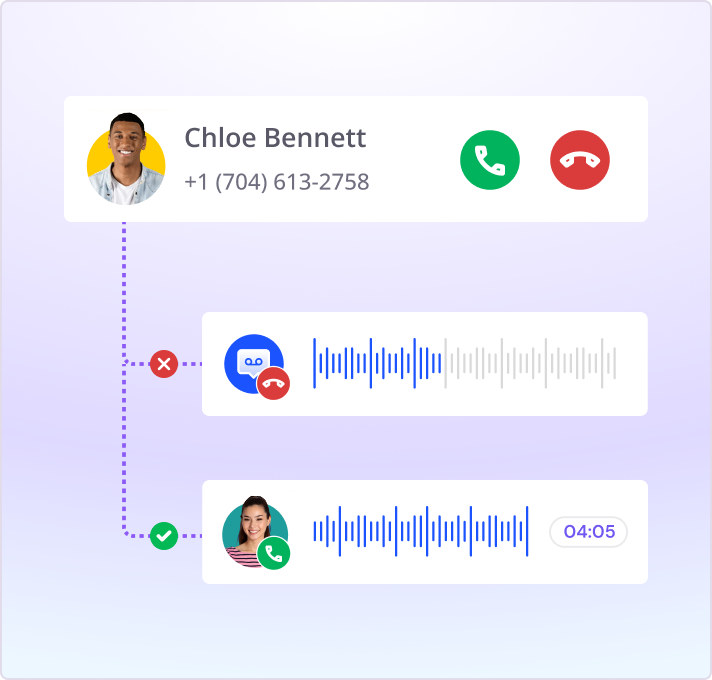
Reps work through a managed call queue with scripts and lead assignment, so they stay focused on conversations instead of admin.
 Recording and transcription
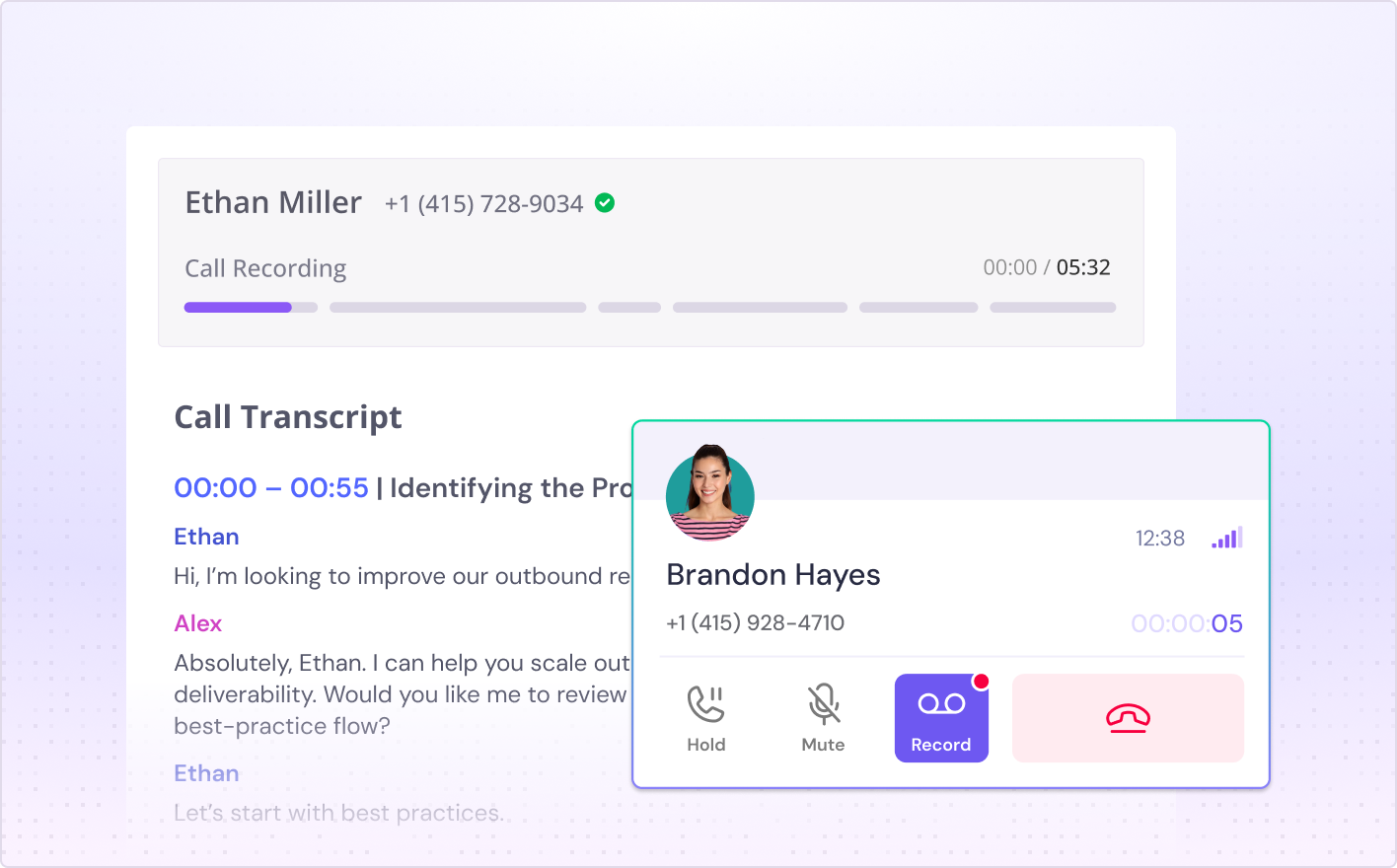
Every call is recorded and transcribed automatically, with timestamped, speaker-separated transcripts on the lead's timeline.
 Post-call disposition
When a call ends, log a disposition and route the lead in one click: next step, stop the sequence, or keep it in the queue.
Instant CRM updates
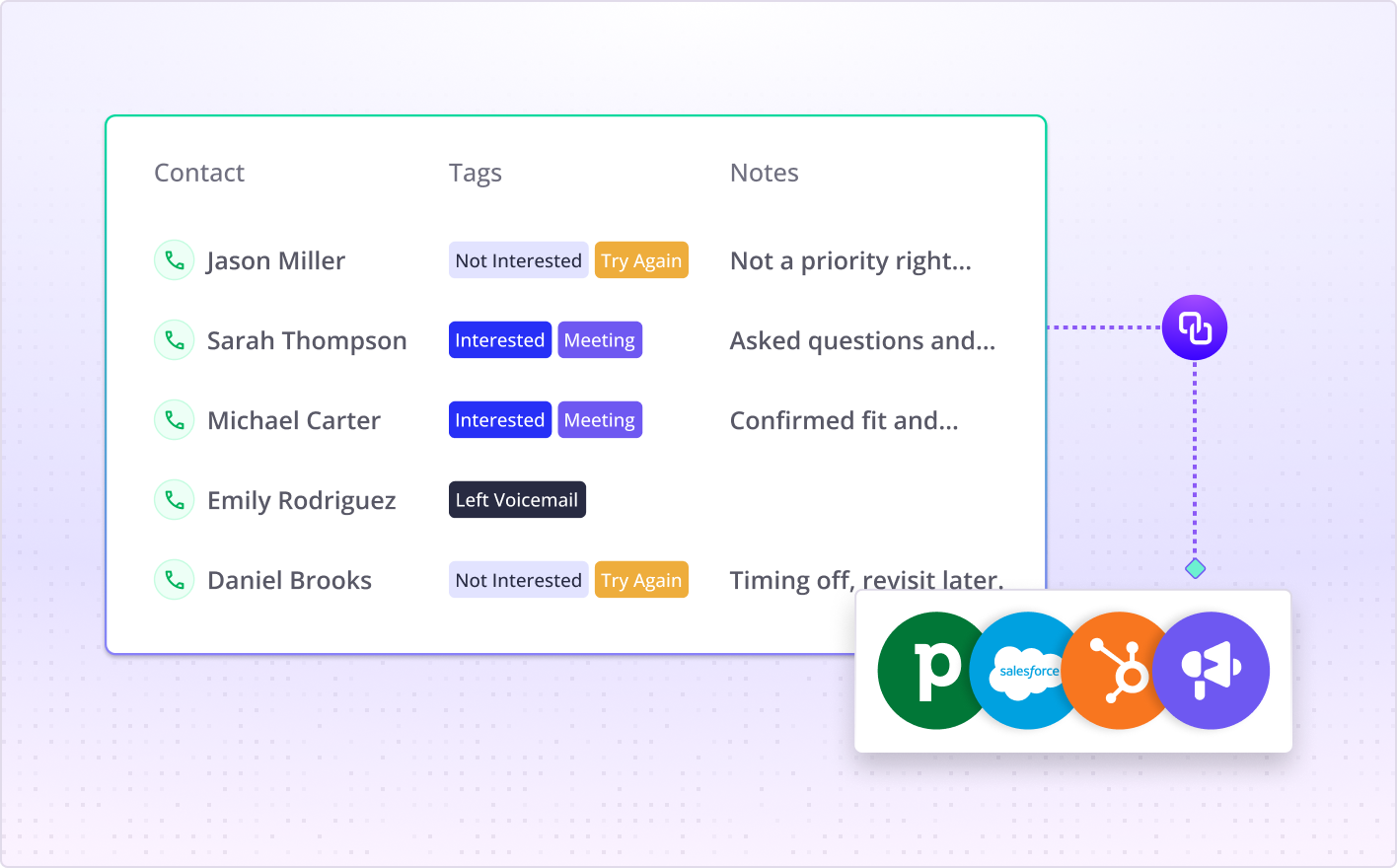
Notes, dispositions and next steps save to the lead's timeline and sync to HubSpot, with no manual data entry.
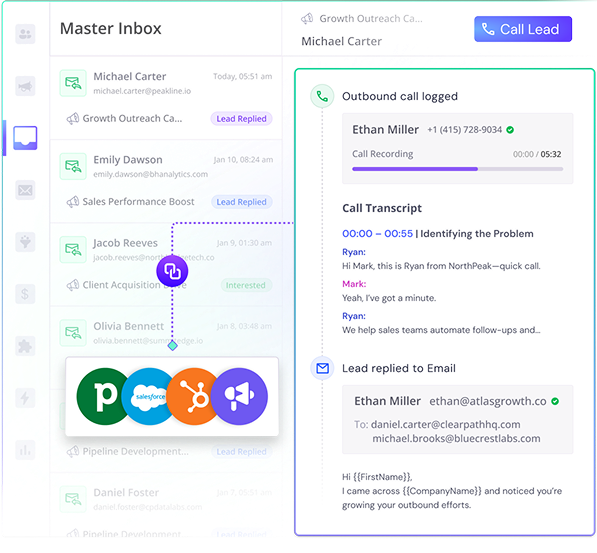
See call history, transcripts, notes and lead status in a single place—no bouncing between apps
Access every email and call for a lead side by side so you know exactly what’s been said before you pick up the phone
SmartDialer integrates with Smartlead’s CRM and popular tools like HubSpot, Salesforce and Pipedrive for seamless workflows.
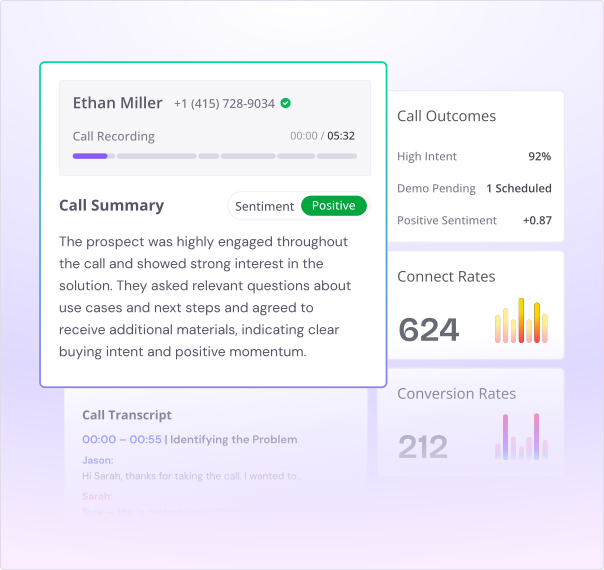
AI analyses each call for sentiment, talk ratios and objection handling to surface coaching opportunities
Track connect rates, conversion rates and call outcomes to see what’s working and what’s not.
Use insights from top‑performing reps to refine your messaging and win more deals.
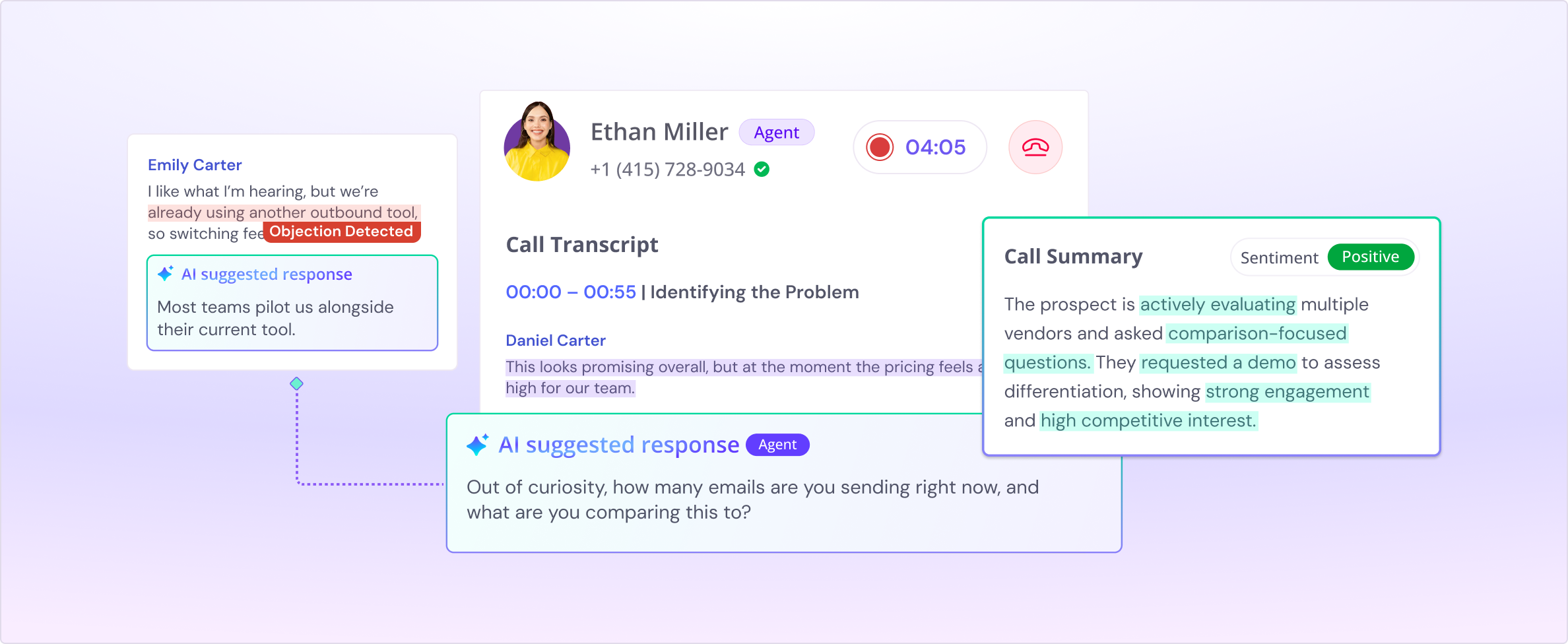
SmartCoach will listen in real time and suggest the right questions or responses to handle objections
Get prompts and playbooks on the fly so even new reps sound like veterans.
Post‑call scoring highlights areas for growth and helps you coach your team at scale.
Founder, StackOptimise
Smartlead's combination of automation, unlimited inboxes, and easy campaign management has completely transformed how we run cold email campaigns.
.jpg)
Founder, Cold Email Hackers

We have about 15 companies and we use Smartlead for all of them.

Founder, DutchSave Media

One of the things I love about using Smartlead is the deliverability feature. If they landed in the bounce or spam folders, we could resolve this quickly.

Co-Founder, Growth Today

I want to continue to use Smartlead to make operations more seamless - the plan is to bring more clients here and build more SOPs.

Founder, FueltoFly

Smartlead listens to the agencies and customers and builds according to what people want, that has really made things easier for us.

Founder, OutboundSync

We build an infrastructure product, and OutboundSync communicates with Smartlead itself. I love the webhook and API. They're really well done and keep getting better.

Founder, Axoleads

With SmartDelivery, you can put all of that in the hands of the tool. It ensures your emails land in inboxes, and by running a simple test, you can see if you're hitting the mark.

Founder, Claygen
Deliverability is the cornerstone of cold email outreach. You could have the best email copy in the world, but if no one is seeing it, it's useless. I really love the feature where you can actually give client accesses to your clients.

Co-Founder, Cymate

I do not want to switch to another software. Pick a solution you trust, stick with it, and keep refining your copy.

CMO, Avalanche Capital

Managing large volumes of emails through multiple inboxes used to be a logistical nightmare. With Smartlead, the process is seamless. We book thousands of discovery calls through cold emails. These campaigns are generating leads at a scale we never thought possible.

Founder, Growth Engine X

We came for the unlimited inboxes, and we stayed for the API. 1.5M cold emails/month, 7,767+ inboxes managed.

Head of Community & Ecosystem, TxtCart

You cannot replace having 10,000 touches with potential clients. When you have that much distribution and reach, you really start to see incredible results. The simplicity of Smartlead made all the difference. It doesn't require you to be a technical wizard.

Founder, Hyperke

Smartlead has been a game-changer for us. It increased our appointment volume, improved ease of use, and offered valuable features. 80% increase in appointments/month, peak of 276 appointments in a single month.

Founder, Kinetyca

Smartlead has been our cold email backbone from day one. The platform evolves constantly, keeping pace with how deliverability and personalization need to work today. 21% overall reply rate, $175K in 4 months for multiple B2B clients.

Founder, Reachflow

Smartlead is centered around deliverability and constantly evolving. Their API is not like any other platform. Smartlead covers all our needs. The focus on core features like deliverability and API integration is unmatched.

CEO, Halfwarm

Our approach to crafting conversational emails led to reply rates that many of my peers thought were unattainable.

Co-Founder, letstrike

We've grown on zero capital, zero marketing, purely cold emailing - and that's the story we love to tell. The best approach is no approach if you can't handle domain meltdown. The second best is something like Smartlead that's built from the ground up for deliverability at scale.

Founder, Fenixtal

Smartlead's white-labeling and automation let us punch above our weight. The 12M euros sales potential? That's what happens when you combine human creativity with Smartlead's precision.

Co-Founder, Digital Creativs

Nine out of 10. Ninety percent of our clients are on Smartlead unless they come in with an existing setup. That's the default.

Co-Founder, BuildingReach

At the end of the day, you have to take a bet on one tool or another. It was a no-brainer taking that bet on Smartlead. We had to even turn down the volume of our marketing campaigns - Smartlead was capable of driving more volume than our sales team was able to fulfill.

Founder & MD, Prospectiv

Since starting the business in January of this year, we've already generated $200K in sales exclusively from cold email. Smartlead has been central to our operations and has exceeded our expectations.

Founder, Growthlynk

There's so much stuff built on top of it. I would be dead if I had to rebuild it with another tool. I can manage hundreds of senders easily. I can send hundreds of thousands of emails.

Founder, Corebits

The platform's HubSpot integration, real-time Slack updates, and advanced campaign customization have been game changers for our business and our clients'.

Founder, Apex Ascension

From day one, we've never used anything else.
A power dialer works through a call list and dials the next lead as soon as a call ends, so reps spend their time talking instead of dialing by hand. SmartDialer does this with auto dialling. You select leads, press Start Dialing, and it calls them one after another, with every call recorded, transcribed and logged to the lead.
Go to SmartDialer, open Call in Queue, and select the leads you want from Dialer Leads or Sequence Leads. Press Start Dialing and SmartDialer calls each lead in turn without a click per call. Reps only step in when someone answers.
Yes. Once dialling starts, a status bar at the bottom of the screen shows progress. Pause to take a break and resume where you left off, or stop to end the session. Stopping resets the list, so you select leads again to restart.
Yes. You can search and buy fresh US numbers by local area code, tied to your workspace, so you call from a local presence instead of an unfamiliar line. You can hold more than one number and choose which to call from, and numbers start at $1 per number per month.
When the call ends you log a disposition with a purpose, tags and notes, then choose the next move: send the lead to the next step, stop the sequence, or keep it in the queue. The call, recording and transcript save to the lead's timeline automatically.
Yes. SmartDialer's call activity syncs with HubSpot. Smartlead also connects with Salesforce and Pipedrive across the wider platform.
As soon as a call ends, SmartDialer can schedule follow-up emails, tasks, and reminders automatically. Notes, dispositions, and next steps sync directly to Smartlead’s CRM or connected platforms, so there is no manual data entry.
Click View List in the status bar. It opens two tabs, In Queue for leads still to be dialled and Attempted for leads already tried. Every call also appears in Call Logs, same as manual calls.
Yes, they are two names for the same thing. Both dial one lead after another from a list, unlike a parallel dialer that rings several numbers at once. SmartDialer's auto dialling is sequential.
A power dialer dials one number at a time and connects a rep when someone answers. A predictive dialer dials several at once and predicts when an agent will be free, which can cause dropped calls. A parallel dialer dials multiple lines at once and connects you to whoever picks up first. SmartDialer is a power dialer. It dials your selected leads one at a time, never several at once, so no answered call waits on a free rep and each rep sees full context on the lead who picks up.
Yes. Calls are recorded by default and transcribed automatically. Transcripts are timestamped and speaker-separated, and you review them from the lead's timeline.
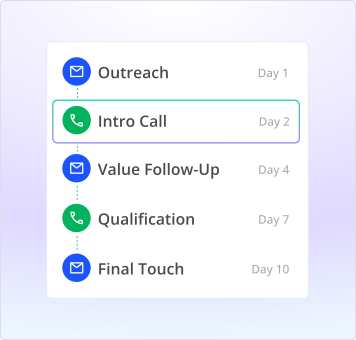
Yes. Calling is a step inside your Smartlead sequence, right next to email, so reps work one queue. Before each call they see the lead's full history, including the emails sent, the opens, and any notes.
SmartDialer provides a unified dashboard where you can see call history, transcripts, notes, and lead status in one place. You can also access previous emails and calls side by side for full context before dialing.
Yes. SmartDialer is built for outbound SDR teams, not call-center support. Reps work from a managed queue with call scripts and lead assignment, calling sits next to email in the same sequence, and every call logs to the lead automatically.